
Team Headshots
Clothing Options
Select professional attire options that will be applied to your team's headshots.
Clothing options let you control what type of professional attire appears in your team's headshots. This ensures everyone looks appropriately dressed for your industry and company culture.
How Clothing Options Work
The AI generates headshots with professional attire based on your selections:
- You choose the clothing styles appropriate for your organization
- Team members will have their headshots generated wearing these options
- Consistency is maintained while allowing for variety
Available Clothing Categories
Formal Business
Traditional professional attire suitable for corporate environments:
- Business Suit - Classic suit and tie look
- Blazer - Professional jacket, versatile look
- Dress Shirt - Collared shirt, no jacket
- Executive - Premium formal business wear
Business Casual
Relaxed yet professional options:
- Smart Casual - Polished but relaxed
- Polo Shirt - Professional casual
- Sweater/Cardigan - Approachable professional look
- Casual Blazer - Relaxed professional
Industry-Specific
Specialized options for specific sectors:
- Medical/Healthcare - Lab coats, scrubs
- Tech Casual - Modern, startup-appropriate
- Creative - Stylish, artistic looks
Selecting Clothing Options
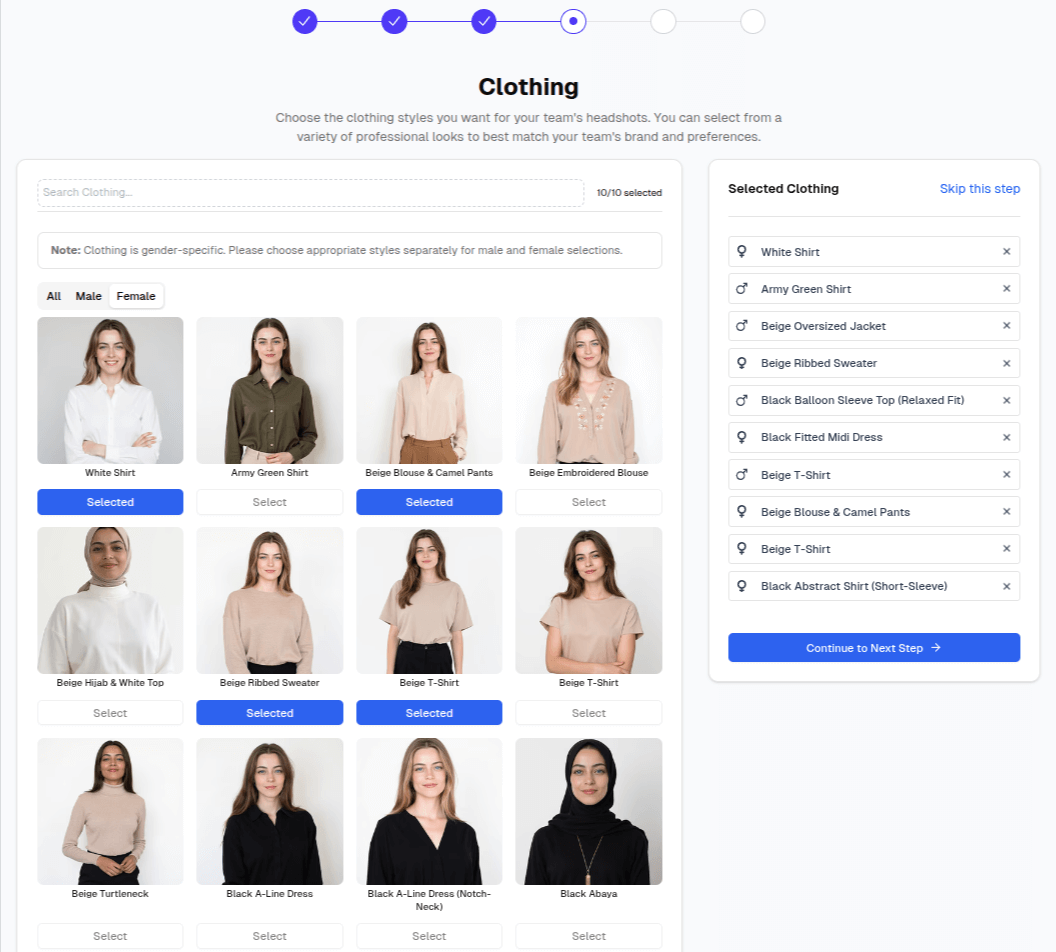
- Review the available clothing styles
- Click to select options appropriate for your team
- You can select multiple options for variety
- Selected options are highlighted
Recommendation: Select 2-3 clothing options that match your company dress code. This provides variety while maintaining a professional, cohesive look.
Matching Clothing to Your Industry
| Industry | Recommended Clothing |
|---|---|
| Legal/Finance | Business Suit, Blazer |
| Technology | Smart Casual, Polo |
| Healthcare | Medical attire, Business Casual |
| Creative/Media | Creative, Casual Blazer |
| Education | Business Casual, Sweater |
| Startups | Tech Casual, Smart Casual |
Best Practices
Consider Your Audience
Think about who will see these headshots:
- Client-facing roles may need more formal attire
- Internal use may allow for casual options
- Executive team often benefits from formal options
Match Your Company Culture
Tip: Select clothing that reflects how your team actually dresses at work. Authentic representations build trust with clients and partners.
Gender-Neutral Approach
The AI generates appropriate professional attire for each person:
- Options are designed to look professional on everyone
- No need to select gender-specific options
- Each person receives well-fitted, appropriate attire
Changing Clothing Options Later
You can update clothing selections from your team dashboard:
- Go to your Team Dashboard
- Click Clothing in the sidebar
- Modify your selections
- Changes apply to future headshot generations
Note: Existing completed headshots are not affected by clothing changes. Only new headshots will use updated settings.
Next Steps
After selecting clothing options, add your company branding: