
Team Dashboard
The team dashboard is your central hub for managing your organization's headshots. This guide covers all dashboard features and how to use them effectively.
Dashboard Overview
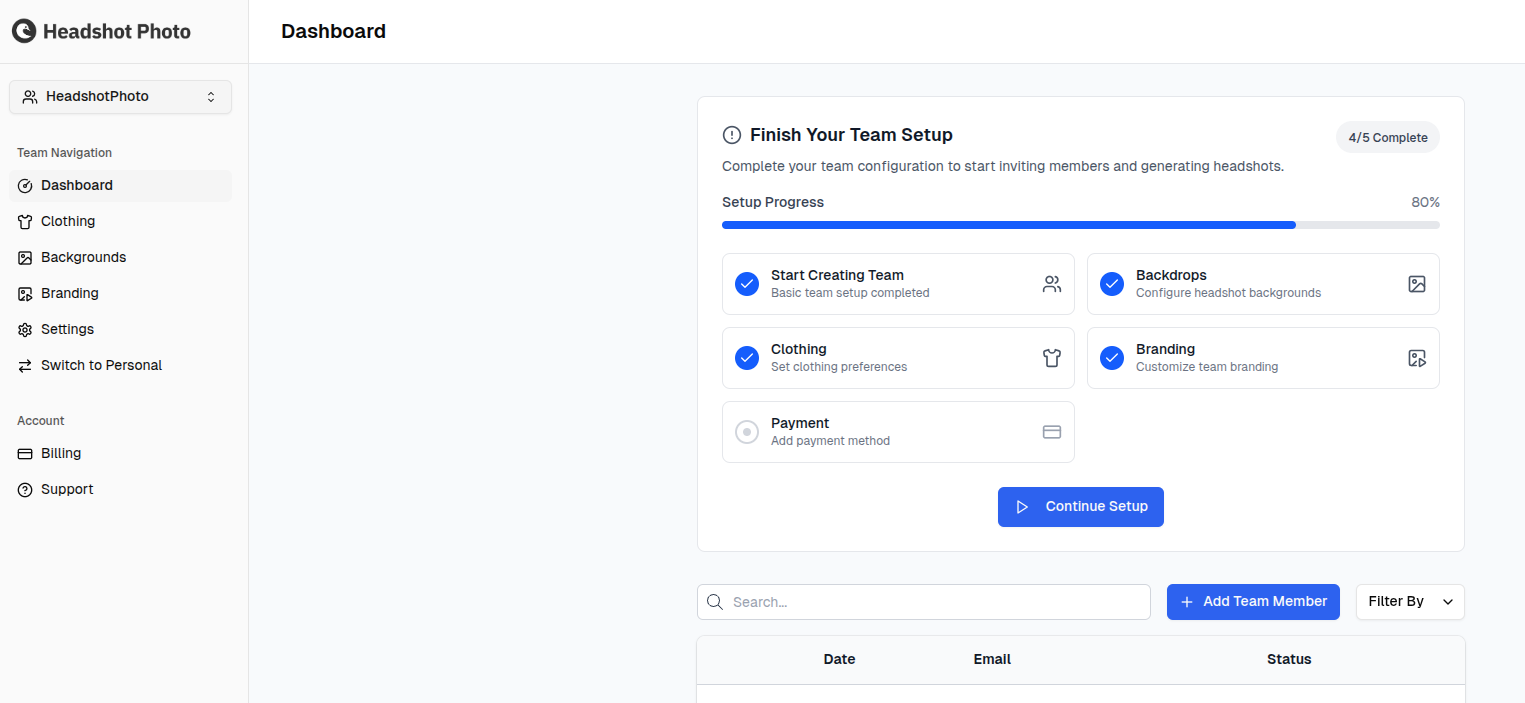
When you open your team dashboard, you'll see:
- Team name and description at the top
- Onboarding progress (if setup isn't complete)
- Quick stats showing member counts by status
- Sidebar navigation for accessing different sections
Onboarding Progress
If you haven't completed all setup steps, you'll see an onboarding tracker:
| Step | Description |
|---|---|
| Backdrops | Select background styles |
| Clothing | Choose attire options |
| Branding | Upload company logo |
| Payment | Add credits to your team |
Click any incomplete step to go directly to that configuration page.
Sidebar Navigation
The sidebar provides quick access to all team features:
Members
View and manage all team members:
- See member list with status
- Invite new members
- Send reminders
- Remove members
- Filter and search
Backdrops
Manage background style selections:
- View currently selected styles
- Add or remove styles
- Preview how styles look
Clothing
Manage clothing options:
- View selected attire options
- Add or remove options
Branding
Manage your company logo:
- Upload or replace logo
- Adjust positioning
- Toggle visibility
Billing
Access team billing:
- View credit balance
- Purchase more credits
- See transaction history
Settings
Configure team settings:
- Update team name and description
- Manage notification preferences
- View API key (for integrations)
Quick Stats
The dashboard shows at-a-glance statistics:
| Stat | Description |
|---|---|
| Total Members | All members ever invited |
| Invited | Awaiting acceptance |
| In Progress | Uploading photos or generating |
| Completed | Headshots ready |
Common Dashboard Tasks
Check Team Progress
- Look at the quick stats on the dashboard
- Click Members for detailed breakdown
- Filter by status to see specific groups
Download All Completed Headshots
- Go to Members
- Filter by "Completed" status
- Click on each member to view/download their headshots
- Or use bulk download if available
Downloaded files are named after the member they belong to, so a folder collected from several members stays sortable without opening anything or renaming it yourself.
Send Reminders to Pending Members
- Go to Members
- Filter by "Invited" status
- Click Send Reminder for each member
- Or select multiple and send bulk reminders
Add More Credits
- Go to Billing
- Click Purchase Credits
- Complete payment
Update Team Configuration
- Go to Settings
- Modify team details as needed
- Changes save automatically or click Save
Dashboard Tips
Regular Monitoring
Check your dashboard regularly to:
- Identify members who need reminders
- Track overall progress toward completion
- Catch any issues early
Delegate to Managers
If you have a large team:
- Assign Manager role to trusted team leads
- Managers can help send reminders and track progress
- Reduces your administrative burden
Use Filters Effectively
The member list filters help you:
- Focus on members who need attention
- Find specific people quickly
- Generate reports by status
Mobile Access
The dashboard is accessible on mobile devices:
- View member status
- Send invitations and reminders
- Check progress on the go
For best experience, use a desktop browser for detailed management tasks.
Next Steps
Learn about billing and credits: