
Member Status
Each team member goes through a defined lifecycle from invitation to completed headshots. This guide explains each status and what it means.
Member Status Lifecycle
Members progress through the following statuses:
INVITED → ACCEPTED → GENERATING → COMPLETED
            ↓
        CANCELLED
Invited
What it means: The invitation has been sent but the member hasn't clicked the link yet.
What you can do:
- Send a reminder email
- Cancel the invitation
- View when the invitation was sent
What the member sees: Email invitation with a link to accept
Accepted
What it means: The member clicked the invitation link and is in the process of uploading photos or configuring their headshot.
What you can do:
- View their progress
- Send reminders if needed
- Wait for them to complete photo upload
What the member is doing:
- Viewing photo upload guidelines
- Uploading 8+ photos of themselves
- Waiting for photos to be validated
- Confirming they're ready to generate
Generating
What it means: The member has uploaded their photos and headshot generation is in progress.
What you can do:
- Wait for generation to complete
- View approximate time remaining
Timeline: Generation typically takes 10-30 minutes depending on server load.
Completed
What it means: Headshots have been generated and are ready for download.
What you can do:
- View the member's headshots
- Download headshots
- Member can also access their own headshots
What the member can do:
- View all their generated headshots
- Download individual images
- Download all images as a ZIP file
- Mark favorites
Cancelled
What it means: The invitation was cancelled before the member accepted it.
What you can do:
- Send a new invitation if needed
- Remove from the list
Viewing Member Status
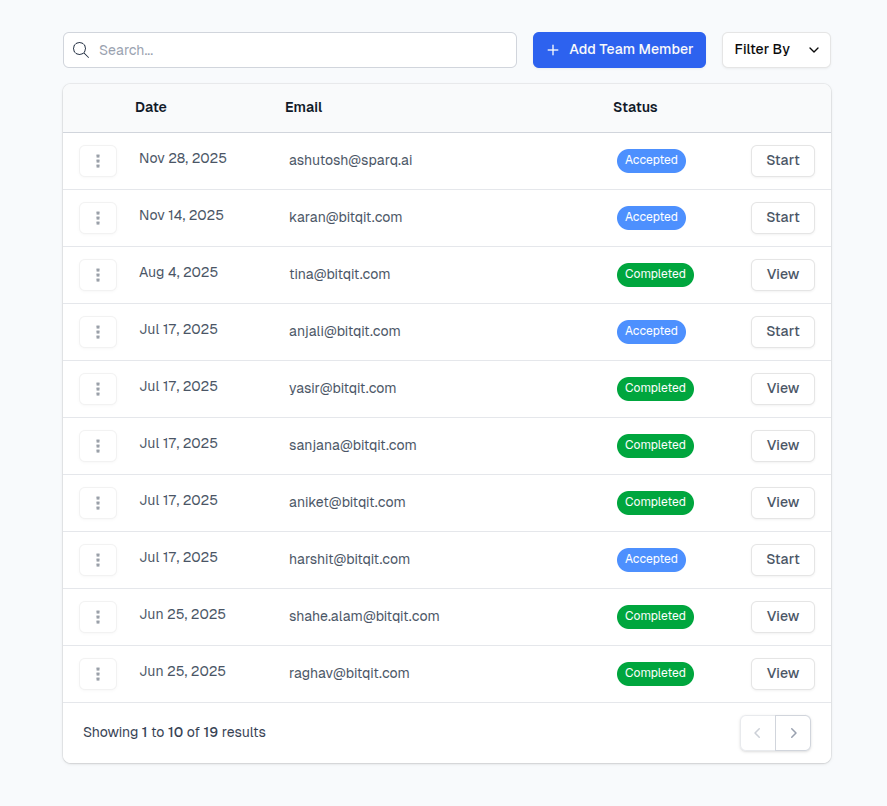
Team Dashboard Overview
Your team dashboard shows a summary of member statuses:
| Status | Count |
|---|---|
| Invited | 5 |
| Accepted | 3 |
| Generating | 2 |
| Completed | 15 |
Member List
The Members page shows detailed status for each person:
- Email - Member's email address
- Role - Member or Manager
- Status - Current stage in the lifecycle
- Last Updated - When status last changed
- Actions - Available actions based on status
Archiving Members
A member you are finished with can be archived rather than removed. Owners get Active and Archived tabs above the members list, and each row's menu offers Archive or Restore.
Archiving is deliberately gentler than Remove User:
| Archive | Remove User | |
|---|---|---|
| Member's data | kept | deleted |
| Credit | not refunded | refunded |
| Member's access | unchanged — they keep everything they had | revoked |
| When it is allowed | any status, including completed | restricted |
What archiving actually stops is chasing. An archived member is skipped by the automatic invite and headshot reminder jobs, and manual reminders are refused for them, so they stop receiving nudges about a session you have already filed away.
Filing away members whose headshots are finished is the main reason to reach for this: the Active tab stays a list of people who still need something from you.
Archived and Filtering Together
The Active/Archived tabs and the Filter By dropdown are independent, so filters keep working inside either tab — you can look at archived members who were only ever invited, for example. Everything outside these tabs, including the pending-invitation count on billing, counts active members only.
Filtering Members
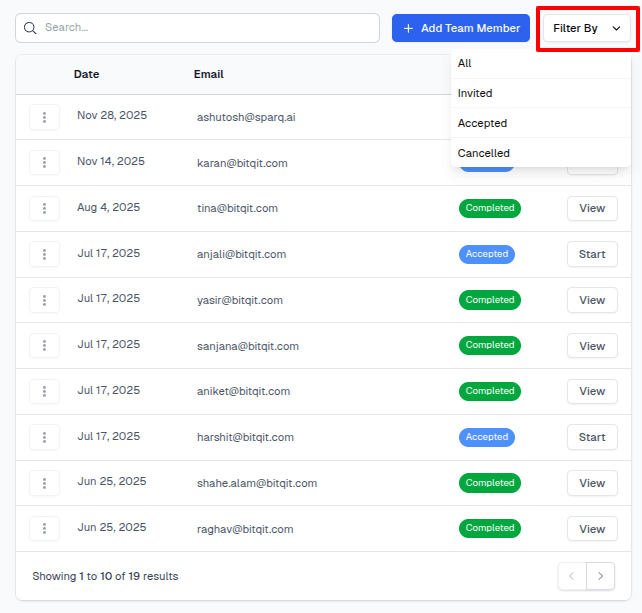
You can filter the member list by:
- Status - Show only Invited, Accepted, etc.
- Role - Show only Members or Managers
- Search - Find specific email addresses
This is useful for:
- Sending reminders to people who are still "Invited"
- Checking on members who are "Accepted" but haven't finished
- Reviewing completed headshots
Managing Members by Status
For "Invited" Members
If someone hasn't responded to their invitation:
- Wait a day or two - They may be busy
- Send a reminder - Click the reminder button
- Verify email - Make sure you have the correct address
- Follow up personally - A quick Slack/email outside the system may help
For "Accepted" Members
If someone started but hasn't completed:
- Check progress - They may be having trouble with photo upload
- Offer help - Some people need guidance on good photos
- Send photo tips - Share the photo guidelines
For "Completed" Members
Once headshots are done:
- Review headshots - Ensure quality meets expectations
- Download if needed - Save copies for your records
- Notify the member - Let them know their photos are ready
Notifications
Email Notifications for Managers
You can enable notifications when:
- A member completes their headshots
- A member accepts an invitation
- There are pending members who need reminders
Configure these in Team Settings.
Member Notifications
Members automatically receive emails when:
- They're invited to the team
- Their headshots are ready
Troubleshooting Status Issues
Stuck in "Accepted"
If a member has been "Accepted" for a long time:
- They may not have uploaded enough photos
- Their photos may have failed validation
- They may have started but not finished
Solution: Reach out to the member directly
Stuck in "Generating"
Generation shouldn't take more than an hour. If it seems stuck:
- Wait a bit longer - server may be busy
- Check back in an hour
- Contact support if it persists
Member Not in List
If someone says they accepted but you don't see them:
- Check the email address - they may have used a different one
- Check your spam folder for their acceptance notification
- Have them try the invitation link again
Next Steps
Learn how to use the team dashboard effectively: