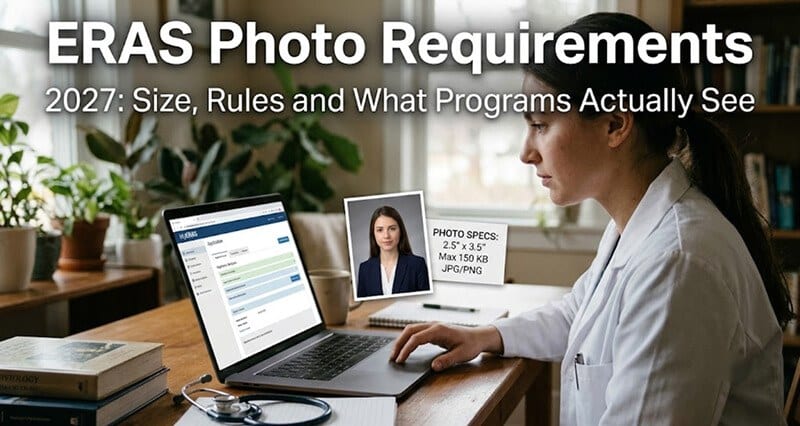
Most ERAS photo guides still cite specs that were removed two years ago. Here's what AAMC actually requires for 2027, plus the upload step almost everyone skips.
Sometime in late August, every fourth-year med student in America faces the same quiet crisis.
You've spent four years building a CV, writing a personal statement, chasing research, grinding through rotations. You've asked attendings for letters. You've spent weeks narrowing down which programs to apply to and mentally calculated the $26-per-program cost times 25 or 30 or 40.
And then you get to the photo section of MyERAS and freeze.
I heard from a student last September who captured this moment perfectly. She'd budgeted carefully for her ERAS cycle. She spent $220 on a professional headshot because the stakes felt too high for a selfie. The photographer delivered a gorgeous 5x7 portrait.
And when she tried to upload it, MyERAS rejected it instantly.
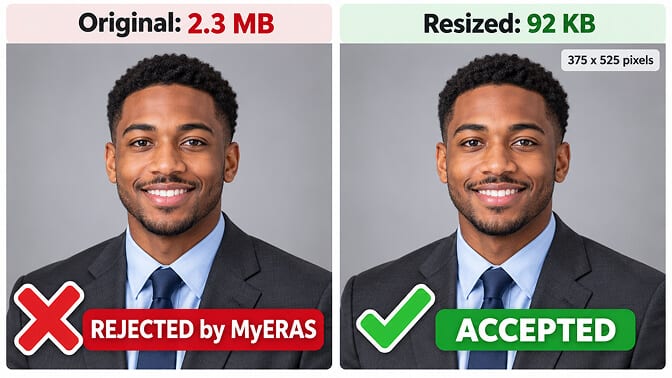
The file was 2.3 MB. ERAS caps photos at 150 KB.
Her photographer had never heard of ERAS. He shot weddings and corporate events. He delivered exactly what any normal client would expect: a large, print-quality file.
She spent two hours the night before the September 2 deadline trying to compress a 2.3 MB file down to 150 KB without turning her face into a pixelated mess. At midnight, exhausted, she uploaded a version she wasn't happy with, assigned it to her top-choice program, and went to bed feeling sick about it.
The worst part? Once she assigned it, she couldn't take it back. ERAS doesn't let you unassign a photo.
This happens every single cycle. And it happens because the actual ERAS photo requirements are surprisingly specific in some places and almost confusingly vague in others. And because most guides online are still quoting specs that AAMC quietly removed from the official documentation two years ago.
Here's what you actually need to know.
The Official ERAS Photo Specs (2027)
Let's start with what AAMC actually requires. Not what blogs say. Not what your school's older orientation packet says. What the 2027 MyERAS Applicant User Guide states on its Photo page.
File format: JPG/JPEG or PNG. Nothing else. WebP, HEIC (what your iPhone shoots by default now), and BMP will all be rejected.
Maximum file size: 150 KB.
This is the spec that catches the most applicants off guard, and it's worth understanding just how small 150 KB is. A single photo from a modern smartphone camera is typically 3 to 8 MB. A photographer's deliverable is often 5 to 15 MB. You're compressing something that's 20x to 100x too large for the system.
Framing: The official language is "face is centered in the photo." Head and shoulders, face centered, looking at the camera. Not off-center. Not a three-quarter body shot. Not a candid. Your face, middle of the frame.
Background: AAMC doesn't specify a required background color. But every example they show and every medical school guide that references ERAS photos uses a clean, solid background. Light gray, white, or pale blue. No outdoor shots. No bookshelf backgrounds. No blurred office hallways.
Dimensions: And here's where this gets interesting.
If you've read other ERAS photo guides (you probably have, that's how you ended up here), you've almost certainly seen "2.5 x 3.5 inches at 150 DPI" listed as a hard requirement. You might have even adjusted your photo to match those exact specs.
That requirement was in the 2024 guide and was removed starting in 2025. AAMC no longer specifies exact pixel dimensions or DPI anywhere in the current documentation.
Most competing guides haven't updated. They're still quoting 2024 specs for 2027 applicants. That's not dangerous (the old dimensions still work), but it creates unnecessary confusion and anxiety about hitting exact numbers that AAMC no longer enforces.
What you actually need: a photo that displays cleanly in the system while staying under 150 KB. 375 x 525 pixels is a reliable target. It matches the old 2.5x3.5 ratio, saves well under the file size limit as a JPEG, and looks sharp on screen. But treat it as guidance, not gospel.
One quirk worth noting: the ERAS landing page describes the photo as "high-resolution, passport-style," which sits oddly next to a 150 KB file size cap. In practice, that means a properly lit, properly framed photo saved at a resolution that looks sharp on screen without exceeding the limit. 375 x 525 pixels at JPEG quality 80 to 85% hits that balance consistently.
The only hard specs for 2027: JPG or PNG, 150 KB maximum, face centered. Everything else is best practice, not a requirement.
What Programs Actually See When They Open Your Application
This is the part most guides skip completely. And it matters, because once you understand what happens on the other side, every decision about your photo gets easier.
AAMC's official language states that the photo is "most often used by programs to help identify you when you report for an interview."
Read that carefully. The stated purpose isn't to evaluate your professionalism, judge your appearance, or assess whether you "look like a doctor." It's identification. The program coordinator at the front desk needs to match the person walking through the door with the application file they reviewed.
But here's the practical reality. Your photo doesn't exist in a vacuum. It sits at the top of your ERAS application alongside your name, your medical school, your Step scores, and your personal statement. Program directors, associate program directors, faculty reviewers, and coordinators all see it. Depending on how many programs you apply to, somewhere between 50 and 200 people will look at your ERAS photo over the course of the application season.
They're not supposed to judge you by it. But humans are humans. A blurry, poorly lit, badly cropped photo creates a different first impression than a clean, professional one. Not because it changes your qualifications, but because it signals whether you paid attention to details.
This means two things matter above everything else:
1. The photo must look like you. Not a glamorized, heavily retouched version of you. Not you from three years ago when you started M1. You, right now, as you'll appear when you walk into the interview room in November.
2. The photo must be professional and clean. Good lighting, sharp focus, solid background, appropriate framing. The basics of a photo that says "this person took this seriously."
Everything beyond that (the exact shade of gray in the background, the precise angle of your chin, whether your blazer has two buttons or three) is style. Style matters, but it matters far less than clarity and accuracy.
Who Uploads the Photo and How the Process Works
The upload process differs based on your pathway, and getting this wrong creates real problems.
US medical graduates (MDs and DOs) upload their photo themselves through the Photo section of MyERAS. You select your file, it uploads, and you can preview how it looks in the system before doing anything else.
International medical graduates (IMGs) do not upload their own photo. ECFMG handles the photo submission for IMG applicants. This means your photo needs to be finalized and submitted to ECFMG well before the September application window, because you're adding their processing time to your timeline.
Fellowship applicants have their photos uploaded through EFDO (the Electronic Fellowship Document Office).
If you're a US grad, you control the entire process. If you're an IMG, coordinate with ECFMG early and confirm your photo meets specs before they submit on your behalf. Don't wait until August to find out your photo doesn't work.
The Step Most Guides Don't Mention: Assigning Your Photo
Uploading your photo to MyERAS is not the same as sending it to programs. This trips up applicants every year.
After you upload, you have to manually assign your photo to each program you've applied to. This is a separate, deliberate step in the MyERAS interface. Your photo does not automatically attach to your applications.
And here's the detail that changes everything: once you assign a photo to a program, it cannot be unassigned.
Let that sink in.
If you upload a photo, assign it to your top three programs in a rush, and then notice the cropping is slightly off, or the lighting washes out your skin, or you simply uploaded the wrong version of the file, those three programs have that photo permanently. You can upload a replacement and assign it to your remaining programs, but the original stays with every program it was already sent to.
This is why the preview step matters so much. Upload your photo. Look at it in the system. Check the cropping, the centering, and how it renders on screen. Check it on your phone and on a laptop. Only when you're satisfied should you start assigning.
And if you're applying to 30 programs, assign in batches. Start with your safety programs. Make sure everything looks right. Then assign to your target and reach programs.
The 2027 Timeline (When Your Photo Actually Needs to Be Ready)
Your photo doesn't have a separate deadline. It follows the broader ERAS timeline. But "follows" is doing a lot of work in that sentence, because in practice, your photo needs to be done well before most applicants think about it.
June 4, 2026: The 2027 ERAS season opens. You can start building your application.
September 2, 2026: Applicants can begin submitting applications and uploading photos.
September 23, 2026: Programs can start reviewing applications. If your photo isn't uploaded and assigned by this date, programs are reviewing your application without it.
May 31, 2027: The 2027 ERAS season closes.
The real deadline isn't September 23. It's the week before September 2.
You want your photo finalized, compressed, tested, and ready to go before the submission window opens. September is already overwhelming. You're finalizing your personal statement, double-checking your application entries, agonizing over your program list, and coordinating letters of recommendation. The last thing you want is a photo problem eating into that time.
Get your headshot taken (or generated) in July or August. Compress it. Test the file size. Have it sitting in a folder, ready, before September arrives.
What to Wear in Your ERAS Photo
AAMC does not publish an official dress code for the application photo. There's no rule requiring a suit, a white coat, or any specific type of clothing.
But there is a strong consensus across medical school residency application guides, and it's consistent enough to treat as the standard.
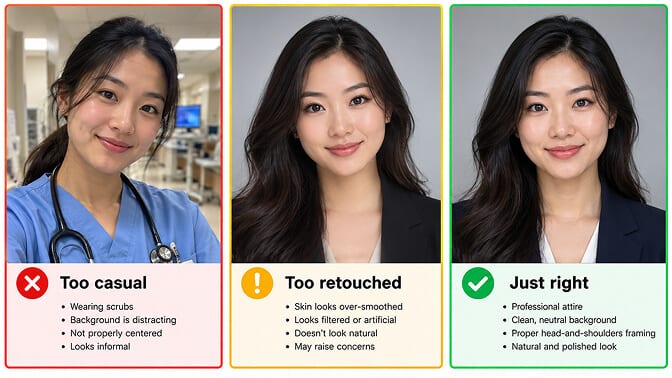
The University of Maryland School of Medicine manual specifically notes that scrubs are "not appropriate" for the ERAS photo and asks for an up-to-date professional headshot. Similar language appears in residency application guides from dozens of programs.
A blazer or suit jacket is the safest choice. Navy, charcoal, or black. Paired with a white or light blue collared shirt or blouse. Solid colors or very subtle textures. This combination works across every specialty, from pediatrics to surgery.
Scrubs send the wrong signal. Yes, you wear them every day. But in the context of a formal application to a residency program, scrubs read as casual. This isn't the place for them.
White coats are optional. Some applicants wear one. Some don't. Neither choice hurts you. If you wear a white coat, make sure it's clean, pressed, and fits properly. A wrinkled or oversized white coat looks worse than no white coat at all.
Keep jewelry and accessories minimal. Small earrings, a simple necklace, a watch. Nothing that draws the eye away from your face. The photo is small in the application interface, and distracting accessories shrink the visual impact of your actual expression.
For a full breakdown of what works and what doesn't, our guide to medical school headshots covers outfits, backgrounds, and the most common styling mistakes.
Can You Use an AI Headshot for ERAS?
AAMC has no published rule that prohibits or addresses AI-generated headshots for ERAS applications. There's no AI detection check, no watermark requirement, and no language in the 2027 guide about how the photo was created.
The only standard that matters is the one AAMC has always stated: the photo needs to allow programs to identify you at interviews.
This makes the question straightforward. If an AI headshot tool produces a result that is indistinguishable from a studio photograph and accurately represents your current appearance (same face shape, same skin tone, same general hairstyle and features), it meets the functional requirement.
If it smooths your skin to the point of looking filtered, changes your bone structure, or produces a face that's a polished but noticeably different version of you, it creates a problem. Not a policy problem. A practical one. The program coordinator will look at your photo, look at you, and hesitate.
The test is simple: would someone who has only ever seen your ERAS photo recognize you instantly when you walk through the door?
For med students on a budget (which is most med students), this is worth considering seriously. A professional headshot photographer specializing in medical application photos typically charges $150 to $400. On top of the $26-per-program ERAS fees, the Step exam fees, the interview travel costs, and everything else fourth year throws at you, that's not trivial.
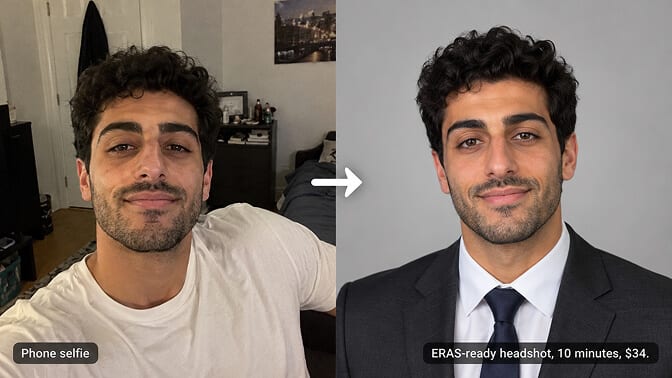
Headshot Photo gives medical professionals 40 to 100 headshots starting at $34. Every set is trained on your specific face structure, so what you get back looks like you, not a generic AI face wearing your hairstyle. Upload a few selfies, pick a professional medical style, and have your ERAS-ready headshots in a few hours.
We cover what makes a strong healthcare headshot in more detail in our guide to doctor professional headshots.
Common Mistakes That Cost Applicants Every Cycle
These come up every September. Every single one is avoidable.
Mistake 1: The file is too large. This is by far the most common rejection. Your photographer handed you a 5 MB file. Your iPhone shot a 4 MB HEIC. ERAS needs 150 KB. Resize to around 375 x 525 pixels and export as JPEG at quality 80 to 85%. That typically lands between 40 and 100 KB with no visible quality loss.
Mistake 2: Using outdated specs. If a guide tells you the photo must be "2.5 x 3.5 inches at 150 DPI," it's quoting 2024 requirements that AAMC removed. The current rules are simpler: JPG or PNG, under 150 KB, face centered. Following old specs isn't dangerous, but it creates unnecessary confusion about hitting exact dimensions that don't exist anymore.
Mistake 3: Assigning before previewing. This is the one that actually hurts. You upload, you assign to programs, and then you notice the cropping is wrong or the file looks washed out on screen. Too late. It's assigned permanently. Always preview first. Always.
Mistake 4: Getting the headshot at the last minute. The first two weeks of September are chaos. You're submitting applications, chasing final letters, and making last-minute decisions about your program list. The photo should be done in July or August, sitting in a folder, already compressed, ready to upload.
Mistake 5: Over-retouching the photo. Softening harsh shadows is fine. Removing a temporary blemish is fine. Smoothing your entire face into a porcelain filter look defeats the purpose. The interview team needs to recognize you. If your photo looks like a different person, it doesn't matter how polished it is.
The best ERAS photo is one where the interview team looks at it, looks at you standing in the doorway, and doesn't think about the photo at all. It just matches.
One Last Thing
I heard back from that student in February.
She matched. Her top-choice program. Pediatrics at a program she'd dreamed about since third year.
When I asked her about the photo situation, she laughed. "I stressed about that photo more than I stressed about my personal statement," she said. "And you know what? Not a single person at my interview mentioned it. They just glanced at it, looked at me, and moved on."
That's the whole point.
The ERAS photo is a small detail in a massive process. But it's a small detail that can eat an outsized amount of your time and energy if you don't handle it early and handle it right.
Get it right early. Get it right once. And then go focus on everything else that actually determines where you match.
For specific pose and expression guidance for medical headshots, our medical headshot poses guide covers what works for residency applications, hospital directories, and faculty profiles.
Frequently Asked Questions
What are the official ERAS photo requirements for 2027?
JPG or PNG format, 150 KB maximum file size, and face centered in the photo. AAMC removed the old pixel dimension and DPI requirements (2.5 x 3.5 inches at 150 DPI) after the 2024 guide. A safe target is 375 x 525 pixels at JPEG quality 80 to 85%, which stays well under the size cap. No specific background color is mandated, but solid neutral tones (light gray, white, pale blue) are the standard across every example AAMC publishes.
Can I change my ERAS photo after submitting it?
You can upload a new photo to MyERAS at any time before the season closes. But any program you've already assigned the old photo to keeps the old photo permanently. ERAS does not allow you to unassign a photo once it's been sent to a program. This is why previewing carefully before assigning is critical. If you need to change photos, you can only assign the new version to programs that haven't received one yet.
How do I resize my photo to under 150 KB?
Open your photo in any image editor (even Preview on Mac or Paint on Windows), resize to approximately 375 x 525 pixels, and export as JPEG at 80 to 85% quality. This typically produces a file between 40 and 100 KB. If you're starting from a high-resolution photographer's file (5 to 15 MB), you'll need to resize dramatically. Free online tools like Squoosh or TinyPNG also work, though make sure you verify the output quality before uploading to MyERAS.
Is it worth paying for a professional ERAS headshot?
Your ERAS photo is seen by every program director, faculty reviewer, and coordinator at every program you apply to. Across 20 to 40 applications, that can mean 100+ people forming a first visual impression of you. A professional headshot with proper lighting, framing, and a clean background makes a measurably better impression than a selfie or a cropped group photo. Traditional photographers charge $150 to $400 for medical application headshots. AI alternatives like Headshot Photo produce studio-quality results starting at $34, which makes the investment accessible even on a med student budget.
Can I use an AI-generated headshot for my ERAS application?
AAMC has no published policy on AI-generated photos. The only standard is whether the photo allows programs to identify you at interviews. If an AI headshot accurately represents your current face, skin tone, and general appearance, it meets this standard. The risk is with tools that over-smooth or alter your features. The practical test: if you showed up at an interview and the coordinator had only seen your photo, would they recognize you immediately? If yes, the photo works regardless of how it was created.