Written by:
Shabnam Katoch
Marketer at Headshot Photo
Table of contents:
 What are AI Headshot Generators?
- How Much Do LinkedIn Headshots Cost?
- Why you can trust us
- How We Judged Every AI Headshot Tool
- Our Top Pick Headshot Photo (Price $34 for 40 Headshots)
- Headshot Photo Honest Review
- Runner Up HeadshotPro ($29 for 40 Headshots)
- HeadshotPro Results
- Also Great InstaHeadshots ($49 for 40 Headshots)
- Instaheadshots Results
- A Lighter Option Worth Knowing About
- How accurate are AI Headshot Generators?
- What is the Best AI Headshot Generator?
- FAQs
We tested Top 8 Best AI Headshot Generators
Research and testing done in February, 26
Last Updated: April 2026


You know those insanely good LinkedIn headshots you scroll past, the ones that look like they spent half a day in a studio?
Most people look at a great LinkedIn photo and think, "Wow, this must've been expensive. I don't have the time or energy for a full photoshoot."
So we do what everyone does. We open our phone gallery and start scrolling, hoping to find that one picture that could somehow work as a LinkedIn headshot. And honestly... why are we still doing that?
Here's the fun twist:
- Half of those polished LinkedIn photos weren't shot in studios at all.
- They were created at home, in about 1 hour, for less than $50.
Yep, AI headshots.
And no, not those sloppy, over-smoothed, plastic-looking ones that distort your face.
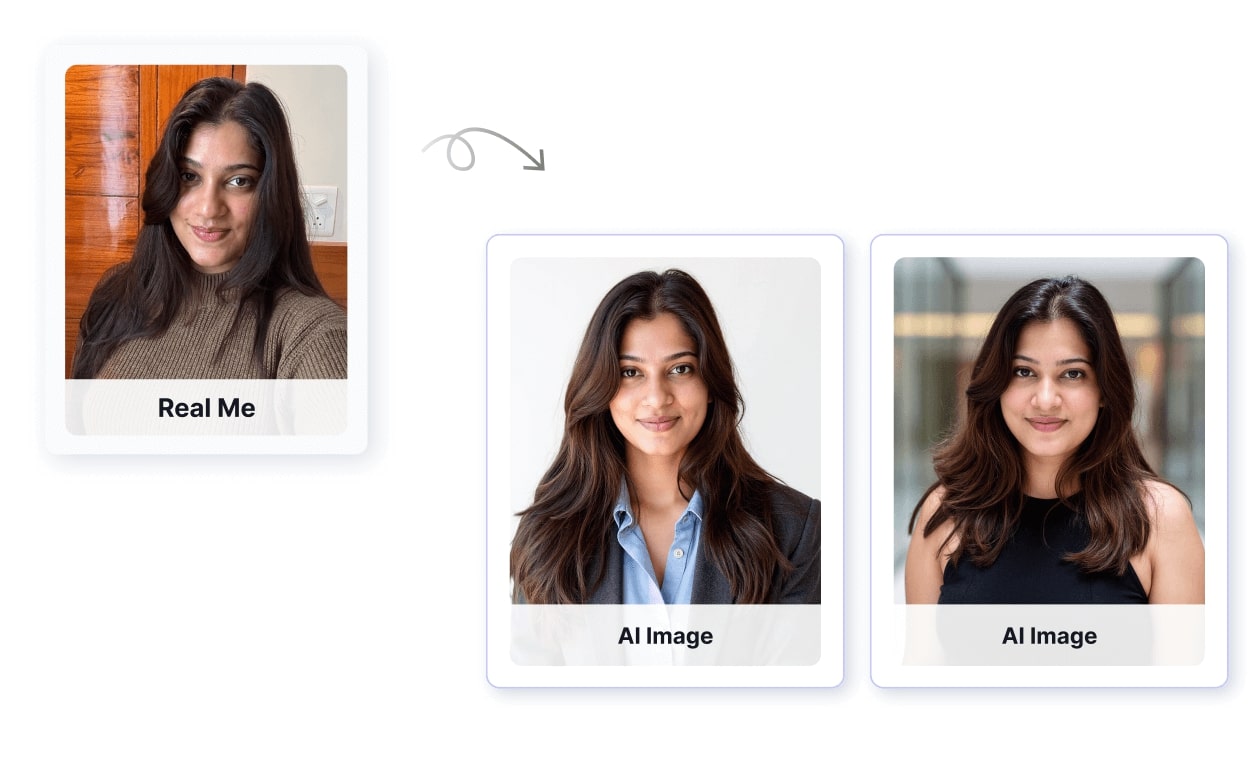
I mean actual AI Headshot Generators - the newer, smarter ones that understand your real features and give you studio-quality pictures without booking a camera guy.
AI has leveled up.
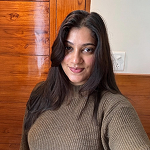
Here's my own before/after with an AI headshot generator… and you'll see exactly what I'm talking about.
What are AI Headshot Generators?
AI headshot generators work by teaching an AI model who you are using your selfies.
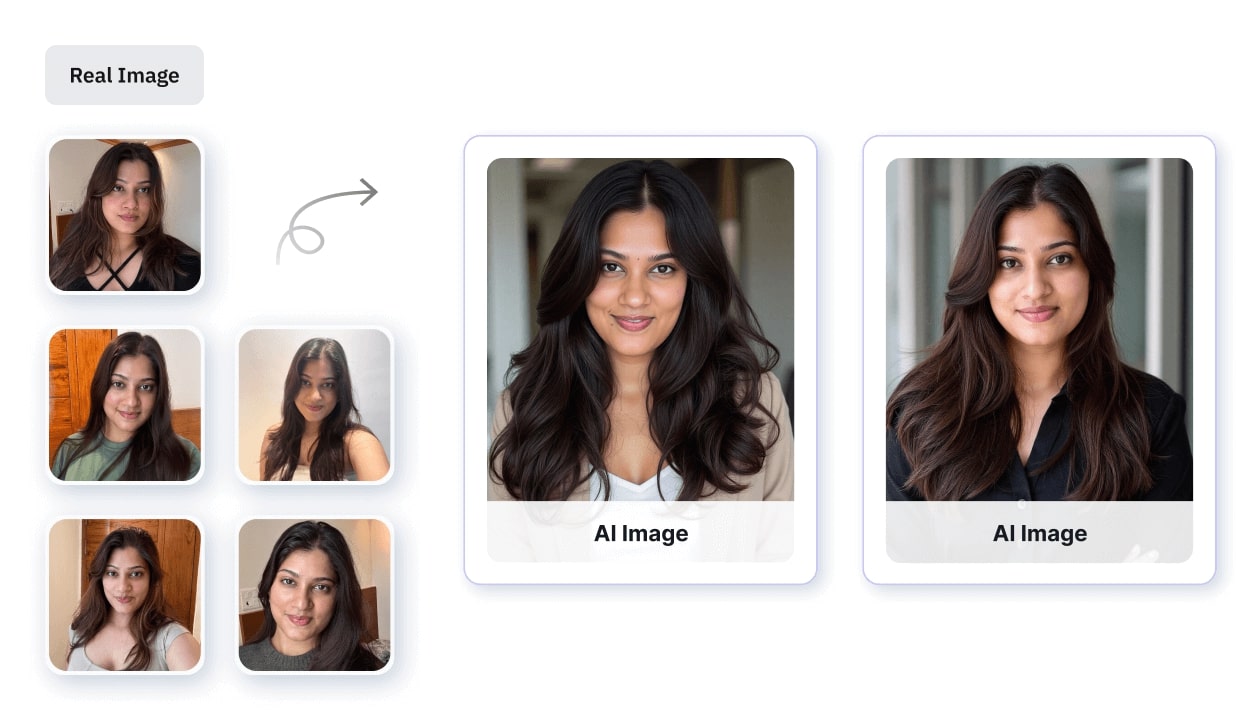
When we start, the model doesn't know you at all. So a prompt like "a [xyz] headshot of a woman" just gives a completely random woman, because [xyz] is just a meaningless code.
Then, when you upload your selfies, the model slowly learns:
"Okay, this random code [xyz] = YOU."
That's the training part.
Once the model understands that code represents your face, it can generate headshots that look like you.
And yes, the quality of your selfies matters a lot, more than most people assume.
If you upload photos with caps, heavy shadows, weird angles, or with plants covering half your face… the model thinks those things are part of "you" and might start adding them into AI headshots.
So in simple terms:
Good selfies = clean, accurate learning = clean, realistic headshots.
Bad selfies = confused learning = weird output.
How Much Do LinkedIn Headshots Cost?
Global Headshot Pricing
| Region / Country | Typical Price Range | Notes |
|---|---|---|
| United States | $230 - $300 | Highest in NYC, San Francisco, LA due to studio rent + demand |
| United Kingdom | £150 - £350 | London pushes the higher end |
| Canada | CAD $200 - $350 | Standard studio sessions in major cities |
| Australia | AUD $150 - $300 | Sydney & Melbourne are on the higher side |
| Germany / Western Europe | €150 - €300 | Costs rise in places like Berlin & Munich |
| India / Southeast Asia | ₹3,000 - ₹10,000 | Varies heavily by city tier + studio reputation |
Professional headshot prices vary a lot depending on the region, the photographer's experience, and whether it's a studio or on-location shoot. Big cities almost always cost more because of higher rents and demand. Even in places like India or Southeast Asia, the price changes significantly based on the studio and the city tier.
With so many variables, rent, photographer seniority, retouching, makeup, extra outfit changes, and whether it's in-studio or on-location, headshots end up being one of the most location-sensitive services in photography.
This is exactly why AI headshots feel like a breath of fresh air. The savings are great, but the real win is the convenience: upload your selfies from your couch in your pajamas, and by lunchtime you're browsing hundreds of professional-looking AI headshots , no studio stress, zero effort.
AI Headshot Generators we recommend
Our Top Pick

Gave me the highest number of accurate, natural-looking headshots with zero weird AI artifacts.
Fastest results too, with 8 selfies turning into multiple usable photos in about 1 hour.
Runner Up

The photos looked very studio-like and professional, but the expressions felt a bit too serious for my taste.
Great quality overall, just not as warm or consistently accurate as I personally prefer.
Also Great

I loved the natural skin texture and how real the photos looked at first glance.
A few inconsistencies showed up on closer look, but the best images were genuinely nice.
Why you can trust us
Headshot Photo, an AI photo studio that's been around since 2024. All we do is AI headshots, and we've gotten pretty good at it. Here's what we stand for:

Enterprise-Grade Security
Your images are processed in an ISO-certified, secure environment.

Privacy First
Photos auto-delete. Your data stays yours.

No AI Training, Ever
We don't use your images to train our models.

Full Ownership
Every headshot we generate belongs 100% to you.
We know it's natural to wonder if we might be biased since we also run an AI headshot generator. That's why every tool in this list was fully paid for, tested with the same selfies, and reviewed with the exact same checklist.
- If another tool does something better, we'll say it.
- You'll see real examples from every generator we tested.
- We paid for every service on the list.
How We Judged Every AI Headshot Tool

Onboarding Experience
Was the process simple? Did the tool actually guide you, or did it leave you confused?

Photo Quality
Do the images look like real, professionally shot headshots — clean lighting, sharp details, natural skin?

Likeness & Consistency
Does the AI actually capture your face accurately? And does it stay consistent across all photos?
.png)
Realism (No AI Weirdness)
Are there any strange artifacts, extra fingers, distorted faces, or odd backgrounds? Or does everything look natural?

Speed & Reliability
How long does it take to get the results? And does the tool work smoothly, without errors or failed generations?

Value for Money
Do you walk away feeling, "Yep, this was worth it"? Or do the results fall short of the price?
We tried every tool using the exact same set of selfies. That's important because your input photos make a huge difference in how good your AI headshots turn out. If your selfies are clear, bright, and show your face properly, the AI does a much better job. If they're dark, blurry, or full of background noise, the results can look off.
By using the same photos for each tool, we could actually compare them fairly. This way, whatever difference you see in the results is because of the tool, not the selfies we used.

Our Top Pick
(Price $34 for 40 Headshots)
Our top pick, Headshot Photo produced the AI headshots we were most likely to use in the tools we tried. The headshots came out surprisingly clean and sharp, with lighting that looked natural instead of artificial. The clarity felt pretty close to what you'd get from an actual studio photo. And the best part is that we didn't spot any obvious AI weirdness or that super-smooth, plastic skin effect you usually see in lower-quality tools. The output looked balanced and suitable for professional use.
See how the AI headshot generator works, or see Headshot Photo pricing .
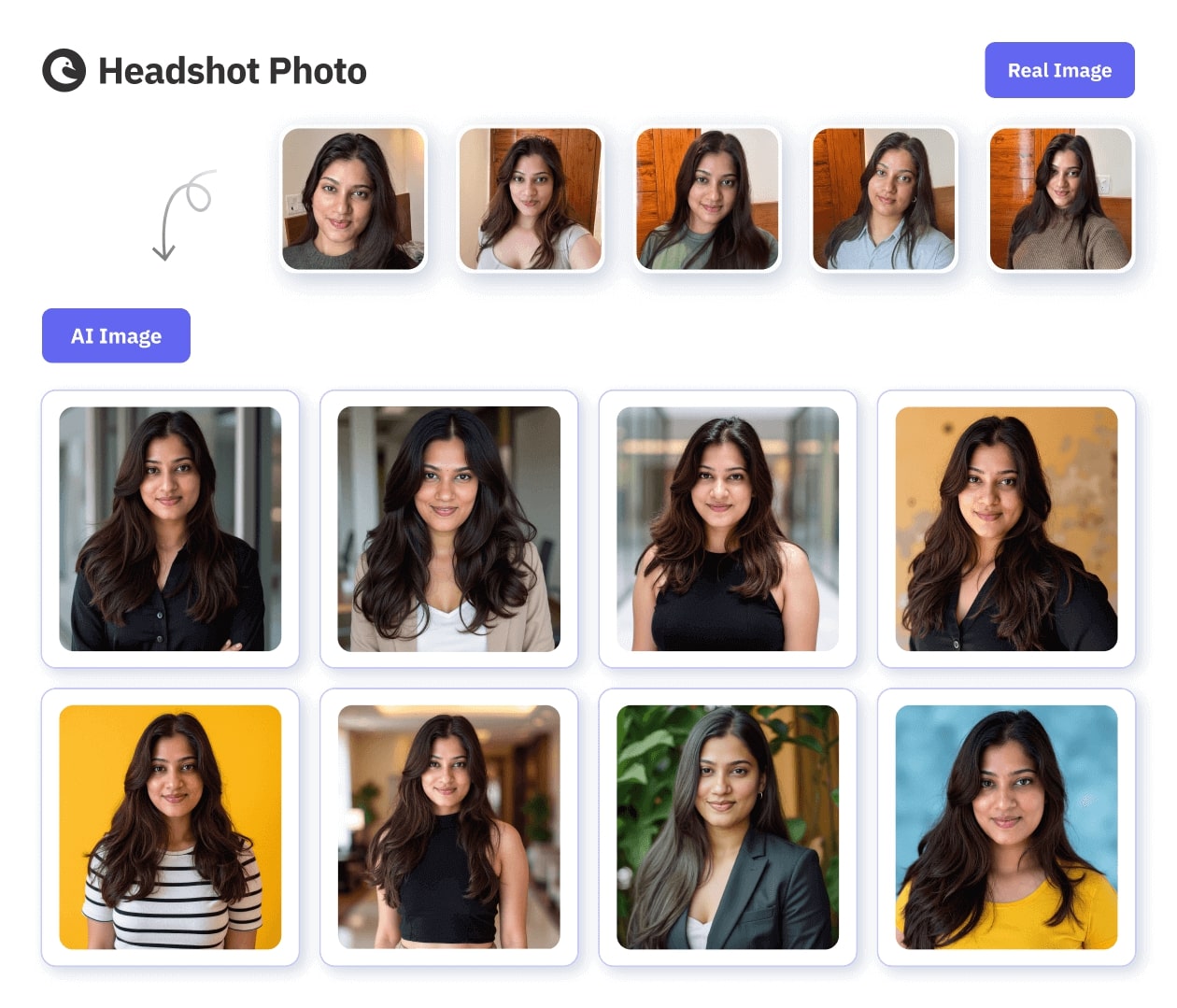
What stood out in Headshot Photo:
Realistic, high-quality output
The photos had strong detail, even lighting, and a professional finish without looking over-edited.
Natural poses
The angles and facial expressions looked relaxed and photogenic instead of stiff or obviously AI-generated.
Option to choose outfit
Unlike many tools that randomize clothing, this one lets you pick the type of outfit you want. The replication wasn't perfect every time, but it was close enough to feel intentional.
Consistent likeness across photos
The facial features stayed accurate from one style to another, which gave a reliable sense of identity.
Good color balance and lighting
The photos looked polished and bright without crossing into an artificial look.
Headshot Photo Honest Review
I work as a marketer at Headshot Photo, and I've used the tool many times myself. I'm not going to be biased here, so this is my honest experience as a normal user.
The onboarding was very simple. I only had to upload 8 clear selfies, which is much easier than other tools that usually ask for 12 to 20 photos. It took me around 4 minutes to set everything up.
The speed is one of the best parts. My headshots were delivered in about 10 minutes. So in less than an hour, I got a complete set of professional headshots ready to use.
There's also a lot of choice. You get 100+ backgrounds and 50+ outfit options. The AI does a good job mixing them, so you can pick from multiple looks like clear studio shots, modern office settings, or simple professional backdrops.

Even with the usual AI variation, I still ended up with more than 10 photos that were genuinely good enough for LinkedIn, resumes, company profiles, and any professional space. The images looked natural and sharp, with accurate facial features, real-looking skin texture, and clean lighting. There were no plastic effects and no strange AI mistakes.
My honest take is this: the process is simple, quick, and you get real, usable, photorealistic headshots without going to an actual studio. That's why I personally like using it, even outside my role here.
Runner Up
($29 for 40 Headshots)
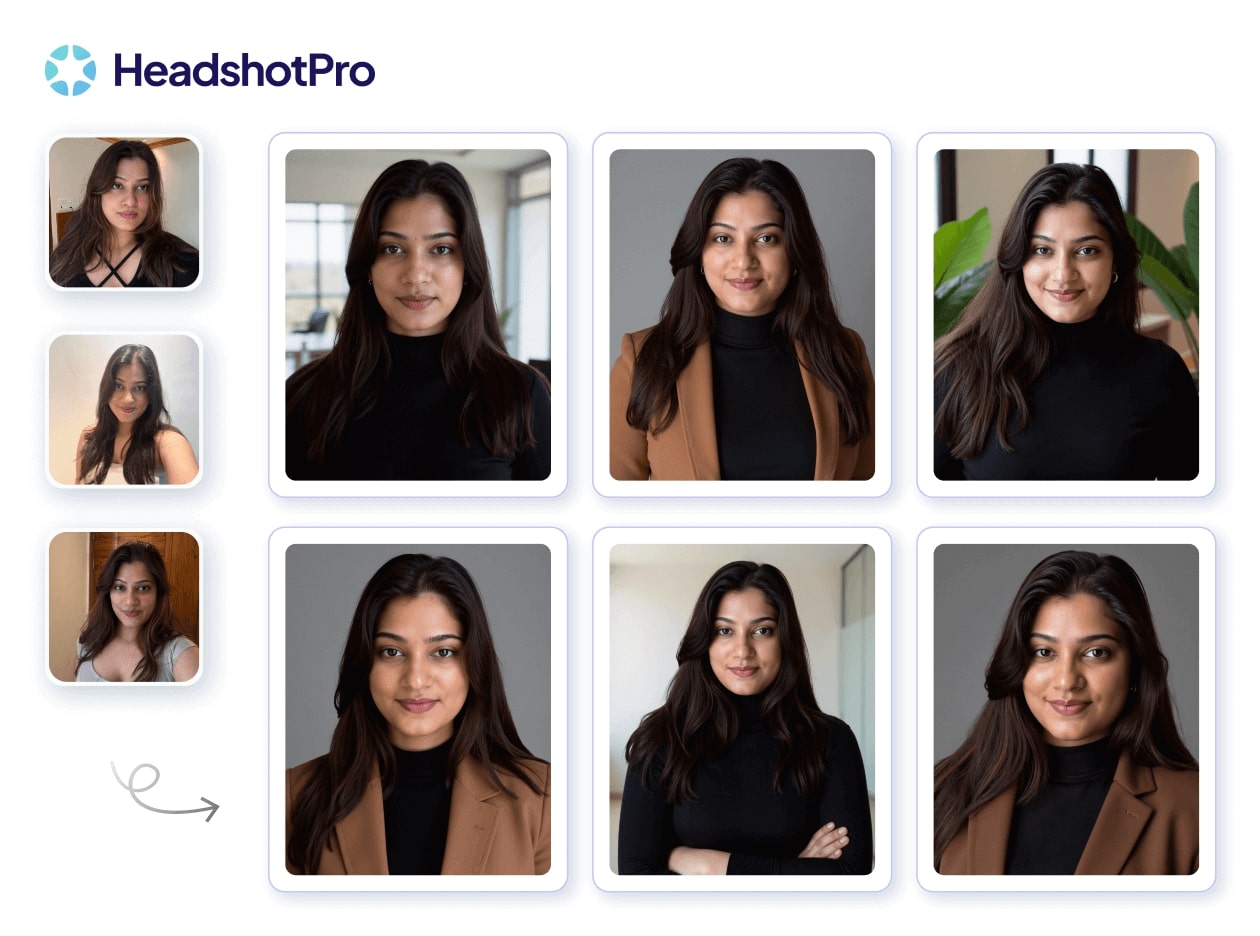
In our testing, HeadshotPro delivered clean, studio-style results with polished lighting and professional-looking backgrounds. The images generally looked sharp and well-framed, and the overall output felt suitable for LinkedIn or corporate use. There were a few variations in expression and facial softness, but the best photos were sharp and visually consistent.
What stood out in HeadshotPro:
Realistic, professional finish
Most photos had a clean, studio-shot look with soft lighting and a well-balanced background that made the headshots appear polished.
Structured and confident poses
The positioning and framing looked intentional. The expressions leaned more toward serious and authoritative rather than warm or friendly, which may work well for certain roles.
Consistent background and lighting quality
HeadshotPro handled indoor office-style setups effectively and cleanly, delivering evenly lit, stable backgrounds across the set.
Limited outfit selection
Unlike other tools that offer many outfit choices, HeadshotPro only allowed me to pick 2 outfits for the entire batch. It worked, but the options felt more restricted compared to other generators.
Accurate likeness with minor variations
The face generally stayed recognizable, although a few photos made the features look slightly broader or more refined than real life.
HeadshotPro Results
I tried HeadshotPro, and here's my honest experience as someone who actually needs friendly, usable headshots.
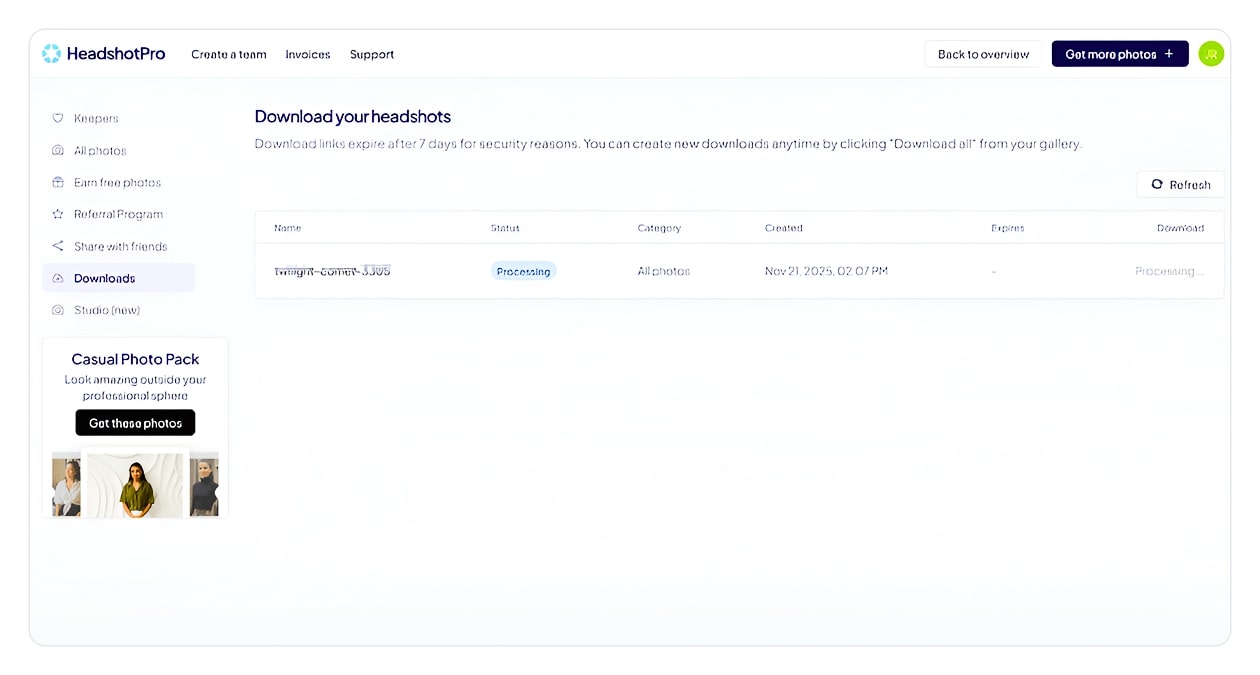
The process took a bit of time. It needed at least 15 photos to begin with, and the results took around 2 hours to generate. Even the downloading part felt a little inconvenient because you can't download the images directly. They email you a link instead, so you end up waiting for that too.
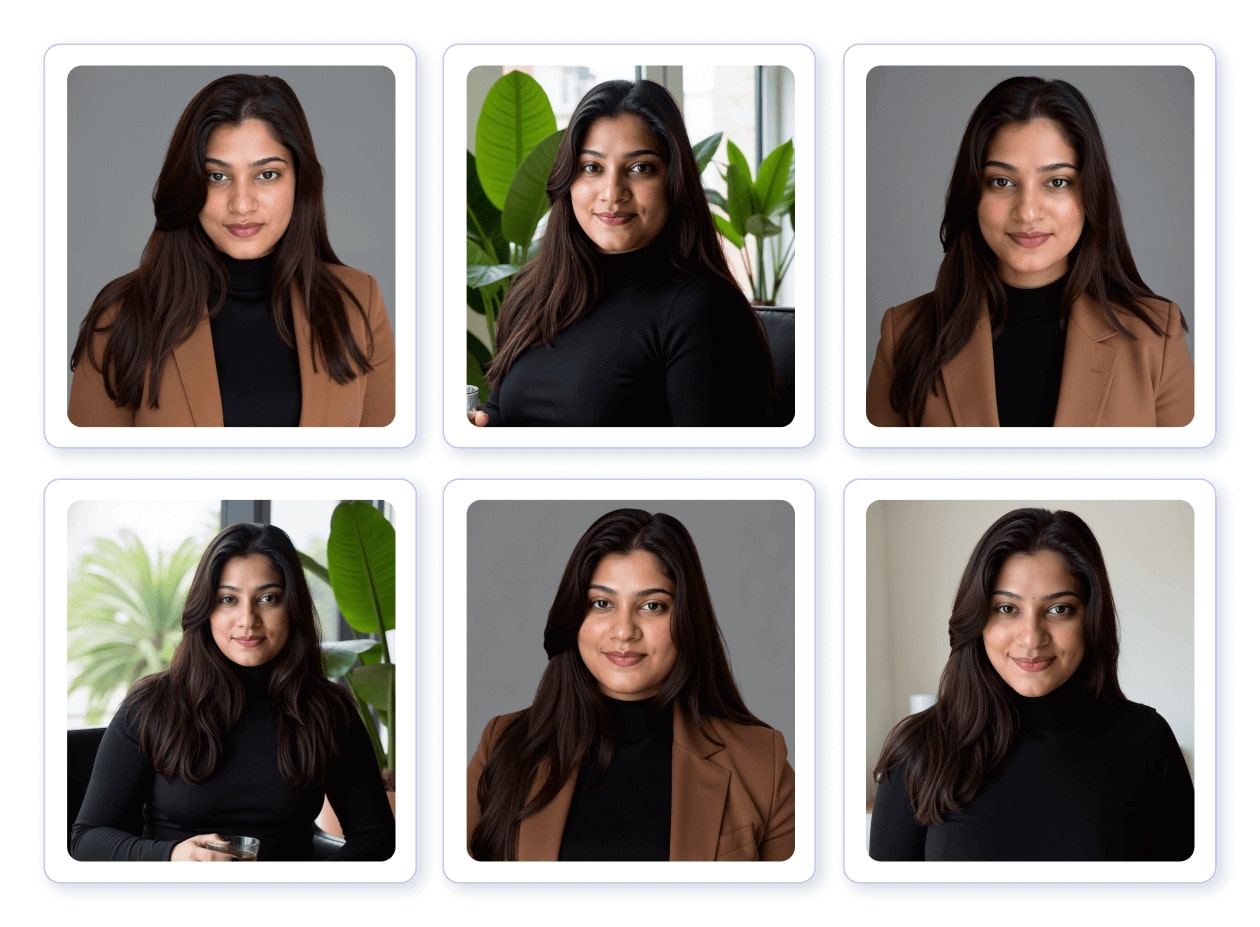
The actual headshots look very professional. They genuinely have that studio-shot feel with clean lighting and polished backgrounds. But I personally prefer images where I look warmer and more approachable. These came out a little more serious and authoritative. It's great for certain roles, but as a marketer, I like having a friendly, confident smile in my headshots. A couple of photos also made my face look slightly broader, which is fine, but I did notice it.
They promise that you'll get at least one keeper, and yes, I did get one photo that I would actually use. The overall quality is good, but I do wish the expressions felt a bit softer and more inviting.
So in short, the quality is strong and very studio-like, but the overall experience could be smoother, and I personally would have liked a warmer, more approachable set of photos.
Also Great
($59 for 50 Headshots)
In our testing, Instaheadshots offered a quick and simple flow, requiring 10 photos and delivering the results in about 30 minutes. The preview feature was helpful, even though it came with a watermark. The overall output had a friendly, approachable feel, and the skin texture looked impressively natural rather than over-smoothed. However, a closer look at the final downloads revealed a few inconsistencies and small deformities that were not noticeable during the preview stage.
What stood out in InstaHeadshots:
Natural-looking skin and hair
The tool did a very good job preserving real texture. The skin didn't look plastic or overly edited, and my natural blush and hair pattern showed up clearly.
Warm and approachable expressions
Several headshots captured a pleasant, natural expression that felt friendly and professional. Some images drifted slightly in tone, but overall the vibe leaned warm.
Good variety of background styles
From outdoor greenery to softly lit indoor scenes, the backgrounds brought variety without feeling random.
Fast generation time
The headshots were ready in around 1 hour, which makes the tool convenient for someone who wants results quickly.
Some accuracy variations
While many images looked close to real life, a few had minor distortions or facial adjustments that affected consistency across the batch.
Instaheadshots Results
My experience with InstaHeadshots was mixed overall..
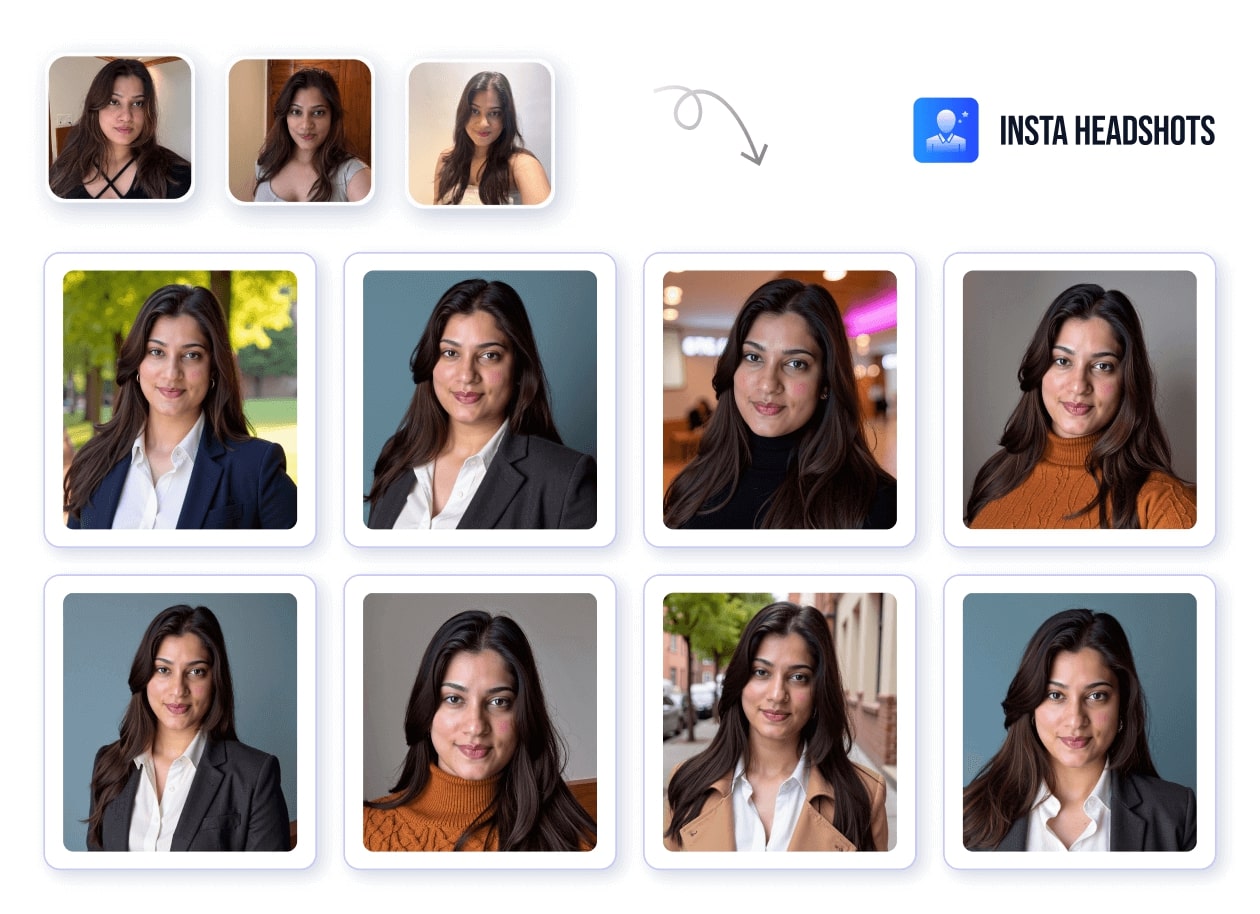
There's no option to choose different pricing. The site simply asked me to pay $49. Before that, it needed at least 10 photos to start. The process was quick though, and my headshots were ready in about 1 hour. I liked that they let me preview everything beforehand, even if the previews had a watermark. It still helps you get a general idea before paying.
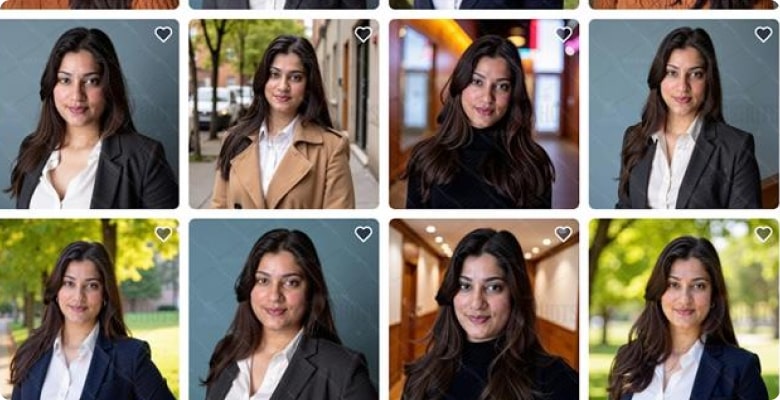
The real details showed up only after downloading. A few of the photos had small deformities or little inconsistencies that I hadn't noticed earlier. Some images looked quite close to me, while others drifted slightly, which is normal for AI but still noticeable.
To give credit where it's due, they handled skin and hair really well. My face didn't look oversmoothed at all. The skin texture looked very natural, my blush showed up the way I actually wear it, and the hair looked realistic instead of flattened or painted on. This part was genuinely impressive. The expressions varied a bit from photo to photo. Some looked warm and natural, and others felt slightly off, but overall the emotional tone wasn't bad.
So overall, InstaHeadshots is fast, easy to try, and really good at preserving natural texture. The main thing to keep in mind is that the accuracy and consistency can vary from shot to shot, so it depends on what you're personally looking for.

A Lighter Option Worth Knowing About
The three tools above all work the same way: you upload a batch of photos, wait while a model trains on your face, and get back a set of forty or fifty images. That is the right approach when you need a full portrait session's worth of output. It is overkill when you need one usable photo before a meeting tomorrow morning.
Overchat AI covers that second case. You upload a single casual photo — a selfie, a candid, a cropped group shot — choose a style (LinkedIn, Studio, Outdoor, or Casual), and get an HD result back in seconds, with no watermark and no training queue to wait through. Access starts at $4.99, and a Google or Apple sign-in is required before you can download.
The trade-off is what you would expect. One source photo gives the model far less to work with than fifteen do, so you will not get the variety or the frame-to-frame consistency of a properly trained batch. It is a different tool for a different deadline, not a replacement for the three reviewed above.
How accurate are AI Headshot Generators?
If you are using a good paid AI headshot generator the accuracy is honestly very impressive. The photos look so realistic that most people, including employers, cannot tell they were created by AI. They blend in perfectly with real studio photography. The skin texture looks natural, the facial features stay true to who you are, and the lighting feels professionally done. On resumes, LinkedIn profiles, or company websites, these headshots look completely believable and indistinguishable from real photos.
Free tools are a different experience. They often create images that look obviously AI-made. You will see things like overly smooth skin, odd face proportions, or weird lighting that doesn't match the background. They are fine for trying things out but not ideal for professional use.
So overall, AI headshots can be extremely accurate, but the quality depends heavily on the tool you choose. Paid services produce images that look like real photography, while free tools tend to show their limitations much more clearly.
What is the Best AI Headshot Generator?
The funny thing is, most AI headshot tools are built on very similar AI models. Many of them use versions of Stable Diffusion or custom fine-tuned models on top of it. These models cost money to run every time the tool generates a batch, which is why the pricing across the industry looks almost the same.
Because the underlying tech is similar, the quality between most good tools is about 90 percent similar. Where the difference really shows up is in how well the tool has been trained, how much feedback they've incorporated, and whether they use higher-quality model versions or cheaper ones to save costs. Some tools also charge extra simply because they spend more on marketing.
So the real question is not "Which tool has the best AI?"
It's "Which tool uses strong models, doesn't cut corners, and doesn't overcharge?"
And that's where you'll notice differences.
Some tools stand out because of their processing and refinements, not the base model. For example:
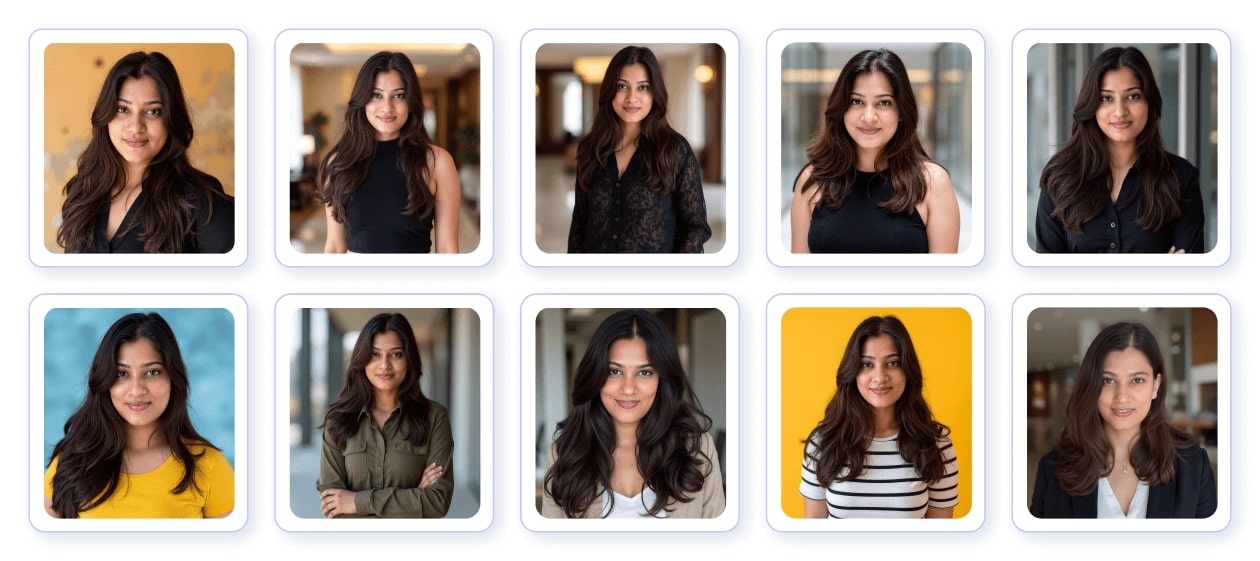
Headshot Photo delivered the highest number of accurately-matched, usable photos for me, with natural lighting and minimal distortions. I got around 6 to 7 photos I could genuinely use. My body look looked accurate, my face looked like me, expressions were clear, and there were no distortions in the final images. It looked slightly slimmer in a few shots, which honestly I didn't mind. And even if I wanted to tweak backgrounds or outfits, I could just edit them later.
It produces the most studio-like headshots in terms of lighting, backgrounds, and overall framing. The photos look very professionally lit. But in my experience, the expressions weren't always spot-on. My face sometimes looked slightly broader, and in a couple of shots it even got a double chin that I don't have. Great quality, but not always the most accurate.
They give the most realistic skin texture. The face looks very close to your actual selfies and the details are impressive. But then, you sometimes see small distortions like squinted eyes or tiny shape inconsistencies. Very natural, but slightly unpredictable.
At the end of the day, almost every tool in this category sits in the same price range, around 30 to 39 dollars.
So the "best" AI headshot generator isn't the one with magical technology.
It's the one that gives you:
- consistently accurate faces
- minimal distortions
- natural expressions
- good lighting
- and a fair price
Everything else is personal preference.
FAQs
1. Which AI headshot generator gives the most realistic results?
Paid tools generally produce the most realistic headshots because they use stronger AI models and better processing. Headshot Photo's AI headshot generator is one of the more reliable options in this category, and it's priced fairly compared to other paid tools.
2. Are there any AI headshot tools that are truly free to use?
Yes, a few tools offer genuinely free AI headshots. Canva's AI Headshot, VistaCreate, Supamove's free tier, Headshot Photo's Free LinkedIn Photo Generator are all good options. Some other "free" tools exist, but many of them limit surprises like long waiting times or forced subscriptions.
3. How do I know if an AI headshot generator is worth paying for?
Reviews can help, but keep in mind that some reviews may come from affiliates. Platforms like Reviews.io are generally more reliable. You can also check sample images, turnaround time, and how transparent the tool is about pricing and features.
4. Can ChatGPT or other AI tools create professional headshots for me?
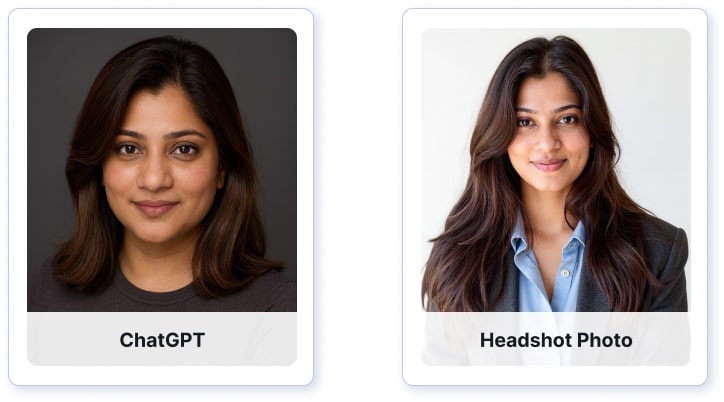
ChatGPT can generate images, but the results often show small distortions that make them easy to identify as AI. For professional, realistic headshots that look like real photos, it's better to use a dedicated paid tool like Headshot Photo.
5. Can Gemini create my professional headshot?
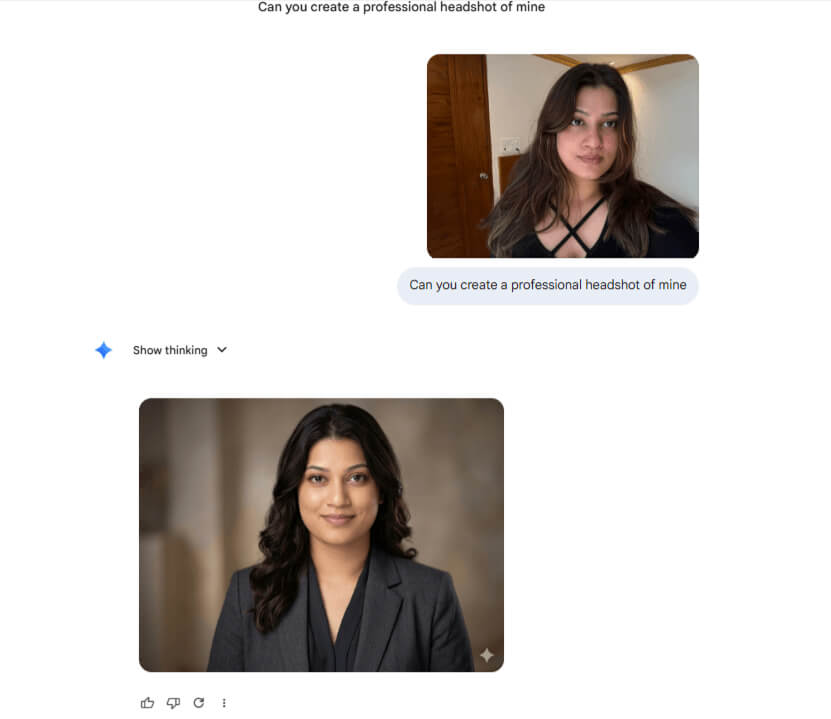
Gemini can generate headshots, but the results are far from professional-grade. We tested it ourselves by uploading a clear selfie and asking for a professional headshot. The output changed several key features: brown hair came out as jet black, the face and body looked noticeably heavier than the real person, and the overall proportions were off. The skin tone shifted, and the expression looked generic rather than natural.
6. How accurate are AI headshots compared to real studio photos?
Good AI headshot generators can be extremely accurate. With the right tool, the photos can look completely indistinguishable from real studio photography.
7. Is it possible to tell if a headshot was created by AI?
With high-quality, paid tools, it's visually impossible to tell. But if there are even small distortions in the eyes, face shape, or skin texture, then yes, you can sometimes detect that it's AI-generated.
8. What should I look for when choosing the best AI headshot generator for LinkedIn?
Look for fair pricing, and trustworthy reviews. Make sure the tool produces natural expressions, accurate facial features, and clean lighting. Reviews from genuine platforms or independent sources are the most helpful.
Generate Your Headshots Now
If you're tired of recycling old photos on LinkedIn, here's the easiest fix. Upload your 8 selfies and in about 1 hour, you'll have a set of professional headshots that actually look like you.
Generate Your Headshots Now