Employee Headshots: The Hidden $47,000 Mistake Most Companies Make
Why most companies dramatically underestimate the true cost of team photos and the surprisingly simple fix that saves 81%
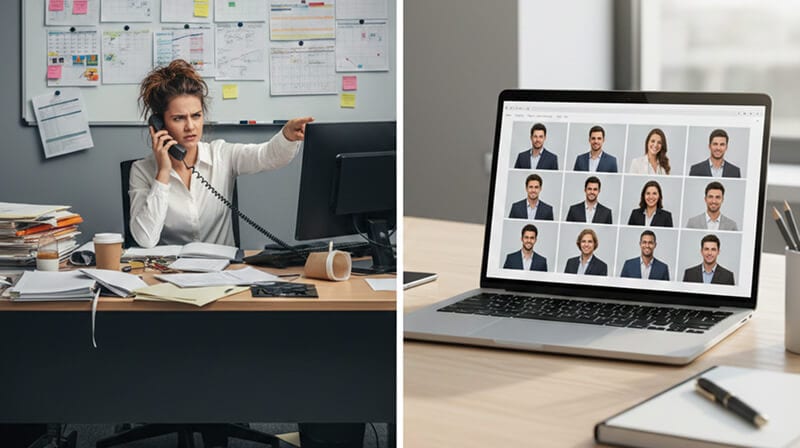
Last February, I watched our Head of People spend four straight weeks coordinating headshots for 62 employees.
She scheduled. Rescheduled. Negotiated. Begged.
"Can you come in at 2pm instead of 11?"
"The photographer just canceled - we need to push everyone back."
"Wait, you're remote? In Denver? Nobody told me that."
By the time the photos finally arrived - six weeks later, retouched and formatted - she had logged 47 hours on what was supposed to be a "quick project."
Forty-seven hours.
At her salary, that's roughly $2,800 in pure coordination costs. The photographer charged $8,500. Add in employee downtime, travel for remote team members, and the emergency reshoot for the seven people who hated their first photos?
The total: $14,300.
For 62 headshots.
And here's the kicker: within eight months, 11 of those employees had left the company. Their headshots sat on our website like digital ghosts faces of people who hadn't worked there in half a year.
The Part Nobody Puts on the Invoice
When companies budget for employee headshots or full company headshots, they think about the photographer's day rate.
Maybe retouching fees.
Travel costs if it's an on-site shoot.
That's it.
But the actual cost of traditional corporate headshots involves a cascade of hidden expenses that never appear on any invoice:
The Coordination Tax
Someone - usually your most capable operations or HR person - becomes a full-time scheduling coordinator for 2-6 weeks. Every 10 headshots requires approximately 3-4 hours of calendar wrangling. That person isn't doing their actual job during this time.
The Productivity Leak
Each employee loses 45-90 minutes: travel to the studio or waiting for their slot, the actual session, review time. For a 50-person team, that's 37-75 hours of collective productivity gone.
The Inconsistency Problem
Employees photographed in January look different from those shot in July. Different lighting. Different energy. Different seasons visible through windows. Your "About" page looks like a ransom note assembled from different magazines.
The Onboarding Gap
Every new hire joins without a headshot. They'll wait 3-6 months for the next photography session - if there even is one. Their LinkedIn says "New role at Your Company" with no supporting visual on your website.
The Ghost Factor
When employees leave (and they will), their photos linger. Updating becomes its own project. Most companies just... don't. Visitors see faces that haven't worked there in years.
Add it all up, and a "simple" headshot initiative for a 100-person company easily tops $25,000-$50,000 in true total cost.
I'm not exaggerating.
The company I mentioned earlier? When we calculated everything - including the opportunity cost of our Head of People's time - we landed at $47,340 for what the photographer had quoted as an "$8,500 project."
Why This Actually Matters for Your Business
Here's where I could give you statistics about first impressions and trust signals.
And those stats are real. Company websites with professional team photos receive 40% higher trust ratings. Job seekers - 75% of them evaluate company culture through team pages before applying.
But let me tell you something more honest.
When I see a company website with missing headshots, inconsistent photos, or those terrible amateur shots where someone is clearly in their living room with a virtual background...
I don't trust them.
Not consciously. I don't think "Oh, they couldn't afford a photographer."
It's more primal than that. Something feels off. Unfinished. Like walking into a restaurant where half the light bulbs are burned out.
The absence of professional employee headshots doesn't communicate "we're budget-conscious." It communicates "we don't have our act together."
Your clients feel this. Your candidates feel this. Your investors feel this.
And your employees feel it too.
There's something quietly demoralizing about being the person with the missing photo on the team page. Or being stuck with a headshot from three haircuts and 15 pounds ago. Or having your photo look completely different from everyone else's because you were hired in a different season than the rest of the team.
Employee headshots aren't vanity.
They're infrastructure.
The Math That Changed Everything for Us
After the $47,000 debacle, we swore off traditional photography.
Not because photographers are bad. Some of the best money we've ever spent was on executive portraits for our leadership team - high-end, styled, magazine-quality stuff. Worth every penny.
But for team-wide employee headshots? The logistics just don't scale.
Here's the actual breakdown:
Traditional Photography (50 employees):
- Photographer day rate: $2,500-$4,000
- Retouching: $15-$50 per person = $750-$2,500
- Coordination time: 25-40 hours = $1,500-$3,200
- Employee downtime: 50-75 hours = $2,500-$4,500
- Travel/setup fees: $200-$800
- Total: $7,450-$15,000
- Timeline: 6-10 weeks
AI-Generated Headshots (50 employees):
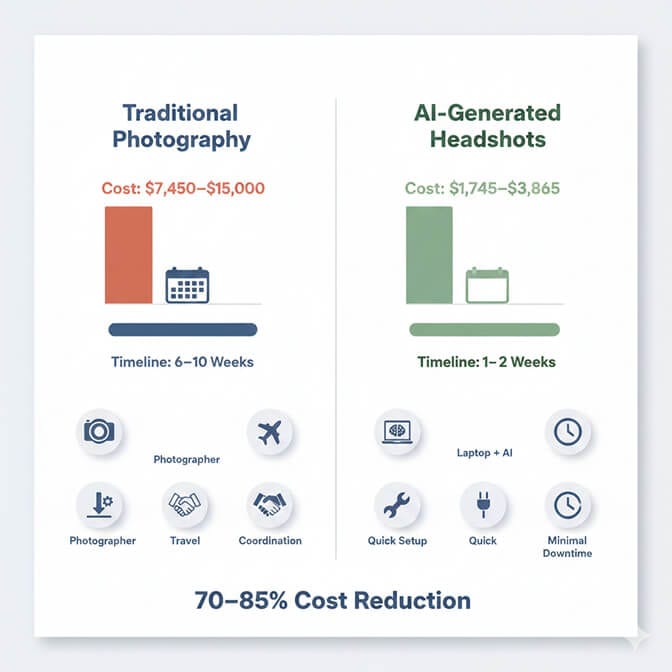
- Per-employee cost: $20-$60 = $1,000-$3,000
- Coordination time: 2-3 hours = $120-$240
- Employee time: 15 minutes each = 12.5 hours = $625
- Total: $1,745-$3,865
- Timeline: 1-2 weeks
That's a 70-85% cost reduction.
But the real magic isn't even the money.
It's the consistency.
Here's Where It Gets Interesting
When we switched to AI headshots, something unexpected happened.
Every single photo matched.
Not in a creepy, uncanny-valley way. In a professional way.
Same lighting profile. Same background treatment. Same energy level. Same crop and composition.
Our About page went from looking like a collage assembled by a caffeinated intern to looking like a Fortune 500 company's executive team.
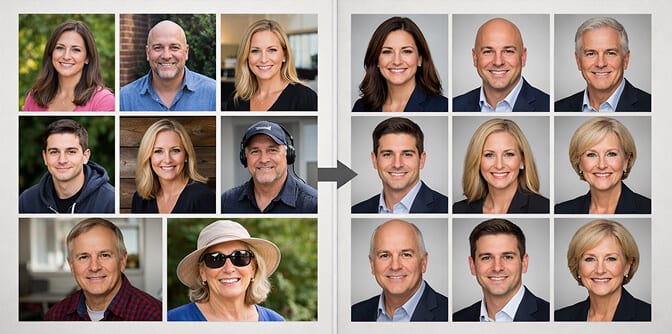
And when we hired three people the following month? They uploaded their selfies. Submitted their photos. Within 48 hours, their headshots were on the website - perfectly matched to everyone else.
No scheduling. No coordination. No waiting for the next photography session that may never come.
The new hires looked like they'd always been part of the team.
Because visually, they had.
The Objection I Hear Most Often
"But will AI headshots look fake?"
I get it. I had the same concern.
The AI headshot tools from 2022 were... not great. Uncanny valley stuff. Plastic skin. Weird eyes. Dead giveaways.
But the technology in 2024-2025 is genuinely photorealistic.
I've shown people our team page and asked them to identify which headshots were AI-generated and which came from our original photography session.
They can't.
Not reliably, anyway. Some guess correctly, some guess wrong, and most just shrug and admit they have no idea.
The modern AI corporate portrait isn't trying to fabricate a fake photo. It's taking a real photo of a real person and applying professional-grade lighting, backgrounds, and composition that would normally require expensive equipment and skilled photographers.
You're not faking your face.
You're upgrading your presentation.
When to Use Traditional Photography (Yes, Really)
Look, I'm not here to tell you AI headshots are always the answer.
For certain use cases, traditional photography is still the right call:
C-suite and Executive Leadership
Your CEO, CFO, and other public-facing executives deserve the full treatment. Styled shoots. Multiple looks. Environmental portraits. These photos will be used for speaking engagements, press coverage, and investor materials. Budget $500-$1,200 per executive and don't cut corners. For tighter budgets, AI executive headshots can also produce boardroom-grade output.
Sales and Client-Facing Roles
If someone's headshot appears on proposals, contracts, and key client communications, consider investing in higher-end photography.
Companies with Under 10 Employees
At this scale, traditional photography is manageable. The coordination overhead is minimal, and you can knock it out in a single afternoon.
The Hybrid Approach
The hybrid approach makes sense for most growing companies:
Traditional photography for leadership + AI headshots for everyone else.
This gives you the premium treatment where it matters most, while maintaining consistency and scalability across the broader organization.
How to Actually Implement This (Without Messing It Up)
If you're convinced that AI employee headshots make sense for your team, here's the non-obvious stuff that trips companies up:
1. Set Clear Photo Requirements Upfront
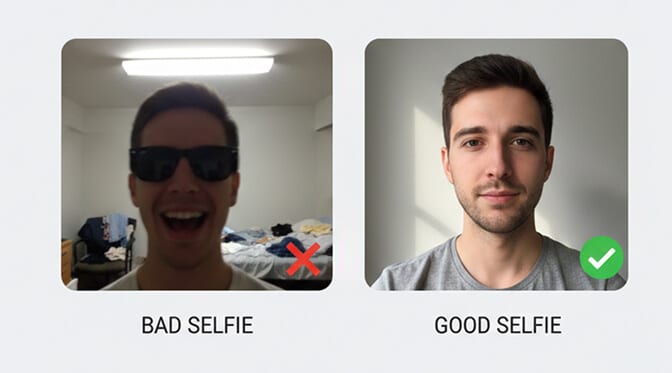
Employees will submit whatever they have on their phone. Half will be blurry. A quarter will be cropped weirdly. Some will have other people in them.
Create a simple one-pager: "Good lighting. Face centered. Shoulders visible. No sunglasses. No filters. No screenshots."
Include visual examples of good vs. bad submissions.
2. Give Employees a Deadline - and Stick to It
"Upload your photo by Friday" means nothing. "Upload by Friday at 5pm or you won't be on the website for our Monday launch" creates urgency.
3. Batch by Department, Not by Hire Date
Instead of processing photos one at a time as people submit, batch them weekly or bi-weekly. This creates natural urgency ("Marketing's photos go out Thursday - submit by Wednesday") and reduces coordination overhead.
4. Plan for Turnover
People leave. Budget for quarterly updates where you remove departed employees and add new ones. This keeps your team page accurate without becoming a constant maintenance burden.
5. Store Originals Somewhere Permanent
AI outputs, source photos, department assignments - all of this needs to live somewhere organized. Not in Sarah's downloads folder. Not in a random Slack thread.
Google Drive folder with clear naming conventions. Takes 2 minutes to set up. Saves hours of confusion later.
The Psychological Shift I Didn't Expect
Here's something nobody warned me about.
After we switched to AI-generated employee headshots, our team asked for updates.
Not because they had to. Because they wanted to.
Someone got a new haircut and wanted their photo refreshed. Someone else lost weight and felt like their old photo didn't represent them anymore. A few people just wanted to experiment with different background colors.
With traditional photography, these requests would be absurd. "Can we bring the photographer back so I can get a new headshot after my haircut?" Nobody would ask that.
But with AI headshots, the marginal cost of an update is essentially zero.
And that changes the psychology.
Suddenly, your team page isn't a static artifact from the last photography session. It's a living document that actually represents who your team is today.
That feels different.
It feels cared for.
The Bottom Line (Because You Need the Numbers for Your CFO)
For a 50-person company making the switch from traditional photography to AI headshots:
- One-time savings: $5,700-$11,100 (66-75% reduction)
- Annual maintenance savings: $4,200-$8,500
- Time savings: 4-7 weeks faster implementation
- Consistency improvement: Measurable, immediate, permanent
For a 200-person enterprise:
- One-time savings: $36,800-$49,000 (73-81% reduction)
- Annual maintenance savings: $15,000-$25,000
- Time savings: 12-15 weeks faster implementation
These aren't theoretical numbers. They're based on real company data, and you can see this in action to test the workflow yourself.
What I Wish I'd Known Earlier
That $47,000 mistake wasn't really about money.
It was about not realizing that employee headshots aren't a one-time project.
They're an ongoing operational requirement.
People join. People leave. People change. Seasons change. Styles change.
Any solution that treats employee headshots as a discrete event - something you "do" once and forget about - is setting you up for the same frustration cycle:
Schedule → Coordinate → Shoot → Wait → Launch → Watch it decay → Repeat
The companies that get this right treat headshots like any other piece of corporate infrastructure: maintained, updated, and built for change.
That's the real lesson.
Not "AI is better than photographers."
But rather: build systems that adapt, not projects that expire.
Frequently Asked Questions
How much do professional employee headshots cost per person?
Traditional photography typically costs $75-$150 per employee when you factor in the photographer's day rate, retouching, and coordination time. For larger teams, consider exploring corporate headshot pricing guides to understand the full scope of costs. AI-generated headshots reduce this to $20-$60 per person while delivering consistent, professional results.
What are some creative ideas for team photos beyond standard headshots?
Beyond individual headshots, many companies want group photos that showcase company culture. Check out these 21 fun and professional team photo ideas for inspiration - from candid office shots to coordinated outdoor sessions. The key is balancing professionalism with authenticity.
How should employees pose for professional headshots?
Posing can feel awkward, especially for men who may not have much photography experience. For guidance on angles, expressions, and body positioning, see our guide on stylish photo poses for men. The key is to relax your shoulders, slightly angle your body, and think of something that makes you genuinely smile.
Do headshot requirements differ for job applications versus company websites?
Yes, context matters. Job application pictures often need to be more conservative and formal, while internal company headshots can reflect your brand's personality. Either way, ensure proper lighting, a clean background, and professional attire appropriate to your industry.
Should we consider black and white headshots for our team?
Black and white headshots can create a striking, timeless look for your team page. Learn more about why black and white photo booths remain popular and when monochrome might be the right choice for your company's visual identity. They work particularly well for creative agencies and luxury brands.
How can we make group photos look natural rather than staged?
The secret to natural-looking business team photos is minimizing the "photo shoot" feeling. Give people something to do - discuss a project, share a joke, look at something together. The best group shots capture genuine interaction rather than everyone staring at the camera.
Are there free tools to improve employee headshots?
Yes, you can start with our free AI tools for LinkedIn and professional photos to enhance existing headshots or test AI headshot quality before committing to a team-wide rollout. These tools can help with background removal, lighting correction, and basic retouching.
What should women wear for professional headshots?
While our guide on what to wear for passport photos for women covers the basics of professional photo attire, employee headshots allow more flexibility. Solid colors work best - avoid busy patterns that distract from your face. Jewel tones and navy photograph particularly well.
