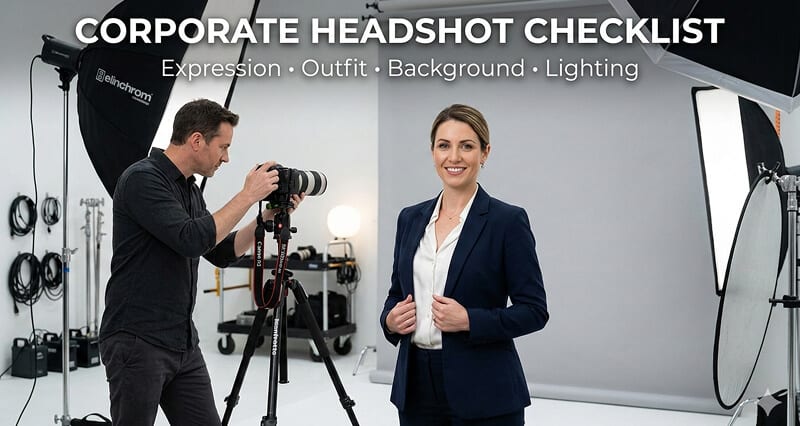
Save this checklist. Open it before your session. Get it right in one take.
I've seen the same pattern hundreds of times.
Someone books a corporate headshot session. They spend 20 minutes picking an outfit. They show up. They sit in front of the camera. They freeze.
Afterward, they look at the photos and think: Something's off. I look stiff. Or the background is weird. Or my shirt is doing that thing where it gaps at the buttons.
The frustrating part? Every one of those problems was preventable. Not with expensive equipment or professional coaching. Just with a checklist.
A corporate headshot has exactly four elements that determine whether it works or fails: your expression, your outfit, your background, and your lighting. Get all four right and the headshot looks effortlessly professional. Get even one wrong and the whole thing feels off.
Here's your checklist. Section by section. With specific do's and don'ts for each.
PART 1: EXPRESSION
This is the element people think about least and that matters most.
Your expression is the first thing a viewer processes. Before they notice your suit, your background, or the lighting quality, their brain has already decided whether you look trustworthy, approachable, and competent based on your face. Research from Princeton suggests this judgment happens in under 100 milliseconds.
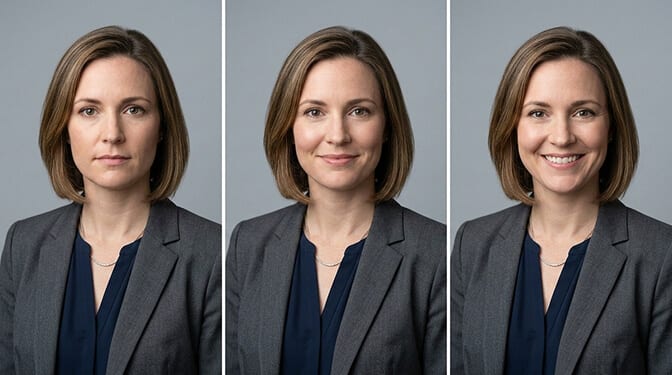
Expression DO's:
Think of a specific pleasant memory right before the photo. Not something hilarious (you'll laugh), but something genuinely warm. A compliment you received recently. A moment with your kid. A project that went well. This relaxes your facial muscles and puts natural warmth in your eyes that no amount of direction can replicate.
Make eye contact with the lens. Direct eye contact with the camera simulates eye contact with the viewer. It creates connection and signals confidence. This is the single biggest difference between a headshot that engages people and one they scroll past.
Drop your shoulders before the shutter clicks. Tension in the shoulders travels up through the neck into the jaw and eyes. Take a breath, consciously drop your shoulders, and let your face follow.
Practice the "Mona Lisa" approach. Slight upturn at the corners of the mouth. Eyes engaged. Mouth closed or barely open. This reads as warm and confident across every industry and context.
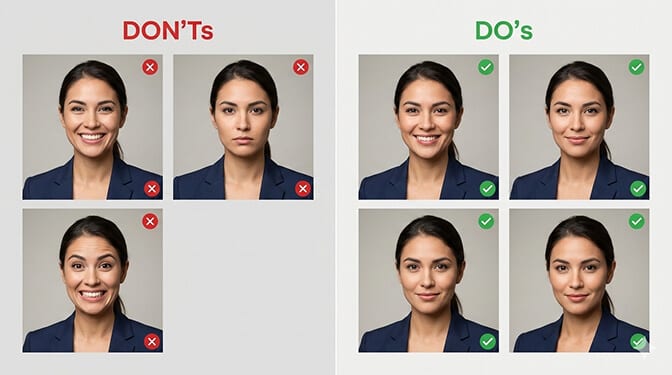
Expression DON'Ts:
Don't do the "power stare." The fully neutral, no-smile expression that's supposed to look authoritative actually reads as cold, unapproachable, or angry on screen. Even in finance and law, a slight warmth in the expression outperforms the stone face.
Don't force a wide smile if it's not natural for you. A forced grin is immediately obvious and makes you look nervous rather than friendly. A natural closed-mouth smile with engaged eyes beats a forced open-mouth smile every time.
Don't tilt your head dramatically. A slight tilt (5 degrees) can add warmth. A significant tilt looks confused or overly casual for a corporate context.
For more on specific posing techniques that flatter different face shapes, our guide to slimming poses for headshots covers angles and jaw techniques in detail.
PART 2: OUTFIT
Your outfit is visible for about 3 inches of frame in a standard corporate headshot. Shoulders, collar, and maybe the top of a lapel. That's it. But those 3 inches set the entire professional tone.
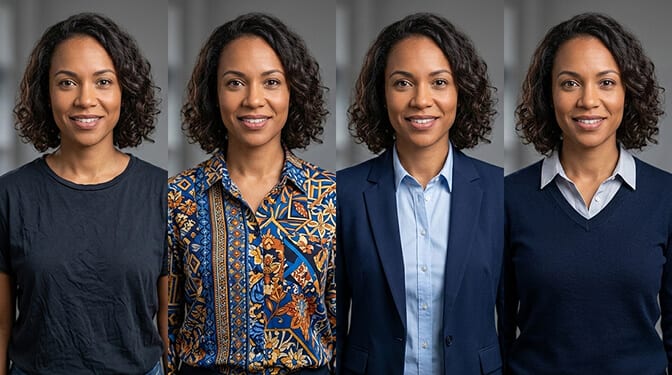
Outfit DO's:
Wear solid colors. Solid fabrics photograph cleanly and keep the viewer's attention on your face. Navy, charcoal, deep burgundy, forest green, and black are all reliable choices that work across skin tones and backgrounds.
Create contrast with your background. Dark clothing against a light background. Light clothing against a dark background. This separation makes you "pop" from the frame rather than blending into it.
Choose structured necklines. Collared shirts, blazers, V-necks, and scoop necks all frame the face well and look intentional on camera. A V-neckline specifically elongates the neck and creates a more flattering frame.
Make sure everything fits properly. In a tight headshot crop, a gaping collar, pulling buttons, or drooping shoulders become the focal point. Try on your headshot outfit and check it in a mirror at the exact angle of a headshot (straight on, head and shoulders). If anything pulls, gaps, or bunches, choose something else.
Iron or steam your clothes the night before. Wrinkles in clothing look exponentially worse on camera than they do in person. Modern cameras capture every crease.
Bring 2-3 options. Give yourself flexibility. Bring one formal option and one business casual option. What looks great in your closet mirror might not work on camera, and having backup eliminates stress.
Outfit DON'Ts:
Don't wear loud patterns, stripes, or plaids. Thin stripes create a visual distortion called moire effect on digital cameras. Busy patterns compete with your face for attention. Both are distracting in a headshot crop.
Don't wear pure white as your only visible layer. White reflects light, can wash out your skin, and tends to add visual weight on camera. White works well as an undershirt visible beneath a blazer, but not as the only thing showing.
Don't wear logos, text, or branded clothing. This applies even to subtle logos. They're distracting, they date the photo, and they introduce unwanted associations.
Don't try a new outfit the day of the session. You want to feel comfortable and confident, not self-conscious about wearing something unfamiliar. Wear something you already know looks good on you.
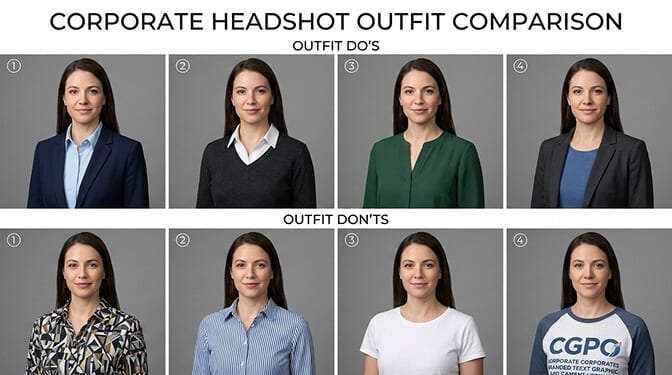
For outfit ideas beyond the standard blazer, check out our guide to professional headshot ideas without a blazer with 12 options organized by industry.
PART 3: BACKGROUND
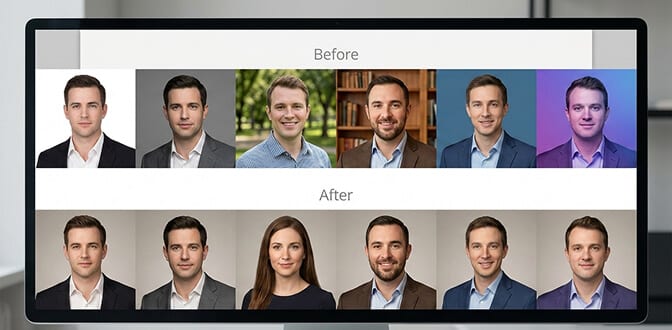
The background is the element that makes the biggest difference in team consistency and the smallest difference to the untrained eye. Most people never consciously notice a headshot background. But they absolutely notice when backgrounds don't match across a team page.
Background DO's:
Choose a solid, neutral color for maximum versatility. White, light gray, medium gray, and soft blue work across every platform (LinkedIn, company website, email signature, conference badge) without needing adjustment.
Match backgrounds across your team. If you're getting headshots for multiple people, pick one background color and use it for everyone. Consistency matters more than which color you pick.
Consider dark backgrounds for executive-level headshots. Charcoal, navy, and near-black backgrounds are a growing trend for C-suite and senior leadership headshots. They add gravitas and sophistication.
Think about where the headshot will live. LinkedIn crops to a circle. Company websites use various aspect ratios. Conference badges are small squares. A clean, solid background works everywhere. A busy environmental background might get awkwardly cropped.
Background DON'Ts:
Don't use mottled or textured "portrait studio" backgrounds. These screamed "professional photo" in 2005. In 2026, they look dated. Clean and solid is the modern standard.
Don't choose a background that matches your clothing or hair color. If you're wearing a navy blazer, don't stand against a navy background. If you have dark hair, avoid dark backgrounds unless the lighting creates clear separation.
Don't use a cluttered real-world background unless it's intentionally curated. An office bookshelf can work IF it's tidy, blurred, and clearly intentional. A random hallway or conference room wall does not work.
For a deep dive on background color psychology by industry, our guide to headshot examples shows what works in different professional contexts.
PART 4: LIGHTING
Lighting is the most technical element and the one you have the least control over in a traditional photo session. But understanding the basics helps you evaluate your options and make better decisions.
Here's the core truth: Good lighting is the difference between looking 5 years younger and 5 years older in a photo. It's the difference between smooth, even skin and every pore and line on full display. It matters that much.
Lighting DO's:
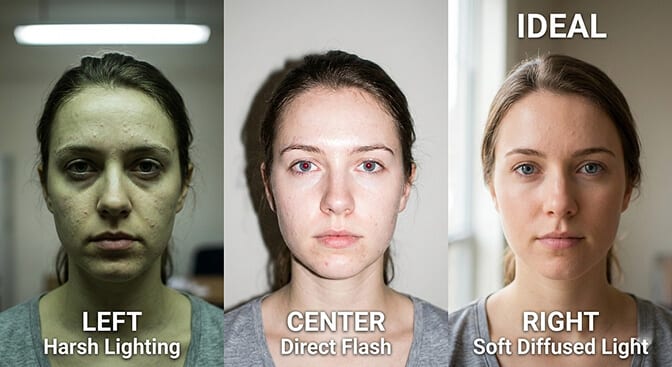
If shooting at home or DIY, face a large window. Natural window light (indirect, not direct sunlight) is the most flattering, easiest-to-access light source available. Face the window. Position yourself 3-4 feet in front of a plain background. The window should be slightly above eye level if possible.
If in a studio, confirm the photographer uses soft, diffused lighting. Softboxes, umbrellas, or large panel lights all create the soft, wraparound light that flatters faces and minimizes harsh shadows. Ask to see recent examples of their corporate headshot work.
Pay attention to the direction of light. The main light should come from slightly above and in front of you (not from the side, not from below, not directly overhead). This fills in under-eye shadows, smooths skin texture, and creates gentle dimension in the face.
Avoid SPF products on photo day. Sunscreen and many moisturizers with SPF contain titanium dioxide, which creates a white flashback effect under studio lights or flash photography. Apply your regular moisturizer without SPF on the morning of your session.
Lighting DON'Ts:
Don't take corporate headshots under overhead fluorescent lights. This is the number one cause of terrible office headshots. Fluorescents cast downward shadows under the eyes, nose, and chin that add years to your face and create a sickly color cast.
Don't use direct flash. On-camera flash (like a phone flash or pop-up camera flash) flattens the face, creates red-eye, and produces the "deer in headlights" look. If flash is needed, it should be bounced or diffused.
Don't sit with a window behind you. A window behind you turns you into a silhouette. The camera exposes for the bright window and your face goes dark. The window should always be in front of you (as your light source), not behind you.
Don't shoot in direct midday sunlight. Harsh sun creates deep shadows and forces squinting. Overcast days or open shade produce much better results for outdoor or natural-light headshots.
For more detail on how professionals approach headshot lighting, our professional headshot tips guide covers the technical side.
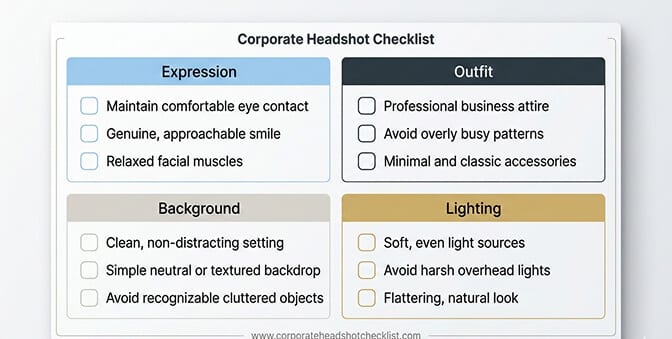
The Quick-Reference Checklist (Save This)
Before your corporate headshot session, confirm:
Expression: Have a pleasant thought ready. Practice relaxed eye contact. Drop shoulders. Slight smile, not forced grin.
Outfit: Solid colors, structured neckline, no patterns. Ironed. Fits properly in a head-and-shoulders crop. Bring 2-3 options.
Background: Solid neutral color preferred. Same background for all team members. No clutter, no matching your clothing or hair.
Lighting: Soft and diffused. From front and slightly above. No overhead fluorescents. No direct flash. No SPF products on face.
What If You Don't Have a Session Booked?
Everything in this checklist applies whether you're sitting in a professional studio, standing in front of a friend's camera, or uploading selfies to an AI headshot generator.
The expression advice works the same way in front of any lens. The outfit guidance applies regardless of who or what is taking the photo. The background becomes automatic with AI (you choose it from presets). And the lighting principles help you select which of your existing photos will produce the best AI-generated results.
At Headshot Photo, you upload casual selfies and the AI handles background, lighting optimization, and professional polish automatically. You control the expression and outfit. The technology handles the rest. Studio-quality corporate headshots in about 1 hour, with matching backgrounds for your entire team.
For teams that need consistent corporate professional headshots across multiple employees, AI generators eliminate the scheduling and coordination problem entirely while producing perfectly matched results.
One Last Thing
Here's what I've noticed after seeing hundreds of thousands of corporate headshots.
The ones that work aren't the most technically perfect. They're the ones where the person looks comfortable. Where the expression is genuine. Where the outfit feels like them. Where the background and lighting are clean enough to let the person be the story.
A corporate headshot isn't a test. It's a handshake. And the best handshakes feel natural, confident, and warm.
Prepare with this checklist. Then forget the checklist and be yourself.
That's how you get the shot.
Frequently Asked Questions
1. What is a corporate headshot checklist and why do I need one?
A corporate headshot checklist is a structured preparation guide covering the four visual elements that determine headshot quality: expression, outfit, background, and lighting. You need one because each element requires specific preparation, and missing even one (wrong lighting, distracting pattern, forced expression) can undermine an otherwise professional photo. Having a checklist ensures consistency, especially when coordinating headshots for a team.
2. How does preparing for a corporate headshot compare to a casual professional photo?
Corporate headshots require more structure across all four elements. Outfits should be more formal (solid colors, structured necklines, blazers). Backgrounds should be cleaner and more consistent. Expressions should balance warmth with authority. Casual professional photos allow more personality in clothing, backgrounds, and expression. The lighting principles (soft, diffused, from the front) remain the same for both.
3. How do I prepare my outfit for a corporate headshot session?
Choose solid-colored clothing in navy, charcoal, deep burgundy, or black. Ensure the neckline frames your face well (V-neck, collar, or scoop neck). Iron or steam everything the night before. Check the fit in a mirror at head-and-shoulders crop level. Bring 2-3 options. Avoid patterns, logos, pure white as the primary visible layer, and anything you haven't worn before.
4. Is it worth investing in professional lighting for corporate headshots?
Yes. Lighting quality is the single biggest factor separating professional-looking headshots from amateur ones. Professional soft lighting (studio softboxes or natural window light) smooths skin texture, fills under-eye shadows, and creates flattering dimension. If professional lighting isn't available, facing a large window produces excellent results for free. Overhead fluorescents should be avoided entirely.
5. Can I use this corporate headshot checklist with an AI headshot generator?
Absolutely. Expression and outfit guidance applies to the selfies you upload, since the AI works from your existing photos. Better input photos (good expression, proper outfit) produce better AI headshot results. Background and lighting are handled automatically by the AI, with options to select consistent backgrounds across team members. AI generators like Headshot Photo are particularly effective for teams that need matching corporate headshots without coordinating a group session.
