
How to Take a Professional Headshot With Your iPhone (2026 Guide)
The phone in your pocket is better than the camera most studios used a decade ago. Here's how to actually use it.
I watched a friend spend $300 on a headshot session last month.
Three hundred dollars. A two-hour round trip across the city. A wardrobe change in a cramped bathroom. And then? She got the proofs back a week later and hated all of them.
Here's the part that stung. The photographer used natural window light and a plain gray wall. That's it. No fancy rig. Nothing she couldn't have done in her own living room with the phone sitting in her bag.
So we tried it. Twenty minutes, her iPhone, a window, and a stool. The shot she ended up using on LinkedIn came from that afternoon.
This is the thing nobody wants to admit: your iPhone is already a professional-grade headshot camera. You just have to stop using it like a tourist.
Let me show you exactly how.
Why Your iPhone Is Secretly a Studio
The cameras Apple ships now are absurd.
The iPhone 17 Pro and Pro Max carry a triple 48-megapixel system with a proper telephoto lens, plus an 18-megapixel front camera that actually holds up for selfies. Even the standard iPhone 17 runs dual 48-megapixel sensors and the same upgraded front camera.
Translation? You are walking around with more resolution than working photographers shot on ten years ago.
But here's where most people get it wrong. They grab the phone, hold it at arm's length, snap upward into their own nostrils, and wonder why they look like a hostage. The hardware was never the problem. The technique is.
Good headshots come down to four things: light, distance, lens choice, and background. Master those and the phone does the rest.
Light Is the Whole Game
If you remember one thing, remember this.
A great headshot is 80% lighting and 20% everything else.
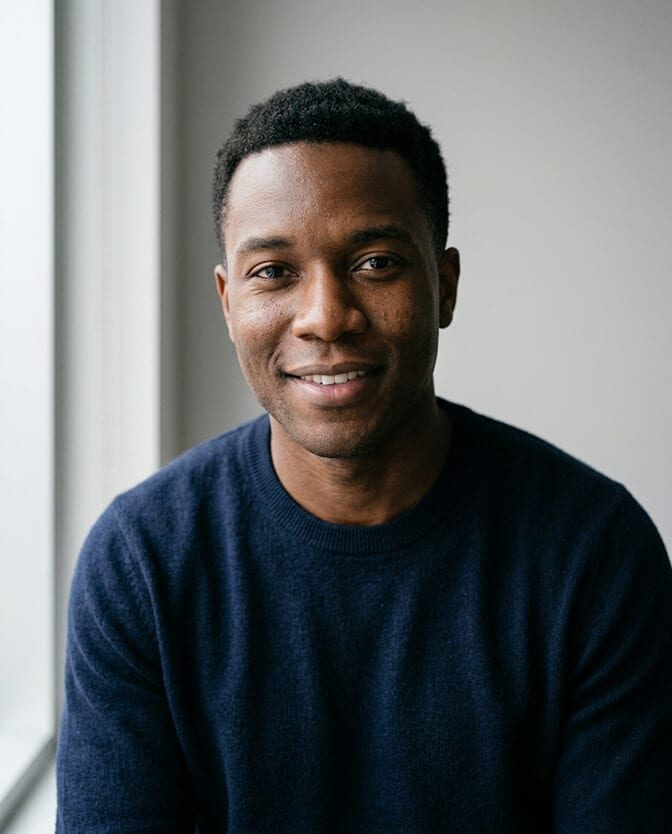
The cheapest, best light source you own is a window. Find one with soft, indirect daylight. Face it directly so the light falls evenly across your face. That soft wash from a north-facing window or an overcast sky is what expensive studios spend money trying to fake.
What you want to avoid is just as important. Never shoot with the window behind you. Backlight turns your face into a shadow and your phone into a confused mess. And skip harsh midday sun outdoors. It carves ugly shadows under your eyes and makes everyone squint.
If you can swing it, shoot near golden hour. That warm, low light an hour after sunrise or before sunset is flattering on basically every face.
No good window? A cheap ring light or a small softbox solves it. Position it slightly above your eye line and angled down a touch. Consistent, soft, in front of you. That's the entire formula. The deeper version of this lives in our breakdown of natural lighting for headshots.
Distance and Lens: The Trick That Fixes "Weird Face"
Ever notice your selfies make your nose look big and your forehead huge?
That's not your face. That's the wide-angle front camera distorting your features because you're holding it six inches away.
The fix is stupidly simple: back up. Stand three to eight feet from the camera. At that distance, facial proportions look natural and true to life. This is why a tripod or a propped-up phone with a self-timer beats arm's-length selfies every single time.
Here's a pro move most people miss. On the Pro models, use the telephoto or the 2x setting instead of the default wide lens. A longer focal length compresses your features in a way that's genuinely flattering. It's the same reason photographers shoot portraits with longer lenses, not wide ones.
One more: position the phone slightly above your eye level and look up into it a touch. It defines your jawline and keeps you from shooting up your own nose. Small angle, huge difference.

Portrait Mode, But Used Correctly
This is where the iPhone quietly shows off.
Portrait Mode creates that soft background blur that separates you from whatever's behind you. It's the look that reads as "professional" instantly. And from the iPhone 15 onward, the phone is smart enough that you don't even have to switch modes. Shoot a normal photo of a person and a little Depth button appears so you can add or adjust the blur afterward.
On Pro models, the LiDAR sensor maps depth even in dim rooms, so the cutout around your hair and shoulders stays clean.
Then there's Portrait Lighting, and most people never touch it. Natural Light keeps things clean and true, which is what you want for a professional or print headshot. Studio Light brightens your face like a softbox, great for a polished profile shot. Contour Light adds drama with deeper shadows.
My advice? Start with Natural Light. It's the safest choice for a headshot that needs to look like you, not a magazine filter.
A few quick settings that punch above their weight:
- Clean the lens. A smudge of pocket lint softens your whole shot. Wipe it.
- Tap your face on screen to lock focus, then swipe up or down to fine-tune exposure.
- Turn on the grid. It helps you center yourself and keep the horizon straight.
- Never use digital zoom. Walk closer or use an optical lens. Digital zoom just throws away detail.
Backgrounds: Keep It Boring on Purpose
A busy background is the fastest way to look amateur.
You want clean and simple. A plain wall in light gray, white, beige, or muted blue is perfect. Step three to six feet away from that wall so Portrait Mode can blur it naturally and you don't cast a hard shadow on it.
A tidy office with soft blur works too. So does outdoor shade with a little greenery behind you. The rule is the same everywhere: nothing should compete with your face.
If someone looks at your headshot and notices the background first, the background lost you the job.
If you want to go deeper on this, our breakdown of headshot background and outfit choices walks through specific setups for home, office, and outdoors.
Wardrobe and Expression: The Human Stuff
The camera's ready. Now the easy part everyone overthinks.
Wear solid colors. Skip loud patterns, logos, and anything that pulls focus. A blazer, a clean knit, a crisp shirt. Business or business casual depending on your field. Steam out the wrinkles, because the camera sees everything now.
For expression, the secret is a real, relaxed half-smile. Not a grin. Not a stern blank stare. Think of someone you actually like walking into the room. A genuine "soft smile with the eyes" reads as confident and warm, which is exactly what a headshot is supposed to sell.
Take way more shots than you think you need. Fifty, a hundred. Burst mode is free. You only need one keeper, and the keeper is usually buried in the batch.
If you want to nail the wardrobe and posing side specifically, we put together a guide on what to wear for professional headshots that takes the guesswork out of it.
Where the DIY Route Hits a Wall
I'll be honest with you, because pretending otherwise would be useless.
You can get a great headshot with your iPhone. People do it every day. But there's a gap between "good enough for now" and "consistently studio-grade across ten different looks."
When you shoot yourself, you're juggling everything at once. Lighting, angle, focus, expression, your own self-consciousness about smiling at a phone on a stool. It works, but it's fiddly. And the day your lighting is off or you don't have twenty free minutes, the whole thing falls apart.
That's the exact problem we built Headshot Photo to solve. You upload a handful of normal selfies, and you get back a full set of polished, professional headshots in different outfits, lighting setups, and backgrounds. No window-chasing. No tripod. The technique I just walked you through, applied automatically, every time. If you're curious how the AI headshot process compares to a traditional studio session, we broke that down in our piece on AI headshots versus a traditional photographer.
We've generated more than 1.4 million headshots for over 50,000 people, and the thing they tell us most often is simple: it just saved them an afternoon.
So Which iPhone Should You Actually Use?
Short version: whatever you already own.
The iPhone 17 Pro and Pro Max give you the most flexibility thanks to that telephoto lens and the LiDAR depth mapping. But an iPhone 15 Pro or 16 Pro takes a beautiful headshot. Even older models do fine if your lighting is right, because remember, light matters more than the phone.
Don't buy a new phone for this. Buy yourself a window and twenty minutes instead.
The Takeaway Nobody Tells You
My friend uses that LinkedIn photo to this day. The one we shot in twenty minutes by a window.
Nobody has ever asked her what camera it was taken on. Nobody asks anyone that. They just see someone who looks capable, warm, and put-together, and they move on with that impression.
That's all a headshot has to do.
The iPhone in your pocket can absolutely do it. And on the days you don't have the window, the time, or the patience, there's a faster way to get there.
Your face is your first impression. It deserves more than an arm's-length selfie under a kitchen light.
Ready to skip the setup entirely? Upload a few selfies and let Headshot Photo turn them into a full set of studio-quality headshots in about ten minutes. Same professional result, none of the fiddling.
Frequently Asked Questions
1. Can you take a professional headshot with an iPhone?
Yes, you absolutely can. Modern iPhones shoot in 48 megapixels with Portrait Mode and Portrait Lighting, which is more than enough quality for LinkedIn, résumés, and company directories. The trick is good soft lighting, standing three to eight feet back, and using a clean simple background. The phone is rarely the limiting factor. Your technique is.
2. iPhone headshot vs professional photographer: what's the real difference?
A photographer brings lighting gear, posing direction, and editing experience, which is why studio sessions cost more and take longer to schedule. An iPhone headshot is free to shoot and instant, but you're directing yourself, so consistency is harder. For most people the gap has narrowed dramatically, and an AI headshot tool now sits comfortably in the middle: studio-grade polish without the studio.
3. How do I make my iPhone headshot look more professional?
Face a window for soft even light, never shoot with light behind you, and stand back so the wide lens doesn't distort your face. Use Portrait Mode with Natural Light, keep the background plain, and position the phone slightly above eye level. Take dozens of shots and pick the one with a relaxed, genuine expression.
4. How much does a professional headshot cost in 2026?
A traditional photographer typically runs anywhere from $150 to $400 or more for a single session, plus travel and scheduling. Doing it yourself on an iPhone costs nothing but your time. An AI option like Headshot Photo starts at $34 and gives you a full range of looks, which is why so many people land there once they price out the alternatives. You can see the full breakdown on our pricing page.
5. Are iPhone headshots good enough for LinkedIn and work?
For the vast majority of professional uses, yes. LinkedIn, résumés, team pages, and speaker bios all display images small enough that a well-lit iPhone shot looks completely professional. The only time you'd want more is when you need a wide variety of polished looks fast, which is exactly where an AI headshot set earns its keep.
