
AI Headshot Lighting That Looks Natural: How to Get Soft, Flattering Results Without Any Equipment
Professional photographers spend $3,000 on lighting gear to recreate one thing: a cloudy day next to a window. AI does it from your phone photo. Here's what's actually happening, and how to make it work for you.
The first time I really understood professional lighting, I was watching a photographer spend forty minutes setting up a single shot.
Softbox on a C-stand. Reflector bounced at an angle. Rim light behind the subject. Diffusion panel over the main source. Adjustments. More adjustments. A light meter reading. More adjustments.
The result was genuinely beautiful. Soft, directional, flattering on the face.
And then I looked out the window. It was overcast. Gray sky, full coverage. The light coming through the glass was... almost identical to what the photographer had just spent forty minutes constructing with several thousand dollars of equipment.
All of that, I thought, to recreate a cloudy Tuesday.
That moment is essentially what AI headshot lighting simulation does. It has learned, from hundreds of thousands of professionally lit portraits, exactly what that soft directional light looks like on a human face. The catchlights in the right position. The shadow transition from highlight to dark at the right gradient. The subtle rim separation that lifts the subject from the background.
And it applies all of that to your input photo. Automatically. Without a single piece of equipment.
Here's what you actually need to know about how it works, and more importantly, how to give the AI the best possible starting material.
What AI Lighting Simulation Actually Is (Not a Filter)
Here's the weird part.
When people first hear "AI lighting simulation," they imagine a filter. Something that brightens the image, maybe smooths the skin a bit, adds a warm tone. That's not what this is.
A well-trained AI headshot model has learned the physics of how light behaves on human faces. It understands that a large, soft light source to the upper left of a face produces a specific pattern of highlight and shadow. It understands that the catchlights (the small reflections visible in the eyes) appear in a predictable position relative to the light source. It understands how different skin tones respond to warm versus cool light. How shadows under the nose and jaw look when the key light is high versus low.
Natural lighting simulation isn't adding brightness. It's applying the learned visual signature of a specific lighting setup to your face, based on everything the model has learned from real professional photography.
This is why a good AI headshot can take a photo shot under bathroom vanity lights and return something that looks like a studio portrait. Not because it filtered the original, but because it recognized your facial structure from the input and rendered it under different (correct) lighting conditions.
The quality of that rendering depends on two things: how well the AI model was trained, and how much useful information your input photo gives it to work with.
The Three Lighting Styles That Do Most of the Work
Professional portrait photographers have developed a handful of foundational lighting setups over the past century. They're still the standard because they work across virtually every face shape, skin tone, and industry context.
The best AI headshot generators simulate all of them. Understanding what each one looks like helps you both choose the right output and recognize when the AI has done its job correctly.
Loop lighting. A soft light source placed slightly above eye level and 30 to 45 degrees to one side. Creates a small shadow from the nose that loops down onto the cheek. This is the most universally flattering setup for professional headshots. The shadows define without dramatizing. The overall quality reads as clean, natural, and confident. If you look at ten professional LinkedIn headshots from senior people in almost any industry, loop lighting is probably in at least seven of them.
Rembrandt lighting. Named after the Dutch painter whose portraits used it. The key light is higher and further to the side, creating a triangular patch of light on the shadow-side cheek. More dramatic, more character, more authority. It's the setup that makes an executive look like they belong in an investor presentation. It's a stronger look and it signals seniority. Not for everyone, but when it's right, it's very right.
Butterfly lighting. Light comes from directly in front of the face and slightly above, creating a small butterfly-shaped shadow under the nose. Classic Hollywood glamour setup. It lifts the cheekbones, softens the jawline, and flatters almost every face shape. Warmer and more approachable than Rembrandt. Common in headshots for client-facing, consumer, and lifestyle-adjacent roles.
All three of these start from the same principle: a large, soft, directional light source. All three are things a well-trained AI headshot model can render convincingly from your input photos.
If you want a deeper breakdown of how studio lighting setups are constructed before AI ever touches them, our headshot lighting setup guide covers the equipment and physics in detail.

This Is Where Most People Get It Wrong
Bad input lighting is the single most common reason AI headshot results disappoint.
Not bad poses. Not bad expressions. Bad input lighting. Specifically, one of three problems.
Overhead ceiling lights. This is the most common and most damaging mistake. Ceiling lights, by definition, point straight down. They create deep shadows under the eyes, under the nose, and under the chin. They make everyone look tired. When an AI model receives an input photo with overhead lighting, it has to work against the shadow information it's receiving. The results are often flat or have residual shadow patterns that the rendering can't fully correct.
The fix: turn off ceiling lights before shooting your input photos. Move to a position where a lamp or window provides the dominant light source.
Backlighting. Standing with a window or bright light source behind you puts your face in shadow relative to the background. The camera (or phone) either exposes for your face (washing out the background) or for the background (underexposing your face). Either way, the AI receives a face with inadequate detail. It cannot invent facial information that wasn't captured in the input.
The fix: physically turn around so you're facing the light source, not the other way around.
Mixed sources. Ceiling lights on, window light coming from the side, a lamp behind you. The AI receives a face lit from three conflicting directions with three different color temperatures. It can't fully reconcile this. The output often has a slightly muddy or inconsistent quality that's hard to pinpoint but visible.
The fix: one dominant light source. Window or lamp, not both. Everything else off.
What Good Input Lighting Actually Looks Like
You don't need a single piece of equipment. You need to find the right light that already exists in your space.
The north-facing window on an overcast day is the gold standard for input photo lighting. No direct sunlight, just the ambient light of the sky. Soft, even, slightly cool. It's essentially a giant natural softbox. Position yourself facing it directly, with the window slightly to one side, and you have loop lighting without a single piece of gear.
Any window on a cloudy day works almost as well. Cloud cover acts as a diffuser for the entire sky. The light is soft and even across the whole overcast area. Position yourself the same way.
A window with sheer curtains on a sunny day. The curtains diffuse the harsh direct sun into something softer. Position yourself facing the window at a 30 to 45 degree angle (mirroring the three-quarter turn you'd use in the photo itself) and the light becomes directional enough to create natural shadow definition without being harsh.
A lamp at face level, positioned to one side. Lamps pointed upward or placed behind you are bad. A lamp placed at roughly eye level to your left or right, just out of frame, creates a natural directional key light. Pull it slightly forward of your face position and you have something close to loop lighting without the softbox.
In all of these situations, the operating principle is the same: one soft, forward-directional source, slightly above eye level, from one side. That's what the AI model is trained to recognize, enhance, and render at professional quality.
If you want to see how well-lit input photos translate into finished professional headshots, browse AI headshot examples from Headshot Photo users across a range of professions and lighting styles. The quality gap between good-input and bad-input results is immediately visible.
The Checklist Before You Shoot Your Input Photos
This takes about two minutes and changes your output quality significantly.
Step one: kill the ceiling lights. Walk into the room you're shooting in and turn off the overhead lights. If the room becomes too dark, you're in the wrong room. Find a space where window light or a lamp can do the work.
Step two: face the light source. Stand where you'll shoot and look for where the light is coming from. Your face should be angled toward it, not away from it. If your shadow falls in front of you, you're positioned correctly. If your shadow falls behind you, turn around.
Step three: check the shadow quality. Hold your hand up in front of your face and look at the shadow it casts. If the shadow edge is harsh and sharp, the light source is too small or too direct. Move to a spot where the shadow transitions more gradually. That gradual transition is soft light, which is what you want.
Step four: eliminate competing sources. Is there a bright window behind you? A lamp to the side casting a different-colored light? Eliminate or block anything that isn't your primary source. One clean source beats three mixed ones every time.
Step five: shoot at face level or slightly above. Phone at eye level or just above. Not below (which creates unflattering upward shadows) and not dramatically above (which makes the chin disappear). Eye level is your starting point.
Follow these five steps and you give the AI's lighting simulation the cleanest possible canvas to work from.
For professionals building a headshot library across multiple backgrounds and lighting styles, the background and outfit guide from Headshot Photo explains how wardrobe and background choices interact with the lighting output, which is worth reading alongside this before your session.
Why the Polished-Not-Plastic Standard Matters
There's one more thing worth addressing directly.
Early AI headshot tools had a specific problem: they made skin look synthetic. Over-smoothed, with that slightly waxy quality that reads as processed rather than real. Pores removed. Every texture flattened. The uncanny valley problem in portrait form.
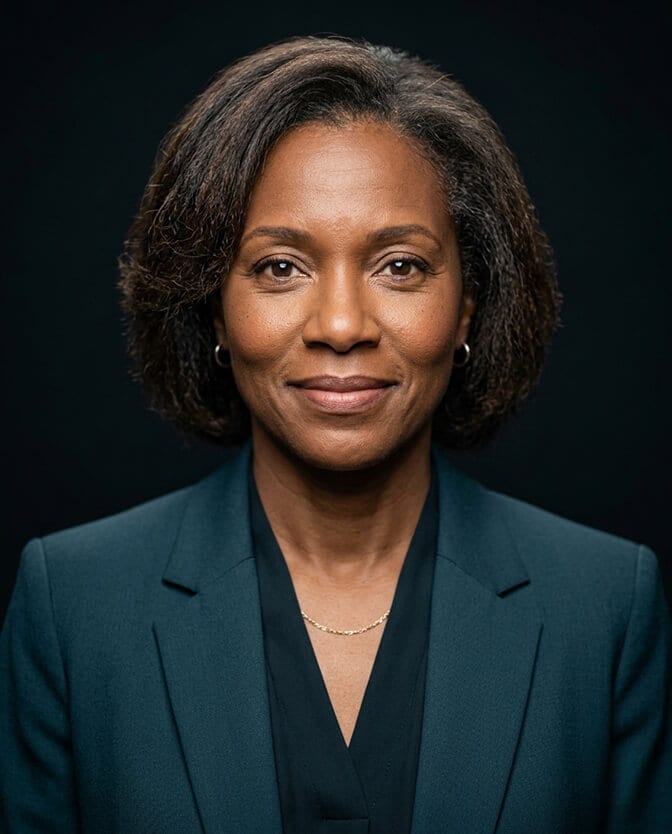
The good news: the best AI headshot generators in 2026 have moved past this. The standard now is polished but not plastic. Natural skin texture visible. Character lines kept. The kind of retouching that removes temporary distractions (a temporary blemish, stray hair) without removing the things that make your face look human and real.
The lighting simulation plays a role in this. Harsh, flat light tends to expose every texture in a way that makes retouching feel necessary. Soft, directional light does the opposite: it creates gradual transitions that naturally flatter skin without requiring heavy editing. It's why professional photographers use softboxes rather than bare bulbs.
When the lighting is right, whether produced by a studio softbox or simulated by a well-trained AI model, the skin looks good naturally. The AI doesn't need to smooth over problems because the problems don't appear in the first place.
The Honest Takeaway
AI lighting simulation is genuinely impressive in 2026. But it's not magic. It's a trained system that applies professional lighting patterns to the facial information your input photos provide.
Give it clean, well-lit input photos with one soft directional source and no competing lights, and the output looks like a professional photographer set up a full rig in your living room.
Give it overhead-lit, backlit, or mixed-source input photos and the output looks like a polished version of the problem.
The technology has done its part. The preparation is yours.
When you're ready to put the input lighting prep from this article to work, get your professional headshot with Headshot Photo and see what a well-lit input produces in the final output.
Frequently Asked Questions
1. What is natural lighting simulation in AI headshots?
Natural lighting simulation is the process by which AI headshot generators apply the visual patterns of professional soft lighting to your photos without any physical lighting equipment. The AI has been trained on thousands of professionally lit portraits and learned how different lighting setups (loop, Rembrandt, butterfly) appear on human faces. It applies those patterns to your input photos, producing results that look like studio or window-lit photography regardless of how your input photos were originally lit.
2. How does AI lighting simulation compare to actual professional studio lighting?
The best AI headshot generators in 2026 produce lighting that is visually comparable to studio setups for standard professional headshot contexts. Subtle differences can appear in very complex multi-light setups or when the input photo has significant lighting problems for the AI to overcome. For LinkedIn profiles, company websites, business profiles, and most professional use cases, AI-simulated lighting is fully professional quality and indistinguishable from studio work at normal viewing sizes.
3. What is the best lighting setup for AI headshot input photos?
Position yourself facing a window with indirect light (north-facing, overcast sky, or with sheer curtains diffusing direct sun), with the light source slightly to one side and at or above eye level. Turn off ceiling lights and eliminate any competing light sources. One soft, forward-directional source is the target. This gives the AI the cleanest, most interpretable facial information and consistently produces the strongest output results.
4. Does lighting in my input photos really affect the AI headshot quality?
Yes, significantly. AI headshot models render your face at professional lighting quality based on the facial information in your input photos. If the input photo has heavy overhead shadows or competing light sources, the AI is working with incomplete or contradictory information and the output reflects that. Clean, soft, directional input lighting produces dramatically stronger results than poorly lit inputs, even with the same AI model.
5. Can AI fix bad lighting in my input photos completely?
Partially. AI headshot generators can correct moderate lighting issues such as slight underexposure or minor color temperature imbalance. What they cannot do is invent facial detail that was obscured by severe shadows, recover a face that was backlit into near-silhouette, or cleanly resolve heavily mixed light sources. The strongest AI headshot results always start from the cleanest possible input. Following the five-step input lighting checklist in this article removes the most common lighting problems before they reach the AI.
