
10 Red Flags of a Low-Quality AI Headshot in 2026 (And Exactly How to Avoid Each One)
Not all AI headshots are created equal. Some look indistinguishable from studio photography. Others quietly destroy your credibility. Here's how to tell the difference before you publish.
A product manager I know spent forty-five minutes choosing between two AI headshot outputs.
Both looked professional at first glance. Same lighting. Same background. Similar expression. But something about one of them felt slightly wrong and he couldn't pinpoint it.
He chose the better-looking one and updated his LinkedIn.
Three days later, a recruiter messaged him. Not about a job. She asked, gently, if he'd used an AI headshot generator. She could tell because of the skin texture. Something about it read as synthetic under close inspection.
He went back and looked at the photo properly for the first time. She was right. The skin had zero texture. No pores. No natural variation. Just a smooth, slightly glowing surface that looked like it had been airbrushed by someone who'd never met a human face.
The second photo, the one he almost chose, was actually the stronger one.
That experience captures the AI headshot problem in 2026 precisely. The quality gap between a good AI headshot and a bad one is real, significant, and not always obvious at a glance. The red flags are there. You just need to know what to look for.
Here are the ten most common signs of a low-quality AI headshot, and how to avoid each one.
Red Flag 1: Plastic Skin With No Texture
This is the most common and most damaging failure in AI-generated headshots.
Real human skin has pores. Fine lines. Subtle variations in tone. The way light scatters differently across the nose versus the forehead. Natural skin texture is imperfect, and that imperfection is what makes a face look real in a photograph.
Low-quality AI headshot generators over-smooth skin during rendering. The result is a face that looks like it was airbrushed to the point of unreality. Everything is smooth, evenly toned, and slightly luminous in a way that no real person ever looks.
The fix: Look at your headshot zoomed in to 100% on a desktop screen. Can you see any skin texture at all? Pores? Fine lines appropriate to your age? If the skin looks completely uniform and smooth, that's a plastic skin artifact. Quality AI headshot generators trained specifically on professional photography preserve natural skin texture as a deliberate feature. They retouch temporary distractions (a blemish, a stray hair) without smoothing away the texture that makes your face look like a real face.
Red Flag 2: Eyes That Are Slightly Off
The eyes are the most trust-critical element of a headshot. They're also the hardest thing for AI to get consistently right.
The specific failure modes vary: one pupil slightly larger than the other, irises that don't quite match in color, an off-center gaze where both eyes aren't quite looking at the same point, catchlights (the small reflections of the light source) in the wrong position or inconsistent between eyes, or that specific "dead eyes" quality where the eyes are technically open but look like they're not actually looking at anything.
Human brains process eyes faster than any other facial element and are extraordinarily sensitive to anomalies. A viewer might not consciously identify the eye problem. But they'll feel something is slightly wrong, and that unease is the trust signal breaking.
The fix: Look directly at the eyes in the output. Cover one eye and assess each independently. Do both eyes look present and engaged? Are the catchlights in the same position in both? Is the gaze directed at one consistent point? If anything feels slightly misaligned, that output isn't usable. Select from a different frame, or use a different tool.
Red Flag 3: Lighting That Doesn't Follow Physics
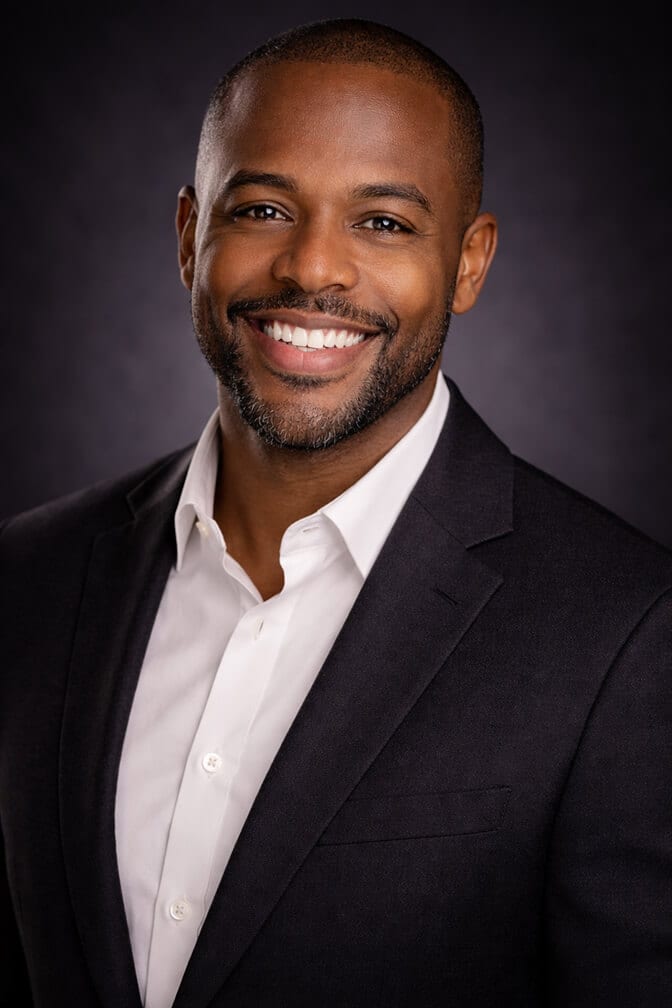
Professional studio lighting follows physical rules. Shadows fall in consistent directions. The highlight on the nose corresponds to the position of the key light. Catchlights in the eyes reflect the same source that creates the highlights on the skin.
Low-quality AI headshots sometimes get this wrong in ways that are hard to name but immediately felt. The shadow under the nose points in a different direction than the shadow under the chin. The lighting on the face doesn't match the lighting on the background. There's a highlight on one cheek that has no corresponding light source explanation.
This isn't something most viewers consciously analyze. But the brain processes lighting direction automatically, and when the physics don't add up, something registers as wrong.
The fix: Look at the shadow direction in your output. Trace where the light appears to be coming from by following the highlights on the face. Does the shadow under the nose point the same direction as the shadow under the chin? Do the catchlights in the eyes reflect the same source? If the lighting tells contradictory stories, the output has a physics failure. Our AI headshot natural lighting guide explains the lighting setups that quality generators get right.
Red Flag 4: Hair Edge Artifacts
Hair is one of the hardest elements for AI to render cleanly, particularly around the edges where hair meets background.
The specific failure looks like: a halo of slightly wrong color around the hair outline, individual strands that seem to blend into the background rather than separating cleanly from it, or the reverse: hair edges that look artificially sharp in a way that no real photo ever produces.
This is especially visible against lighter backgrounds and with lighter or finer hair.
The fix: Look at where your hair meets the background at 100% zoom. Does the transition look natural? Do individual strands have normal, slightly soft edges with proper depth-of-field blur? Or is there a halo, a hard cutout edge, or strands that fade into or bleed into the background unnaturally? Hair edge quality is a reliable quality signal across AI headshot generators.
Red Flag 5: The Face Doesn't Look Like You
This is both the most obvious and most frequently overlooked red flag. Partly because when someone is excited about a professional-looking output, they unconsciously rationalize away the likeness gap.
Low-quality AI headshot generators, particularly those trained on general image generation rather than specifically on professional portrait photography with identity preservation, often produce someone who sort of resembles you but with altered bone structure, different eye spacing, or a facial shape that's been averaged toward the training data rather than your actual face.
An AI headshot that looks like a model inspired by your photos is not a professional headshot. It's a flattering fiction. And the moment someone meets you in person or on a video call after seeing it, the trust that photo was supposed to build evaporates.
The fix: Show your output photos to two or three people who know you well and ask one question: "Does this look like me today?" Not "is this a good photo?" Not "do I look professional?" Specifically: does this look like me. If there's any hesitation or they say "sort of," the output is failing the identity test.

Red Flag 6: Clothing Artifacts and Warped Garments
AI headshot generators render clothing as part of the overall image rather than rendering you and then dressing you. This means clothing is synthesized alongside the face, and it's a source of frequent subtle failures.
Common clothing artifacts: collars that sit at an anatomically wrong angle, lapels with irregular edges or mismatched patterns, ties or necklaces that blur or warp near the center of the frame, shirt buttons that don't line up, or fabric texture that looks correct in one area and synthetic in another.
This is particularly common around the collar and neckline, which is the clothing zone closest to the face and therefore most visible in a headshot.
The fix: Check the collar and neckline in your output carefully. Does the clothing sit naturally on your body? Are the edges of collars and lapels clean and consistent? Does the fabric texture hold up across the frame? Clothing problems are often subtle but visible at normal viewing size.
Red Flag 7: Over-Smoothed or Wrong Background
Headshot backgrounds should do one thing: support the face. They should be clean, slightly out of focus (if they have any texture or depth), and consistent in their lighting.
Low-quality AI outputs often produce backgrounds that are either too perfect (unnaturally uniform, almost gradient-painted in quality), too noisy (visible artifacts or inconsistencies), or that have a lighting quality that doesn't match the subject (the background is lit as if from a different light source than the face).
A specific failure mode is the halo effect: a slight brightening or color shift around the subject's outline where the AI composited the person against the background without fully resolving the edge interaction.
The fix: Look at the background separately from the face. Does it have consistent quality throughout? Does the lighting on the background match the apparent lighting direction on the face? Is there any brightening or color shift around the edges of the subject? Any of these indicates a background rendering failure.
Red Flag 8: Uncanny Symmetry
Real human faces are slightly asymmetrical. Not dramatically. But enough that the slight variations in eye height, brow shape, and smile direction are what make a face look human rather than sculpted.
Some AI headshot generators produce faces that are too symmetrical. Not obviously so. But at a subconscious level, the brain registers perfect facial symmetry as something that doesn't occur naturally. The result is a face that reads as beautiful but somehow flat or even slightly unsettling.
This is a subtler red flag than plastic skin or eye artifacts, and it's harder to test for consciously. But it contributes to the overall "something feels off" response that low-quality AI headshots produce in viewers.
The fix: Look at your output photo and assess whether both sides of the face look slightly different, the way a real face does. If the face looks like it was mirrored from one side, that's a symmetry problem. A slight natural asymmetry in the eyebrow position, the smile, and the eye height is actually desirable.

Red Flag 9: Teeth Problems
Smiling headshots with visible teeth are a specific challenge for AI generators. The failure modes are distinctive: teeth that appear as a single fused white block without individual tooth definition, unnaturally bright teeth that glow in a way no real smile does, teeth that have an incorrect perspective relative to the angle of the head, or individual teeth that are misshapen or inconsistently sized.
This is the kind of thing that people often miss on a phone screen and then cringe at when they see the photo on a larger display.
The fix: If your headshot includes a visible smile, zoom into the teeth at 100% on a desktop screen. Can you see individual tooth definition? Do the teeth have natural shadow between them? Does the brightness of the teeth match a realistic, real-world smile rather than an obviously enhanced one? Teeth problems are fixable by selecting a different output or adjusting to a closed-mouth or minimal smile expression in your input photos.
Red Flag 10: The Photo Doesn't Match How You Look on Video
This is the final test, and it's the one that matters most for professional contexts.
You might clear all nine of the previous red flags and still have a headshot problem if the output, however technically polished, doesn't accurately represent your current appearance. The moment someone recognizes you from your headshot on a video call, that recognition is a trust signal. The moment they can't, or they notice you look significantly different from your photo, that mismatch costs you something real.
AI headshots that alter facial structure, make you appear significantly younger, or change your coloring in ways that don't reflect reality are headshots that will fail the in-person recognition test. They look professional in isolation. They create a credibility problem in context.
The fix: Before publishing any AI headshot, open your video call application and look at your live camera feed. Then look at the headshot. Would someone moving from your headshot to a video call with you recognize you immediately and without a moment of adjustment? If yes, the headshot passes. If not, go back and select an output that more accurately represents how you look today.
When you know what to look for, you can evaluate any AI headshot output in about two minutes. The ten red flags above give you a systematic checklist that separates outputs worth publishing from outputs that need to be regenerated or discarded.
For AI headshots that are specifically trained to avoid these failure modes, and that prioritize identity accuracy and natural rendering over generic attractiveness, create your professional headshot with Headshot Photo and compare the output quality against each checkpoint above.
You can also browse professional AI headshot examples from Headshot Photo to see what correctly rendered outputs look like across different industries, skin tones, and lighting styles before starting your own session. For a deeper forensic breakdown of AI tells, our guide on how to spot an AI headshot covers the visual cues in more detail.
The Real Takeaway
The product manager went back and generated a new set of inputs. Better lighting. More deliberate expression. And he used the checklist this time, going through each output frame by frame before selecting one.
The recruiter who'd called out the previous photo messaged him again a few weeks later. This time about an actual role.
The difference between a credibility-building AI headshot and a credibility-damaging one comes down to knowing what to look for and refusing to settle for an output that doesn't pass every check.
Ten things. Two minutes of scrutiny. That's the difference between a photo that works and one that quietly works against you.
Frequently Asked Questions
1. What are the most common red flags of a low-quality AI headshot?
The ten most common red flags are: plastic skin with no pores or texture, eyes that appear slightly asymmetrical or disengaged, lighting that doesn't follow physical rules, unnatural hair edges against the background, a face that doesn't accurately look like you, clothing artifacts and warped garment details, overly uniform or incorrectly lit backgrounds, uncanny facial symmetry, fused or unnaturally bright teeth, and a photo that doesn't match how you look on video calls. Any one of these issues can undermine the professional credibility the headshot is supposed to build.
2. How do I tell if an AI headshot has plastic skin?
Zoom the image to 100% on a desktop screen and look at the skin texture across the cheeks and forehead. Real skin has visible pores, fine lines, and subtle variations in tone. Over-smoothed AI skin appears uniformly textured, slightly luminous, and waxy. There should be natural imperfection across the skin surface. If the skin looks like it was airbrushed to perfection with no visible texture at all, that's a plastic skin artifact from over-processing.
3. How do I check if my AI headshot actually looks like me?
Show the output to two or three people who know you and ask specifically: "Does this look like me today?" Not whether you look professional or whether it's a good photo. Whether it looks like you, accurately, right now. Also compare the headshot side by side with your live video call feed. If someone transitioning from your headshot to a video call would recognize you immediately without any adjustment, the photo passes the identity test.
4. Is it worth investing in a quality AI headshot generator over a free one to avoid these issues?
Yes, significantly. Many of the red flags in this article, particularly plastic skin, eye rendering problems, and identity accuracy, are direct results of the underlying model's training quality. Generators trained specifically on professional portrait photography with identity preservation as a core goal produce dramatically fewer of these issues than generic image generators. The cost difference between free tools and quality AI headshot generators is typically small relative to the professional cost of a headshot that actively damages your credibility.
5. Can any of these AI headshot red flags be fixed after the fact?
Some can be worked around by selecting different outputs from the same session (most quality generators produce dozens of options). Others, particularly plastic skin and identity accuracy problems, are inherent to the tool's underlying model and can't be fixed in post-processing without extensive manual editing. The most practical approach is to evaluate outputs against the ten-point checklist before selecting and publishing, rather than attempting to fix problems after the fact.
