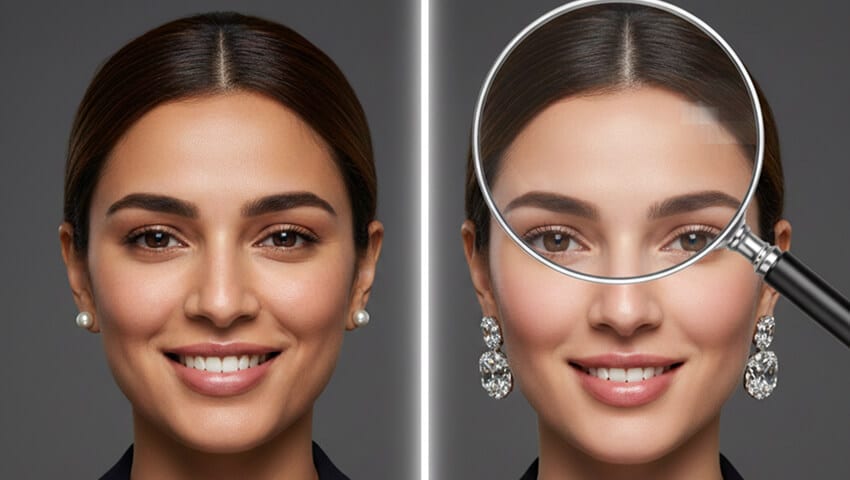
We've generated millions of AI headshots. Here's exactly what gives them away - and why that might not matter as much as you think.
I was on a Zoom call last month when a colleague stopped mid-sentence.
"Wait," she said, squinting at my screen. "Is that person's LinkedIn photo... fake?"
She was looking at a connection request I'd just received. The headshot looked professional. Great lighting. Confident smile. But something was off.
I knew immediately. Because I've spent three years building an AI headshot company. I've seen every glitch, every artifact, every telltale sign that screams "a computer made this."
Here's the weird part: I was right. The profile was fake. A recruitment scam using a synthetic face to build trust before pitching crypto schemes.
But here's the weirder part: I almost missed it.
The technology has gotten that good.
So let me share what I've learned from the inside - both how to spot AI headshots, and why the traditional "gotcha" checklist is becoming obsolete.
The Problem With Most Detection Advice
You've probably seen the standard tips floating around:
"Look for weird hands!""Check for asymmetrical earrings!""Zoom in on the teeth!"
This advice isn't wrong. It's just... outdated.
In 2022, those tells were reliable. In 2026, they're increasingly useless.
The newest AI models have largely solved the hand problem. Earrings render correctly. Teeth look normal. A Lancaster University study found that participants could only identify AI-generated headshots about 50% of the time - essentially a coin flip.
And here's what nobody wants to admit: the gap is closing faster than detection methods can keep up.
"The problem is we've started to cultivate an idea that you can spot these AI-generated images by these little clues. And the clues don't last." - Sam Gregory, Witness.org
So what actually works?
What I Look For (After Seeing Millions of AI Headshots)
Let me walk you through my actual process. Not the recycled tips from 2023, but what I notice now when evaluating whether a professional headshot is AI-generated.
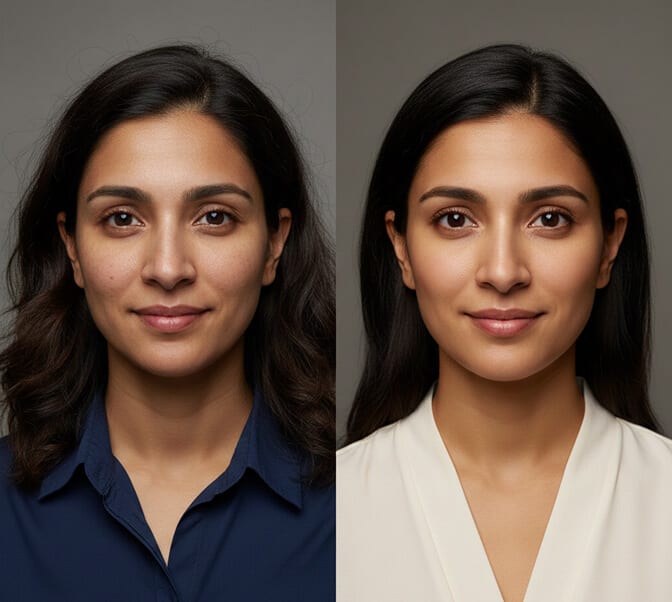
1. The "Too Perfect" Problem
This is the most reliable tell that still works.
Real photos have imperfections. A stray hair. A slightly uneven collar. A minor shadow where the lighting wasn't quite ideal.
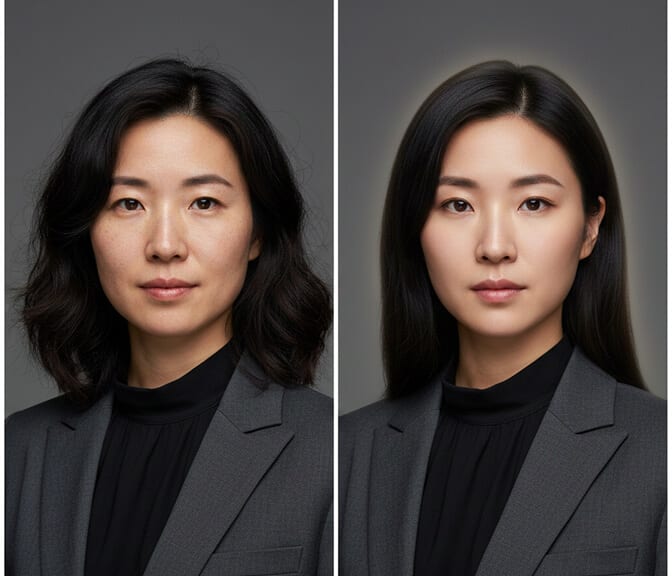
AI headshots tend to be suspiciously flawless.
The skin looks like it's been smoothed by an invisible Instagram filter. The lighting wraps around the face a little too perfectly. Everything is just... clean. Almost eerily so.
I describe it as the "uncanny valley of perfection." Your brain registers something is wrong before you can articulate what.
2. Background Amnesia
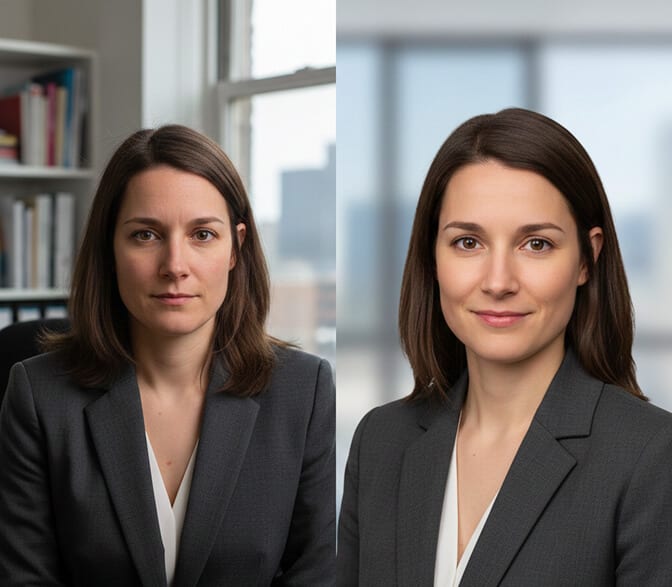
AI models are trained primarily on faces. The background? That's an afterthought.
Look for:
- Backgrounds that are slightly blurry in inconsistent ways
- Generic office settings that feel like stock photos
- Light sources that don't match the subject's lighting
- Gradients that seem to fade into nowhere
Real photographers obsess over backgrounds. AI just... fills in the space.
3. The Jewelry Problem (Still Partially True)
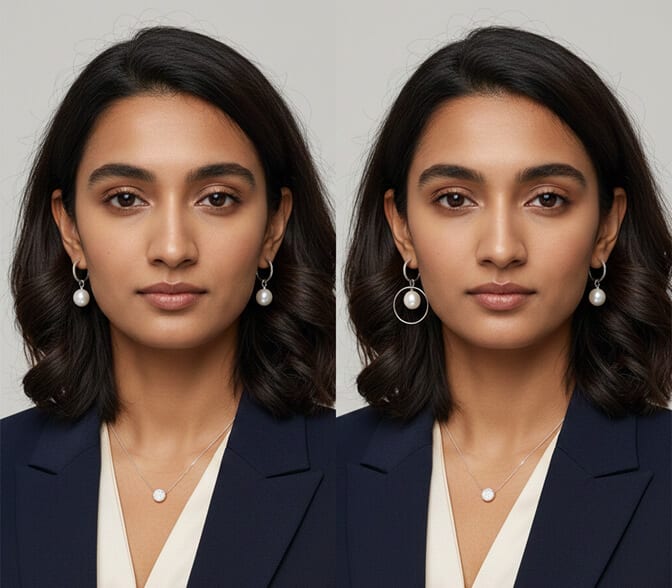
Okay, I know I said the old advice is outdated. But earrings and necklaces still trip up many AI models.
Not because they can't render jewelry - they absolutely can. But because they struggle with consistency.
Check if both earrings match. Look at how a necklace sits against the collar. See if glasses frames are symmetrical.
These details require the AI to understand 3D space and physics. That's still a weak point.
4. Hair at the Edges
Here's one the detection guides rarely mention: the hairline boundary.
Where hair meets skin, or where flyaway strands touch the background - AI often creates a subtle "halo" effect. The transition isn't quite natural.
On real photos, hair is messy at the boundaries. It catches light differently. It has texture variation.
AI hair often looks like it was cut out and pasted onto the head. Which, in a sense, it was.
5. The Metadata Check
This is the technical approach, and it's surprisingly effective.
Right-click the image. Download it. Check the file properties.
Real photos from cameras contain EXIF data - camera model, lens information, date/time, GPS coordinates sometimes.
AI-generated images? They typically have no camera metadata. If the file properties are suspiciously empty, that's a red flag.
Though I should mention: savvy users can strip metadata from real photos too. So absence of data isn't definitive proof.
The Context Matters More Than the Pixels
Here's where I'm going to say something that might surprise you.
I don't think detecting AI headshots is always necessary - or even useful.
Stay with me here.
If someone uses an AI headshot for their LinkedIn because they:
- Can't afford a $300 photographer session
- Are camera-shy
- Work remotely and need a professional image fast
...is that really a problem?
The ethical concern isn't AI headshots themselves. It's deceptive use of AI headshots.
Fake recruiters building synthetic identities to scam job seekers? That's a problem.
Catfish accounts using AI faces to manipulate people? That's a problem.
A software developer who just needs a decent LinkedIn photo and used an AI service to save $250 and a Saturday? I'd argue that's just... practical.
The real question isn't "is this photo AI?" It's "is this person who they claim to be?"
When Detection Actually Matters
There are legitimate situations where spotting an AI headshot is important:
Job Seekers Evaluating Recruiters: Before you share personal information with someone claiming to be a recruiter, verify they're real. Check their posting history. Look for genuine engagement. See if their photo appears on the actual company website.
Online Dating: Romance scams using AI faces are unfortunately common. If a profile seems too good to be true, reverse image search the photo. If it doesn't appear anywhere else on the internet, that's suspicious.
Business Partnerships: Before entering agreements with people you've only met online, do your due diligence. Real professionals have digital footprints beyond a single polished headshot.
Journalism and Research: If you're verifying sources or investigating claims, image authenticity matters enormously.
The Arms Race Nobody's Winning
I'll be honest about something uncomfortable.
We're in an arms race between generation and detection. And generation is winning.
LinkedIn has developed AI detection systems that catch about 99.6% of synthetic profile photos - according to their claims. But that still means thousands slip through daily.
Meanwhile, the best AI headshot generators (including, yes, ours at HeadshotPhoto.io) are specifically designed to avoid these tells. We've spent years eliminating the artifacts. Making the skin texture realistic. Ensuring the lighting is natural.
Why? Because our customers want headshots that look real. That's the entire point.
This creates a strange dynamic where AI headshot companies are effectively in an adversarial relationship with detection algorithms. We're not trying to enable fraud - we're trying to give people professional images. But the technology that makes legitimate AI headshots look good is the same technology that could enable bad actors.
What I Tell People Who Ask
When friends ask me whether they should use AI headshots, I give them this framework:
Use AI headshots if:
- You need something fast
- Budget is a real constraint
- You're reasonably photogenic but hate photo sessions
- The context is low-stakes (internal company directory, social media, etc.)
Consider a real photographer if:
- Your headshot will be scrutinized closely (executive positions, public-facing roles)
- You want photos that capture your actual personality
- You need images for multiple contexts (full body, different poses, action shots)
- You're comfortable in front of a camera and want to own that
Be transparent when it matters:
- If directly asked, don't lie about using AI
- For official company materials, follow your organization's policy
- In contexts where authenticity is paramount, go real
The Part Nobody Tells You
Here's the thing about spotting AI headshots: the better you get at it, the less satisfying it becomes.
Because once you see how prevalent they are - once you start noticing the too-perfect skin, the generic backgrounds, the subtle hairline halos - you can't unsee it.
I scroll through LinkedIn now and I notice them constantly. Not to judge. Just... awareness.
And then I remember: most of these people just wanted a decent photo for their profile. They're not scammers. They're just regular professionals who found a tool that worked.
The technology itself isn't good or bad. Like any tool, it reflects the intentions of whoever's using it.
If you're trying to spot the scammers and bad actors, focus less on pixel-level analysis and more on context. Real professionals have real histories. Real engagement. Real connections.
A fake person with a perfect AI headshot still behaves like a fake person.
That's what gives them away.
Ready to Create Your Own AI Headshot?
If you've read this far, you now know more about AI headshot detection than 99% of people. You know what to look for, when it matters, and when it doesn't.
And maybe you're thinking: "If AI headshots are this good now, maybe I should just get one."
HeadshotPhoto.io can have yours ready in under an hour. No photographer. No scheduling. No awkward poses.
Just upload a few selfies, and we'll generate professional-quality headshots that actually look like you.
Yes, someone who reads this article might be able to spot them. But honestly? Most people won't even try.
Frequently Asked Questions
What are the most reliable signs an AI headshot is fake?
The most consistent tells are unnaturally smooth skin texture, inconsistent jewelry details (especially earrings that don't match), and backgrounds that seem generic or have mismatched lighting. Also check for a subtle "halo" effect where hair meets the background. However, these signs are becoming less reliable as AI technology improves, so context clues about the person's overall online presence often matter more than pixel-level analysis.
Can LinkedIn detect AI-generated profile photos?
Yes, LinkedIn has developed detection systems that they claim catch approximately 99.6% of synthetic profile photos. They partnered with researchers to identify patterns common in AI-generated images. However, the best AI headshot generators are continually improving, and sophisticated synthetic images can still slip through. LinkedIn removed over 21 million fake accounts in the first half of 2023 alone.
Is it unethical to use an AI headshot on LinkedIn?
Using an AI headshot for legitimate professional purposes isn't inherently unethical - many people simply want an affordable, convenient alternative to professional photography. The ethical concern arises when AI headshots are used deceptively, such as creating fake identities for scams. Transparency is key: if directly asked, be honest about using AI-generated images, and follow your organization's policies regarding AI-generated content.
How much does an AI headshot cost compared to traditional photography?
Traditional professional headshot sessions typically cost $150 to $400 or more, plus scheduling time and travel. AI headshot generators like HeadshotPhoto.io offer packages starting around $29 to $79, with results delivered in hours instead of weeks. This cost difference has driven significant adoption, particularly among job seekers, freelancers, and remote workers who need professional images quickly.
Are AI headshots good enough for executive or client-facing roles?
Absolutely. We've worked with Fortune 500 companies updating headshots for their entire leadership teams, from C-suite executives to client-facing directors. The quality of modern AI headshots is indistinguishable from traditional photography for most professional contexts. What matters is choosing a quality AI headshot service that maintains natural skin texture and authentic expressions. Many executives actually prefer AI headshots because they can generate multiple options quickly, test different looks, and update their image regularly without scheduling another photography session.
