HeadshotPro Alternative: 5 AI Headshot Generators That Cost Less (2026)
The math on a "$29 headshot" is never actually $29. Here's what you really pay, and five ways to pay less.
I almost paid for it. Cart loaded, card out, the whole thing.
Then I did the math nobody does before they click buy.
The plan said $29. But 30 headshots at standard resolution, and my LinkedIn crop looked soft. So really I wanted the $39 tier. Then I wanted a retry because the first batch made me look like I'd been embalmed. Then teammates wanted in, and suddenly it's $39 a head, times six.
The $29 headshot was never $29.
Here's the weird part. HeadshotPro is a genuinely solid product. That's not the problem. The problem is you found this page because you saw the price and thought, "there has to be something cheaper that's just as good."
There is. Actually there are five. Let me show you.
First, let's be fair to HeadshotPro
I'm not here to trash it. If I do, you won't trust the rest of this list.
HeadshotPro is built for teams. That's its whole personality. If you're an HR lead who needs twenty employees photographed in matching backgrounds and matching lighting for the company directory, it does that better than almost anyone. The shared dashboard, the consistent presets, the batch processing. Smooth.
Its pricing runs roughly $29 for a small individual shoot, $39 for the popular tier, and $59 for the executive tier with 4K output and faster turnaround. Teams pay around $39 per person, with a discount once you cross five people.
So where does it fall down?
Two places. First, the per-person team price adds up fast, because there's no real "everyone shares one flat cost" option. Second, if you're one person who just needs a great LinkedIn photo, you're paying for team infrastructure you'll never touch.
That's the gap. And these five tools live inside it.
1. Headshot Photo (yes, we're ranking ourselves, and here's why that's fair)
Every "best AI headshot" article ranks the author's own tool at #1. I know. It's a running joke in this industry. So let me earn it instead of just claiming it.
We built Headshot Photo for exactly the person HeadshotPro overcharges: the individual who wants a real, photographed-looking headshot without buying team software.
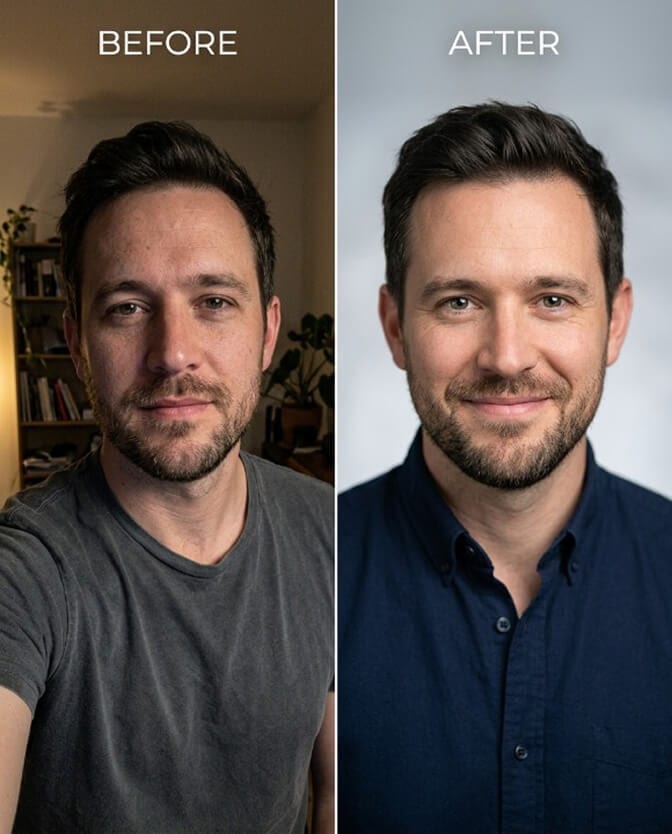
Paid plans start at $34 for 40 to 100 headshots, one-time payment, no subscription trap waiting to auto-renew at $49 a month. Every headshot is trained on your specific face, which is the thing that separates a real result from a filtered one. Upload eight selfies, pick your styles, and it's done in about ten minutes.
Here's the part that actually matters for a "costs less" list, though.
We have a free LinkedIn photo generator. Zero dollars. No card required.
If all you need is one clean, LinkedIn-ready photo to stop looking like you cropped yourself out of a wedding, you can try the free LinkedIn photo generator before you spend a cent anywhere. That's the honest reason we sit at #1 on a price list. Nobody else on this page gives you a genuinely usable professional result for free.
Pros: Free tier that actually works. One-time pricing. Face-trained models, not single-photo retouching. Fast.
Cons: Individual-first, so if you truly need a 50-person corporate rollout with a manager dashboard, a team headshot tool may fit your workflow better.
2. Dreamwave (the "try before you pay anything" option)
Dreamwave is one of the few tools with a genuinely free tier, though it's limited on styles and stamps a watermark on your results.
Paid plans start around $19, which undercuts HeadshotPro's entry price cleanly.
The catch: the output leans "flattering consumer photo" rather than "boardroom executive." You'll get fewer strictly formal, buttoned-up business framings. But for testing whether AI headshots even work for your face before committing money, it's a smart first stop.
Pros: Real free tier. Low entry price. Flattering results.
Cons: Watermark on free output. Fewer formal-business styles.
3. BetterPic (predictable, hand-checked, flat price)
BetterPic went a different direction. Instead of racing to the bottom on price, it added a human quality-check to every batch.
The price is a flat $29 or so, and the trade is time. Because a person reviews your results, delivery runs closer to an hour rather than ten minutes. Style range is modest, around fifteen framings.
You won't be surprised by the results. That's the whole pitch. If consistency matters to you more than variety or speed, this is a rational pick.
Pros: Manual QA on every batch. Flat, honest price. Consistent.
Cons: Slower. Limited style variety.

4. StudioShot (starts where HeadshotPro starts, aimed at pros)
StudioShot also opens at around $29, matching HeadshotPro's floor while positioning itself toward professionals who want a cleaner, more premium finish.
If you're deciding between the two entry-level tools at the same price, the real question isn't cost, it's style fit. Look hard at each one's sample gallery and ask: does this look like a photo of a human, or a photo of an AI's idea of a human? At $29, you should accept nothing less than the former.
Pros: Same entry price as HeadshotPro. Polished, professional finish.
Cons: Not the cheapest on this list. Fewer budget tiers to step down into.
5. Aragon (the premium alternative that's still worth naming)
Aragon isn't the cheapest, and I won't pretend it is. It sits at the more polished, higher-priced end of the market.
So why include it on a "costs less" list? Because "less" is relative to what you'd otherwise spend on a photographer, which is $150 to $500 for five to fifteen images. Against that number, every tool here, Aragon included, is a bargain.
If your budget has room and you want the most refined output in the group, Aragon earns its spot. Just know you're paying for polish, not for savings against HeadshotPro specifically.
Pros: Among the most polished output available. Strong realism.
Cons: Premium pricing. Overkill if you just need a LinkedIn photo.
The comparison table nobody wants to make (but you need)
| Tool | Starting price | Free tier? | Best for |
|---|---|---|---|
| Headshot Photo | $34 (paid) | Yes, free LinkedIn generator | Individuals who want real quality, and anyone testing free first |
| Dreamwave | ~$19 | Yes (watermarked) | Trying AI headshots risk-free |
| BetterPic | ~$29 flat | No | Predictable, hand-checked results |
| StudioShot | ~$29 | No | Professionals wanting premium finish |
| Aragon | Premium | No | Highest polish, budget-flexible |
| HeadshotPro (baseline) | $29 to $59 | No | Teams needing matching photos |
Stay with me, because the table hides the real lesson.
The cheapest tool isn't the one with the lowest sticker price. It's the one that gets you a usable photo on the first try.
A $19 tool that needs three paid retries costs more than a $34 tool that nails it once. This is where most people get it wrong. They optimize for the number on the pricing page instead of the cost per headshot you'd actually put on your profile.
The part nobody tells you about "cheap" headshots
Free and near-free tools have a dirty secret, and it's not the price. It's what happens to your face.
Many of the cheapest options don't train a model on you. They take one photo and retouch it. If your source photo is weak, you get a polished weak photo. Worse, some maintain vague data-retention policies, which is a fancy way of saying your selfies might become someone's training data.
That's the actual cost hiding under "free."
When you're comparing this list, don't just ask what it costs. Ask two more questions. Does it train on my specific face, or just filter one photo? And what happens to my images after? For the full breakdown of what $0 actually buys you, our guide to free AI headshot generators tests the real ones honestly.
So which one should you actually pick?
If you want the truth: start free.
Generate a LinkedIn photo for zero dollars, see if AI headshots even work for your face, and then decide whether to pay anyone. If the free result is good enough, you just saved $39. If you want more styles, backgrounds, and resolution, upgrade with actual information instead of a guess.
If you're tired of comparing pricing pages and just want a real headshot in the next ten minutes, try Headshot Photo free. Upload a few selfies, pick your styles, and see your own face come back looking like you spent an afternoon in a studio. No subscription. No auto-renew trap. If it doesn't look like you, our paid plans are money-back guaranteed anyway.
You came here to spend less than HeadshotPro charges. The cheapest path of all is the one that costs nothing to try.
Frequently Asked Questions
What is the best HeadshotPro alternative in 2026?
It depends on what you need. For individuals, Headshot Photo is the strongest alternative because it starts at $34 with a genuinely free LinkedIn photo generator, and every headshot is trained on your actual face. For teams needing matching photos across many employees, the comparison gets closer. Match the tool to the job, not just the price.
How does Headshot Photo compare to HeadshotPro on price?
HeadshotPro runs $29 to $59 for individuals and around $39 per person for teams. Headshot Photo starts at $34 for 40 to 100 headshots as a one-time payment, and offers a free LinkedIn photo tier that HeadshotPro does not. For a single person, that free option makes Headshot Photo the lower-cost entry point by a wide margin.
How long does an AI headshot take to generate?
Most quality tools deliver in ten minutes to about an hour, depending on the plan. Faster turnaround usually costs a little more. Headshot Photo returns results in roughly ten minutes after you upload around eight selfies and choose your styles.
Is a cheaper AI headshot tool actually worth it?
Often, yes, but judge by cost per usable photo, not sticker price. A cheap tool that needs multiple paid retries can cost more than a slightly pricier one that nails it on the first pass. The real value comes from tools that train on your specific face rather than just retouching a single upload.
Are free AI headshot generators safe and good enough for LinkedIn?
Quality varies widely. The better free tools now produce genuinely professional LinkedIn photos, but many cheap or free options retouch a single photo instead of learning your face, and some keep vague data-retention policies. Use a free tier from a reputable tool, like the Headshot Photo free LinkedIn generator, and check what happens to your images after processing.