Your Crunchbase profile is your pitch deck for people who never asked for one. Here's how to set it up so it works for you around the clock.
We almost missed a $500K angel check because of Crunchbase.
Not because our profile was bad. Because we didn't have one.
An investor we'd cold-emailed told us months later: "I always check Crunchbase before taking a meeting. When I searched your company and nothing came up, I figured you were too early to be serious."
We weren't too early. We had a product, revenue, and a team. We just hadn't bothered to create a Crunchbase profile because it seemed like a formality.
It's not a formality. Crunchbase is the default background check for the startup ecosystem. Investors, journalists, potential hires, and partnership leads all search it before responding to your outreach. A missing or incomplete profile doesn't say "we haven't gotten around to it." It says "nobody's paying attention."
Here's how to set yours up properly, step by step, with the strategic decisions that separate a profile that works from one that just exists.
Why Crunchbase Matters More Than Most Founders Realize
Crunchbase gets over 75 million users annually. It's where investors research companies before taking meetings. It's where journalists verify funding rounds before writing stories. It's where job candidates check company legitimacy before accepting offers.
Your Crunchbase profile shows up in Google search results when someone searches your company name. It generates backlinks to your website. It feeds data to dozens of other platforms and directories that pull from Crunchbase's database.
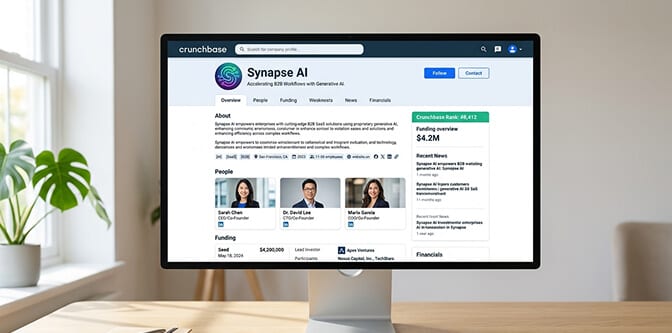
Here's the thing most founders miss: Crunchbase isn't just a directory. It has its own ranking algorithm called Crunchbase Rank. The more complete your profile, the higher you rank in search results within the platform. An incomplete profile doesn't just look unprofessional; it's literally less discoverable than a complete one.
A well-built Crunchbase profile is a credibility asset that works 24/7 without you doing anything. A missing or half-finished one is a credibility liability that costs you opportunities you never know about.
Step 1: Create Your Account (2 Minutes)
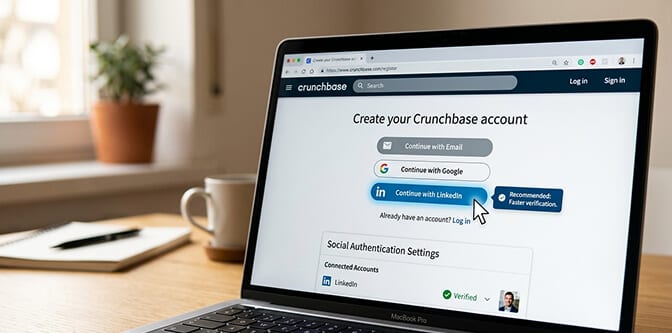
Go to crunchbase.com and click "Log In" in the upper right corner, then select the "Register" tab.
You can register with email, Google, or LinkedIn. Use LinkedIn. It pulls your professional information automatically and authenticates your identity faster.
After registering, you need to complete social authentication. This is Crunchbase's way of verifying you're a real person. Go to Account Settings, scroll to Social Authentication, and connect at least one social account (LinkedIn is the strongest signal).
You need this authentication before you can create or edit any profiles.
Step 2: Check If Your Company Already Exists
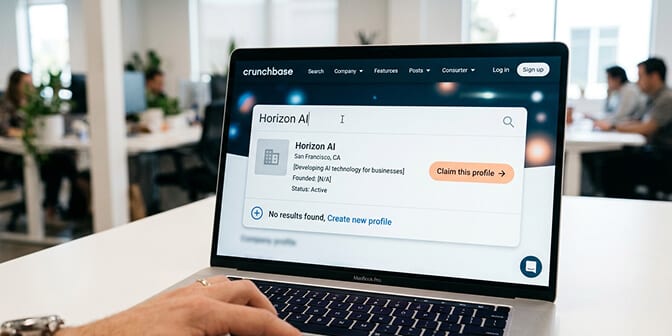
Before creating a new profile, search for your company name on Crunchbase. Your company may already have an auto-generated profile or one created by someone else (an investor, a journalist, or a data scraper).
If it exists, click on it and select "Claim this profile" to take control of editing.
If it doesn't exist, navigate to the "Create Profile" option in the left sidebar under "Explore," or go directly to crunchbase.com/add-new.
Select "Company" as the profile type and click "Next."
Step 3: Fill Out the Core Fields (This Is Where Most People Rush)
This is where most founders spend 2 minutes and then never come back. That's a mistake. Every empty field is a missed signal to Crunchbase's algorithm and to anyone reading your profile.
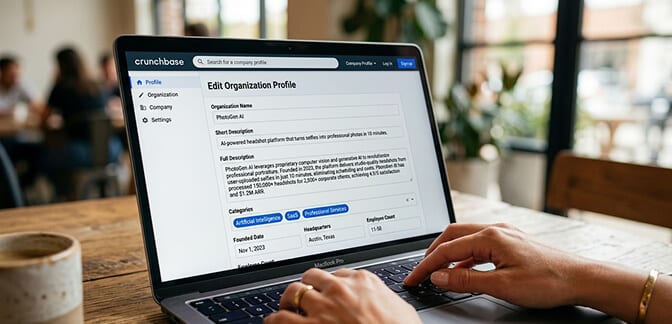
Here's what to fill in, in order of importance:
Company Name: Seems obvious, but use your official registered name. If your brand name differs from your legal name, you can add the brand name under "Also Known As."
Short Description: One sentence. This appears in search results and preview cards across the platform. Make it count. Think of it as your tagline, not a summary. Example: "AI-powered headshot platform that turns selfies into professional photos in 1 hour."
Full Description: 2,000-5,000 characters. This is your pitch. What you do, who you serve, what makes you different, and what traction you've achieved. Write it for investors and journalists, not for SEO bots. Include specific metrics if you have them (users, revenue, growth rate). Avoid buzzwords. Be direct.
Website URL: Your primary domain. Make sure it's live and looks good because people will click through.
Founded Date: The year (and month if you have it) your company was incorporated or launched.
Headquarters Location: Your corporate address. If you're fully remote, use your registered business address. Don't use a personal home address.
Number of Employees: Select the appropriate range. This signals company stage.
Categories/Industries: Choose 3-5 relevant categories. These determine which searches your company appears in. Be specific rather than broad. "Artificial Intelligence" plus "Professional Services" plus "SaaS" is better than just "Technology."
Contact Email: Use a business email (team@yourcompany.com), not a personal Gmail. This email may be visible to Crunchbase users depending on your settings.
Step 4: Add Your Founders and Team (The Part Everyone Skips)
Here's where it gets interesting, and where visual credibility enters the picture.
Every founder should have their own personal Crunchbase profile linked to the company. This isn't optional if you want to be taken seriously. Investors specifically look at the "People" section to evaluate the team.
To add a founder:
Navigate to your company's edit page. In the "Founders" section, search for the person's name. If they already have a Crunchbase profile, select it. If not, click "Create New Founder" to build their profile from scratch.
Each founder profile needs:
Full name. First and last, as it appears professionally.
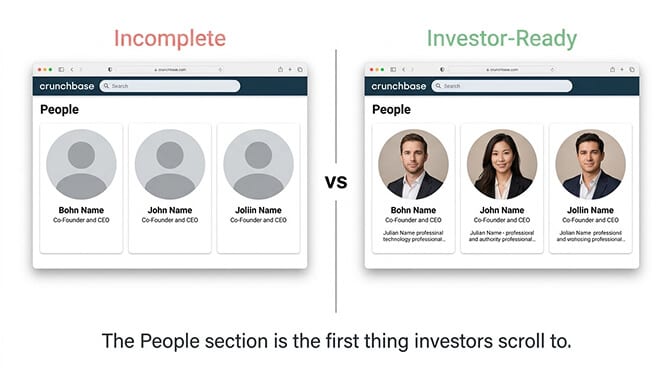
A professional headshot. This is the single most overlooked element of Crunchbase profiles. Founder profiles without photos look incomplete and signal that you don't take the platform seriously. Investors browse dozens of profiles a day. The ones with clean, professional headshots stand out immediately from the ones with missing images or casual selfies.
Primary job title and company. "Co-Founder & CEO at Company Name."
Location. City and country.
Short bio. 2-3 sentences about background, expertise, and role.
A Crunchbase profile with professional founder headshots looks 3x more credible than one with missing photos. The "People" section is often the first thing investors scroll to after reading the company description. Make sure it's complete.
But here's the practical problem. Most founders, especially early-stage ones, don't have a professional headshot. They have a cropped LinkedIn photo from 2021, a conference badge photo, or nothing at all. Getting a studio session takes weeks and costs hundreds of dollars per person.
This is exactly where AI headshot tools solve a real problem. At Headshot Photo, founders can upload a few casual selfies and get studio-quality professional headshots in about 1 hour. No scheduling, no studio visit. For a Crunchbase profile where the visual bar is "polished and current," it's the fastest path from empty photo slot to investor-ready.
Step 5: Add Funding Rounds (If Applicable)
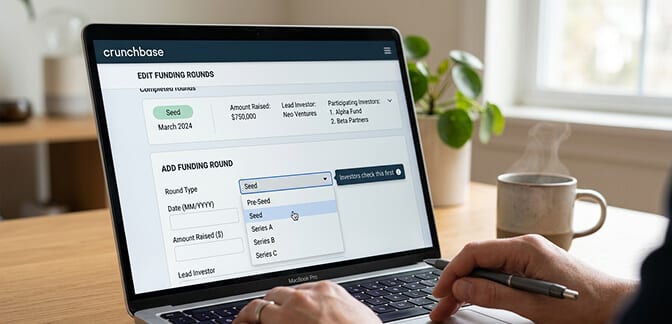
If you've raised capital, add every round. This is the data investors care about most on Crunchbase, and it's what journalists use to verify funding announcements.
For each round, include: round type (Pre-Seed, Seed, Series A, etc.), date, amount raised, lead investors, and participating investors.
Even if you've only raised a small friends-and-family round, add it. An empty funding section doesn't mean "bootstrapped" to most viewers. It means "hasn't raised" or "didn't bother to update." If you're genuinely bootstrapped, say so in your company description.
Step 6: Add News, Events, and Social Links
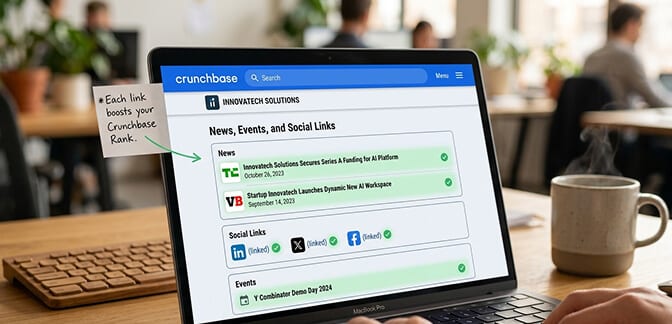
News: Link to press coverage, product launches, and milestone announcements. Crunchbase profiles with news links rank higher and look more active. Even a blog post announcing a product update counts.
Social Media Links: Add your LinkedIn company page, X (Twitter), Facebook, and any other active profiles. These serve as verification signals and make it easy for people to connect with you across platforms.
Events: If you've participated in accelerators, demo days, conferences, or pitch competitions, add them. They signal ecosystem engagement.
Step 7: Review, Save, and Maintain
Click "Save All Edits" in the upper right corner.
Then set a calendar reminder to update your profile quarterly. Crunchbase profiles that haven't been updated in a year look stale. New hires, new funding, new metrics, new press coverage: all of these should flow into your profile regularly.
This is especially important for founder headshots. If you've changed your appearance significantly (new glasses, different hairstyle, grew or shaved a beard), update your photo. The person an investor meets on Zoom should match the person on Crunchbase.
For founders who need to update their headshot quickly, our guide to headshots for men over 50 and headshots for women over 50 covers how to look authoritative and current in professional photos at any career stage.

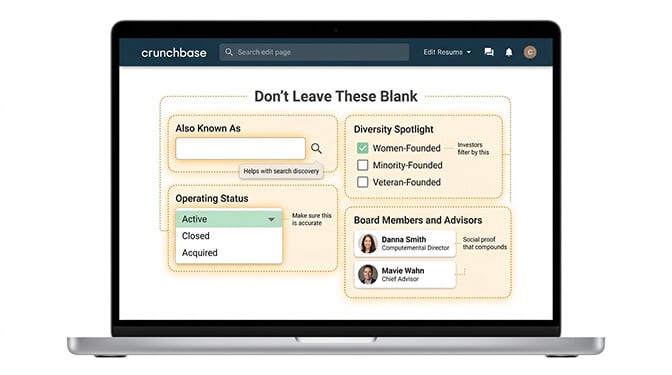
The Fields Most Founders Forget
A few high-impact fields that are commonly left empty:
"Also Known As": If your company has a popular abbreviation or alternate name, add it. It helps with search discovery.
"Diversity Spotlight": For U.S.-based companies, this highlights whether you're women-founded, minority-founded, or veteran-founded. Investors increasingly filter by these categories.
"IPO Status" or "Operating Status": Make sure this is accurate. A company marked "Active" looks very different from one marked "Closed."
Board Members and Advisors: If you have notable board members or advisors, link their profiles. This is social proof that compounds.
How Crunchbase Rank Actually Works
Crunchbase Rank isn't something you game. But understanding it helps you prioritize.
The algorithm weighs: profile completeness, freshness of data (recent updates), volume and quality of linked data (funding rounds, news, people), and external signals (web traffic, social presence).
The simplest way to improve your rank: Complete every field. Add every piece of legitimate data you have. Update it regularly. A 100% complete profile with recent updates will always outrank a 60% complete profile with the same underlying data.
One Last Thing
That investor who passed on us because we didn't have a Crunchbase profile? We eventually got the meeting anyway, through a warm intro six months later. He invested.
But those six months mattered. That was six months of runway we burned that we didn't need to. Six months of other investors who might have searched us and found nothing.
Your Crunchbase profile takes about 45 minutes to set up properly. A founder headshot takes 1 hour with AI. The combined effort is less than an hour for a credibility asset that works for years.
Don't be the company that's invisible on the platform where your next investor is looking right now.
At Headshot Photo, founders can get professional headshots for their entire founding team from casual selfies in minutes. Clean backgrounds, studio-quality lighting, investor-ready results. Upload, choose your style, download. One less reason for your Crunchbase profile to have empty photo slots.
For more guidance on how solopreneurs and small teams build a professional image without a big budget, our guide on how solopreneurs use AI to operate like a 10-person team covers the full stack.
Frequently Asked Questions
What is a Crunchbase company profile and why do startups need one?
A Crunchbase company profile is a public listing on the world's largest startup and business database, used by over 75 million users annually. Startups need one because investors, journalists, potential hires, and partners routinely check Crunchbase before taking meetings or writing stories. A complete profile improves discoverability, generates SEO backlinks to your website, and serves as a 24/7 credibility signal.
How does a Crunchbase profile compare to a LinkedIn company page for investor visibility?
Crunchbase is specifically designed for the investment and startup ecosystem, while LinkedIn serves a broader professional networking purpose. Investors are far more likely to research your funding history, team composition, and company metrics on Crunchbase than on LinkedIn. For maximum visibility, maintain both: LinkedIn for professional networking and talent attraction, Crunchbase for investor and media discovery.
How do I create a Crunchbase company profile from scratch?
Register at crunchbase.com, authenticate your account via LinkedIn or Google, search for your company to confirm it doesn't already exist, then navigate to "Create Profile" and select "Company." Fill in all core fields (name, description, website, headquarters, founded date, categories, employee count), add founder profiles with professional headshots, include funding data if applicable, and link to press coverage and social accounts. Click "Save All Edits" when complete.
Is it worth paying for Crunchbase Pro to manage my company profile?
The basic company profile is free to create and maintain. Crunchbase Pro ($49/month) is worth considering if you want advanced search capabilities for competitor analysis, investor research, and market intelligence. For simply maintaining your company profile and keeping it updated, the free account is sufficient. Pro becomes valuable when you're actively using Crunchbase for outbound investor or partnership research.
Do I need professional headshots for my Crunchbase founder profile?
Yes. Founder profiles without photos appear incomplete and significantly less credible to investors browsing the platform. A professional headshot signals that you take your public presence seriously. You don't need a studio session: AI headshot generators like Headshot Photo produce studio-quality results from casual selfies in minutes, making it easy to get every founder's profile photo-ready the same day you set up your Crunchbase page.
