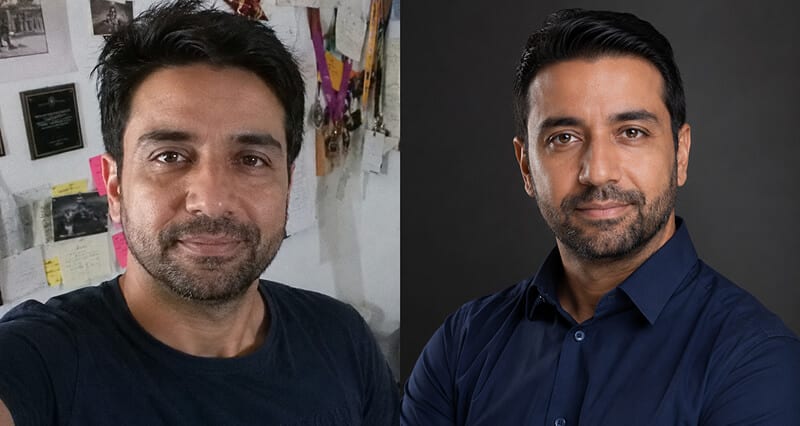
Stop guessing whether your photo is helping or quietly costing you. Here's the method, the toolkit, and what the research really says.
Someone sent me a connection request last week with no photo. Just a grey silhouette and a headline.
I didn't accept it. Reflex. I didn't even read the headline.
Here's the uncomfortable part. Everyone does this. You do it. I do it. And it means your profile picture is quietly deciding conversations before a single word gets read.
So the real question is not "is my photo fine." It's how much is my current photo helping or hurting my acceptance rate, and how would you even know? You test it. Let me show you how, and the small toolkit that makes it painless.
Why the photo carries the decision (not your headline)
Your brain is fast and a little unfair. Research shows people form a judgment about a face in roughly 100 milliseconds. That is one tenth of a second, before the headline, before the mutual connections, before anything you actually wrote.
LinkedIn's own reported numbers point the same direction. Profiles with a photo get around 21 times more profile views, 9 times more connection requests, and up to 36 times more messages than profiles without one. Treat those as directional (they compare having a photo to having none, not a good photo to a bad one), but the direction is not subtle.
A profile without a photo reads as incomplete. A profile with the wrong photo reads as a person who isn't paying attention. Neither one gets the accept.
And when you send requests, the wrapper matters too. Personalized connection requests have been shown to land around a 9.36% acceptance rate versus 5.44% for generic ones. That's the note, not the photo, but it tells you the same thing: the small signals stack up, and they're measurable.
Here's where most people get it wrong. They "update" their photo once every four years, eyeball it, and hope. That's not a decision. That's a coin flip you never check.
How to actually A/B test your LinkedIn photo
You don't need software or a big sample. You need discipline and two weeks.
Pick your control. That's your current photo, exactly as it is today.
Pick one challenger. One. Change a single meaningful variable (a real headshot instead of a crop, a genuine smile instead of a neutral stare, a clean background instead of a busy one). If you change five things at once, you learn nothing.
Baseline your numbers. Screenshot your current profile views and search appearances from LinkedIn's own analytics before you swap. This is your "before."
Run the challenger for a set window. Two weeks is a reasonable floor. Keep your posting and outreach roughly constant so the photo is the thing that changed, not your activity.
Compare. Views, search appearances, and acceptance rate on the requests you send. If the challenger wins, it becomes your new control. Then you find the next challenger. That loop is the whole game.
Stay with me, because the toolkit below is what makes each of those steps take minutes instead of a weekend.
The toolkit: 5 tools to find, test, and upgrade your LinkedIn photo
1. Tonfotos (find your strongest candidate before you test anything)
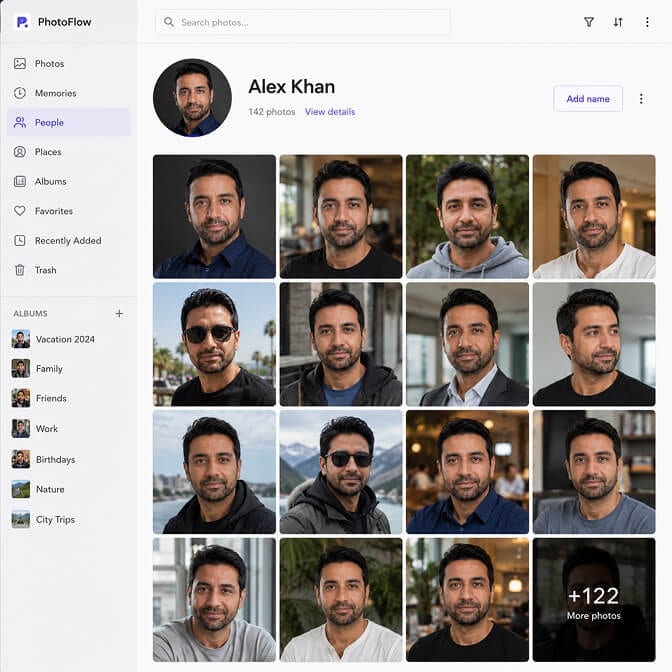
Before you can test a photo, you have to find your best raw material, and for most people that's buried across a phone, an old laptop, and a drive somewhere. This is where Tonfotos earns the top spot.
General information. Tonfotos is a photo and video archive manager for Windows, Mac, and Linux. Its AI face recognition automatically finds every photo of a specific person across your whole library, so you can pull up literally every shot of you in one view and shortlist the few that could work as a headshot base. It also removes duplicates, sorts by date and location, and keeps everything local instead of locked in a cloud subscription.
Pros. Face recognition surfaces candidates you forgot you had. Perpetual license, no monthly fee (free tier, then $59 personal, $159 family). Your archive stays on your own machine or NAS.
Cons. It's a desktop organizer, not a LinkedIn tool, so it won't shoot, edit, or score your photo. It finds and gathers. You still decide what's good.
2. Headshot Photo (create fresh challengers when your candidates aren't good enough)
Sometimes you dig through everything and the honest verdict is none of these are good enough. That's normal. That's the actual problem we built for.
General information. Headshot Photo turns a handful of everyday selfies into studio-grade professional headshots in about 10 minutes, with control over background, wardrobe, and lighting. So instead of one challenger to test, you get a dozen, and you can A/B the winners against each other.
Pros. Fast, cheap next to a studio session, and it gives you variations to test rather than a single take. If you've ever wondered whether AI headshots are acceptable on LinkedIn, the short version is yes, when they still look like you.
Cons. You have to feed it decent source selfies. Garbage in, garbage out, same as any camera.
3. Your network as a live test panel
Before you push a photo public, send your top two to five people you trust and ask one question: which one would you accept a request from?
Pros. Free, fast, and it catches the "you look tired" problems you're blind to. Cons. Small sample, and friends are polite. Ask for the brutal version.
4. LinkedIn's native analytics (your measurement layer)
You already have the scoreboard. Profile views and search appearances are right there in your dashboard.
Pros. It's the real data on the platform that matters, and it's free. Cons. It won't isolate the photo for you, which is exactly why you hold everything else steady during the test.
5. The two-week swap test itself (the actual method)
The most important "tool" is the process from the section above. Control, one challenger, fixed window, compare, repeat.
Pros. Costs nothing and turns opinion into evidence. Cons. Requires patience. Two weeks feels long when you want to know now.
If you're tired of guessing and just want a batch of professional options to test this week, you can see Headshot Photo pricing and have your challengers ready today.
What actually moves the needle inside the frame
Once you're testing, aim your challengers at the variables that carry weight.
Wardrobe. Formal attire has been shown to raise perceived competence and influence more than almost any other single change. A blazer reads as "serious" in a 48 pixel circle.
Expression. A genuine smile with visible teeth is consistently one of the biggest positive shifts in how people rate a photo. The stern LinkedIn stare tests worse than people expect.
Background. Solid and muted beats busy. Clutter competes with your face, and your face is the only thing winning the 100 millisecond glance. If you want the full setup, our guide on how to take a good LinkedIn photo breaks down framing, lighting, and crop.
Boring and clear beats clever and cluttered. Your photo gets seen far more than it gets studied.
Here's the takeaway I actually care about. You are already being A/B tested, every single day, by every person who lands on your profile. The only choice is whether you get to see the results. Run the test, keep the winner, and stop leaving your first impression to a four-year-old crop. If you want the deeper career angle, we went further on how your LinkedIn photo affects your job search.
Ready to build your challengers? Upload a few selfies to Headshot Photo, generate a set of professional options in about 10 minutes, and put your new photo up against your old one for two weeks. Let the acceptance rate settle the argument.
Frequently Asked Questions
What is an A/B test for a LinkedIn photo?
It's swapping your current profile picture (the control) for one new version (the challenger), holding your activity steady, and comparing profile views, search appearances, and connection acceptance over a set window like two weeks. The photo that performs better becomes your new baseline, and you keep iterating.
How does my LinkedIn photo compare to my headline for getting connections accepted?
The photo usually gets there first. People form a face judgment in about 100 milliseconds, before they read your headline, so a weak photo can cost you the accept before your words ever get a chance. A strong headline helps, but it's the second impression, not the first.
How do I test my LinkedIn photo without special software?
Screenshot your current profile views and search appearances, swap in one new photo, change nothing else about your posting or outreach, and check the same numbers two weeks later. LinkedIn's built-in analytics is your scoreboard, and a quick poll to a few trusted contacts gives you fast qualitative signal.
Is a professional headshot worth it just for LinkedIn?
For most people who use LinkedIn for hiring, sales, or networking, yes. Profiles with a photo see multiples more views and connection requests in LinkedIn's own reported figures, and a professional shot tests better on competence and approachability than a selfie. An AI headshot makes the cost low enough that testing one is close to a no-brainer.
Are AI headshots good enough to use for this, or will people notice?
They're good enough when they still look like you and skip the over-smoothed plastic look. The goal is a photo that matches you on a video call, not a flawless stranger. Feed the tool clean, recent selfies and pick the natural results, and most viewers read it as a normal professional headshot.
