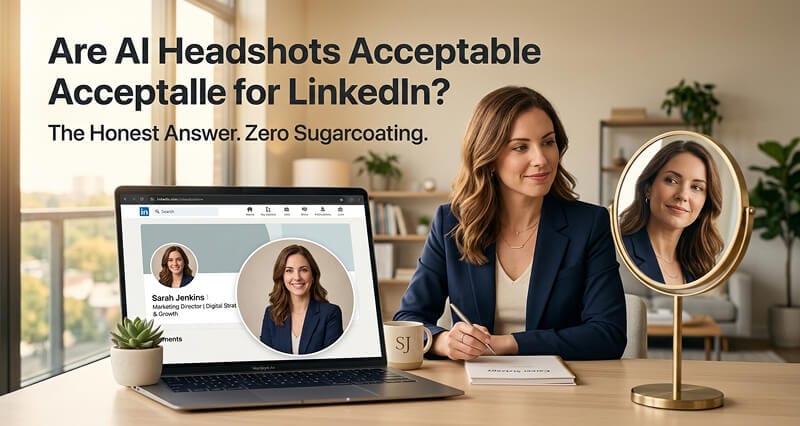
LinkedIn doesn't care how your headshot was made. They care if it looks like you. Here's everything you need to know, with zero sugarcoating.
I got a message last week from a product manager in Chicago.
"I just updated my LinkedIn headshot with an AI-generated photo. It looks great. Better than any photo I've ever had. But now I'm second-guessing myself. Is this going to get me flagged? Will recruiters think I'm being dishonest? Am I going to lose credibility?"
She had 47,000 LinkedIn connections. Over 200 recruiters had viewed her profile in the last 90 days. And she was genuinely worried that her new, professional-looking headshot was going to be a problem.
Because it was generated by AI instead of a camera.
I hear some version of this anxiety every week. And every time, the worry is dramatically larger than the actual risk. So let me give you the honest, complete, data-backed answer.
LinkedIn's Actual Policy (The Part Everyone Paraphrases Wrong)
Here's what LinkedIn actually says about AI-generated profile photos. Not what someone on Reddit said they think the policy is. The actual policy.
Whatever you upload, the framing still has to work at thumbnail size. A profile picture maker handles the crop and background cleanup on a photo you already own.
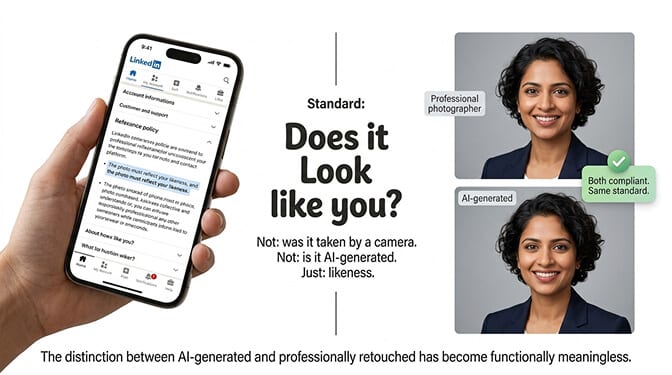
A LinkedIn spokesperson told CNBC directly: the platform allows the use of tools, including AI, to enhance or create profile photos, provided that "the photo must reflect your likeness."
That's it. That's the standard.
"Reflect your likeness." Not "must be taken by a camera." Not "must be a traditional photograph." Not "cannot be AI-generated."
The standard is likeness. Does the photo look like you? Would someone who meets you on a video call or at a conference recognize you from your LinkedIn photo? If yes, the photo is compliant regardless of how it was made.
This is the same standard that has always applied to professionally retouched studio photography. A photographer who smooths your skin, adjusts lighting, removes blemishes, and color-corrects the image is also creating something that isn't a literal unedited photograph. The distinction between "AI-generated" and "professionally retouched" has become functionally meaningless from a visual output perspective.
LinkedIn's photo policy doesn't distinguish between AI and photography. The standard is likeness. If the person in the photo is recognizably you, the photo is acceptable.
What Recruiters Actually Think (The Data Is Clear)
The anxiety around AI headshots on LinkedIn almost always centers on recruiter perception. "What if they can tell? What if they judge me?"
Two large-scale studies have answered this question directly.
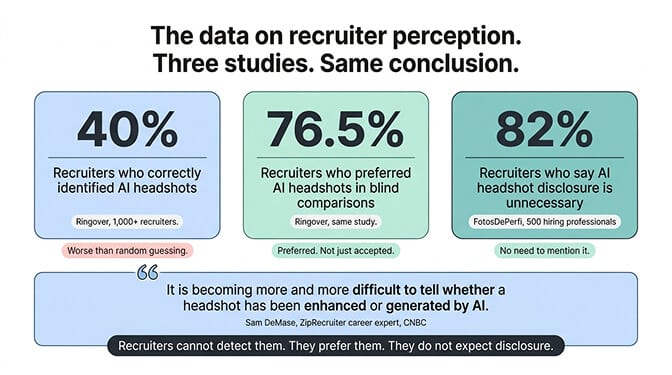
Ringover (2024): Surveyed over 1,000 recruiters. Showed them a mix of AI-generated and traditional headshots. Recruiters correctly identified AI photos only 40% of the time. That's worse than guessing. And here's the part that surprises people: 76.5% of recruiters actually preferred the AI-generated headshots when evaluating professionalism and approachability in blind comparisons.
FotosDePerfi (2025): Surveyed 500 hiring professionals. Detection rate was 38%. When recruiters were "confident" they'd spotted an AI photo, they were still wrong 41% of the time. And 82% said candidates don't need to disclose that their headshot is AI-generated.
A Canva job market report found that 88% of job seekers believe a polished digital presence influences hiring decisions. That number is up 45% from the previous year.
The data is unambiguous: recruiters can't reliably detect high-quality AI headshots, they actually prefer them when they can't tell, and the overwhelming majority say you don't need to mention how the photo was made. For a detailed comparison of which tools produce the most realistic results, see our best AI headshot generators guide.
ZipRecruiter career expert Sam DeMase summarized it perfectly in his CNBC interview: "It's becoming more and more difficult to tell whether a headshot has been enhanced or generated by AI."
The One Test Your AI Headshot Needs to Pass
Here's where most people get it wrong.
The question isn't "is AI acceptable?" It is. The question is: "Is this specific AI headshot good enough?"
Because bad AI headshots are just as damaging as bad phone selfies. The issue was never AI versus photography. It was always quality versus quality.
Here's the 60-second test. Run your AI headshot through these five checkpoints before uploading it to LinkedIn:
1. The Mirror Test. Show the headshot to someone who sees you regularly. If they say "that looks like you, just with really good lighting," it passes. If they say "that looks like a different person" or even hesitate, it fails.
2. The Skin Test. Zoom in to 200%. Can you see natural skin texture, pores, fine lines? Or does the skin look like smooth plastic? If it looks like a wax figure, the AI tool isn't good enough. Natural skin texture is the single biggest quality signal.
3. The Eye Test. Look at the catchlights (small white reflections) in both eyes. They should match in position and shape. Mismatched or physically impossible reflections are a telltale sign of cheap AI generation.
4. The Edge Test. Check where your hair meets the background and where your clothing meets the background. Any glow, halo, or unnatural blur at the edges means the compositing isn't clean enough for professional use.
5. The Video Call Test. Imagine appearing on a Zoom call after someone has only seen your LinkedIn photo. Would they recognize you immediately? If there's any disconnect between how you look in motion and how you look in the headshot, the AI went too far.
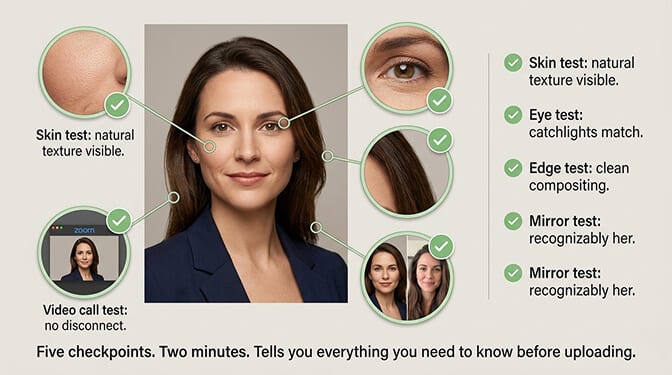
If your headshot passes all five, it's ready for LinkedIn. If it fails any of them, the issue isn't AI. It's the specific tool or output you used.
For tips on getting the best possible input photos for AI generation, our guide to luxury realtor headshots covers what makes a strong professional portrait across different styles.
Why AI Headshots Work Better on LinkedIn Than You'd Expect
Stay with me here, because there's a counterintuitive angle most people miss.
AI headshots often perform BETTER on LinkedIn than traditional photography. Not because AI is inherently superior, but because of how LinkedIn works as a platform.
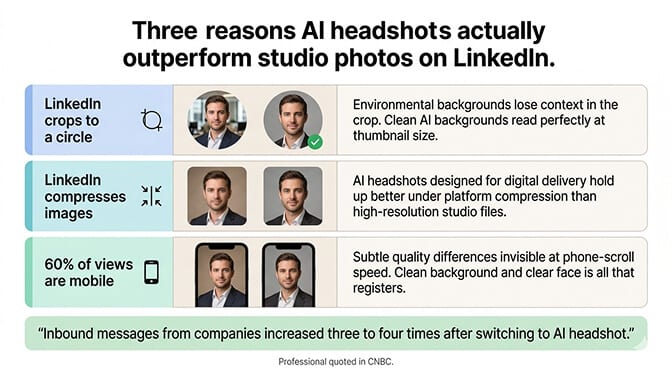
LinkedIn crops photos to a circle. That small circle in search results and comment threads is how most people first encounter your photo. A studio headshot with a creative environmental background loses all that context in the crop. An AI headshot with a clean, consistent background reads perfectly in that tiny circle.
LinkedIn compresses images. The platform reduces resolution significantly from what you upload. Studio-quality photography that looks stunning at full resolution sometimes loses its edge after compression. AI headshots, designed for digital delivery from the start, tend to hold up better under compression.
LinkedIn is viewed on phones. Over 60% of LinkedIn usage is mobile. On a small screen, the subtleties that distinguish a $400 studio session from a $29 AI headshot are essentially invisible. What matters at phone-screen-in-a-scroll speed is: clean background, clear face, professional expression. Both methods deliver that.
The practical result: Multiple professionals have reported significant increases in profile engagement after switching to AI headshots. One user quoted in CNBC said his inbound messages from companies increased "three to four times" after changing his LinkedIn photo to an AI-generated headshot.
At Headshot Photo, the AI is specifically designed for LinkedIn optimization. Clean backgrounds that read well in the circular crop, natural skin texture that passes the zoom test, and professional polish that holds up under platform compression. Upload a few selfies, get a LinkedIn-ready headshot in about 1 hour.
The Only Situations Where AI Headshots Might Not Be Ideal
I want to be honest about the edge cases.
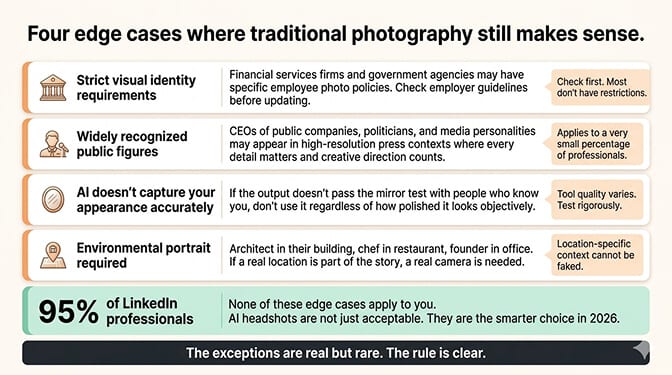
If your industry has strict visual identity requirements. Some regulated industries (certain financial services firms, government agencies) may have specific policies about employee photos. Check your employer's guidelines before updating.
If you're a public figure whose face is widely recognized. CEOs of publicly traded companies, politicians, and media personalities may want the creative direction that only an in-person photographer provides. The photo may appear in high-resolution press contexts where every detail matters.
If the AI doesn't capture your actual appearance accurately. Not all AI tools handle every face type, skin tone, and feature set equally well. If the output doesn't pass the mirror test with the people who know you, don't use it regardless of how "good" it looks objectively.
If you need a specific physical setting in the photo. An architect photographed in their building, a chef in their restaurant, a founder in their office. Environmental portraits that include a real location still require a real camera.
For all other contexts, which covers about 95% of the professionals on LinkedIn, AI headshots are not just acceptable. They're arguably the smarter choice in 2026.
The Cost of NOT Having a Professional LinkedIn Photo
Here's the number that should really keep you up at night.
LinkedIn profiles with professional photos receive 14x more profile views and significantly more connection requests than profiles without photos. Recruiters have told 71% of candidates they've been passed over partly due to poor profile photos.
The cost of a bad or missing LinkedIn headshot isn't a one-time penalty. It's compounding every single day. Every recruiter who scrolls past. Every potential client who doesn't click. Every connection request that doesn't happen.
An AI headshot costs $29. A traditional photographer costs $250+. Having no professional photo costs you opportunities you'll never know about.
The math isn't close.
For a look at what strong LinkedIn profile photos actually look like across different industries, our guide to professional headshot examples that get you hired shows what works.
One Last Thing
That product manager in Chicago? Her AI headshot has been on LinkedIn for three months now. She's received more recruiter outreach than in the entire previous year.
Nobody has questioned it. Nobody has flagged it. Nobody has asked "is that AI?"
They've asked about her experience. Her skills. Her availability.
Which is exactly what a headshot is supposed to make happen. It gets out of the way and lets your qualifications do the talking.
Your LinkedIn photo isn't a test of whether you used a camera or an algorithm. It's a test of whether you look professional, current, and like someone worth connecting with.
Pass that test. Everything else is noise.
At Headshot Photo, professionals get LinkedIn-ready headshots from casual selfies in minutes. Natural skin texture, clean backgrounds, professional polish. The kind of output that passes every recruiter's test because it was built to meet the same standard as studio photography.
For the complete guide to using AI photos across your entire professional presence, our photo resume templates guide covers how to extend your headshot beyond just LinkedIn.
Frequently Asked Questions
Are AI headshots acceptable for LinkedIn profiles?
Yes. LinkedIn's policy permits AI-enhanced or AI-generated profile photos as long as they "reflect your likeness." The platform doesn't distinguish between AI and photography. The standard is that the photo must look like you, appear professional, and not misrepresent your identity. This is the same standard that applies to professionally retouched studio photography.
How do AI-generated LinkedIn headshots compare to traditional photographer headshots?
On LinkedIn specifically, AI headshots often perform as well or better than traditional photography because the platform crops photos to a small circle, compresses resolution, and is viewed primarily on mobile. The subtleties that distinguish a studio session from AI generation are largely invisible at LinkedIn's display sizes. In recruiter blind tests, 76.5% actually preferred the AI headshots. Traditional photography offers advantages for high-resolution editorial use and environmental portraits.
How do I make sure my AI LinkedIn headshot looks natural and professional?
Run the 60-second quality test: show it to someone who knows you (mirror test), zoom to 200% to check for natural skin texture (skin test), verify matching eye reflections (eye test), inspect hair and clothing edges for halos (edge test), and confirm you'd be recognized on a video call (video call test). If it passes all five, upload it. If it fails any, try a different tool or different input photos.
Is it worth paying for an AI headshot generator for LinkedIn?
Absolutely. LinkedIn profiles with professional photos get 14x more views than those without. At $29-$50 for an AI headshot versus $250-$500 for a traditional photographer, the return on investment is immediate. The time savings are equally significant: 1 hour with AI versus weeks of scheduling, traveling, and waiting for edited results with a photographer. For LinkedIn-specific use, AI headshots like Headshot Photo provide comparable quality at a fraction of the cost.
Will LinkedIn remove or flag my profile if I use an AI-generated headshot?
No. LinkedIn has not banned AI headshots and does not have detection systems that flag AI-generated profile photos. Their stated policy allows AI tools for profile photos as long as the result reflects your likeness. The platform reserves the right to remove photos that violate community policies, but this applies to all photos (inappropriate content, misrepresentation), not specifically AI ones. No reports of LinkedIn removing profiles specifically for using high-quality AI headshots exist.
