
LinkedIn Headshot Poses That Actually Get You Noticed in 2026: Body Language and Camera Angle Tips That Work
The difference between a LinkedIn photo that gets ignored and one that gets you inbound messages is often just two degrees of chin tilt. Here's the full breakdown.
Two weeks after I updated my LinkedIn photo, something strange happened.
Not a flood of connection requests. Not a viral post. Something quieter and more useful: a recruiter I'd never spoken to reached out about a role that was exactly right. A potential client I'd been trying to reach finally replied to a cold message after weeks of silence. A collaborator I admired accepted my connection request within hours.
Same profile. Same headline. Same content.
Different photo.
I'd been using a candid from a conference for two years. It wasn't terrible. But it was slightly off-angle, slightly underlit, and I was caught mid-laugh in a way that read more as "party guest" than "person worth doing business with."
The new photo was simple. A three-quarter turn. A slight lean forward. Chin down and out. Genuine expression. Studio lighting.
The same face. Completely different message.
That's the power of getting the pose right.
Why LinkedIn Poses Matter More Than Lighting or Background
Here's the weird part.
Most headshot advice focuses on lighting and background. Those things matter. But they're the equivalent of a clean font on a resume. They remove noise. They don't create signal.
Pose creates signal.
Pose is what determines whether you look approachable or guarded. Whether you look present or absent. Whether you look like someone worth five minutes of a stranger's time, or someone they scroll past without registering.
Profiles with professional photos receive dramatically more views, connection requests, and messages than those without one. But the photo alone isn't enough. Two professional photos, same person, same lighting, same background, can produce wildly different responses based on the pose alone.
Your pose is body language captured in a still image. And just like body language in real life, it communicates before you say a word.
The good news: pose is learnable. You don't need a natural gift for being photographed. You need about five specific adjustments, and you need to understand why each one works.
The Foundation Pose: Why the Three-Quarter Turn Is Non-Negotiable
If you learn one thing from this article, make it this.
Never face the camera dead-on. A straight-on, shoulders-square pose creates two problems at once. It makes you look flat, because there's no depth or dimension in the frame. And it reads as slightly confrontational, the visual equivalent of a stare without context.
The three-quarter turn solves both problems.
Here's exactly how it works: rotate your body 30 to 45 degrees away from the camera. Then turn your head back toward the lens. That's it. That one adjustment creates depth in the image, slims the visual silhouette through foreshortening, and creates a natural, candid quality that a dead-on pose simply can't replicate.
Think of the difference between a passport photo and a photo of someone who walked into the frame.
The three-quarter turn is the base from which every other pose improvement builds. If you're shooting input photos for an AI headshot generator, every frame you submit should use some version of this angle. If you're working with a photographer, ask for it explicitly.
The micro-details:
- Angle the body first, then rotate the head
- Keep shoulders dropped and relaxed, not raised toward the ears
- The turned body should feel natural, like you're about to take a step
The Lean: One Inch That Changes Everything
Stay with me here, because this one sounds too simple to be real.
Lean your upper body approximately one inch toward the camera.
Not dramatically. Not so much that you look off-balance. Just a small, deliberate shift of weight toward the lens.
That single inch changes how your photo reads. Leaning forward signals engagement. It says "I'm interested in whoever is looking at this." It creates a subconscious sense of connection that viewers register without being able to name it.
Leaning back, even slightly, does the opposite. It reads as detached, guarded, or disinterested. And most people, when nervous in front of a camera, unconsciously lean back.
The fix is deliberate. After you get your three-quarter turn right, consciously shift your weight forward from the hip. One inch. Check how it looks. That's your pose.
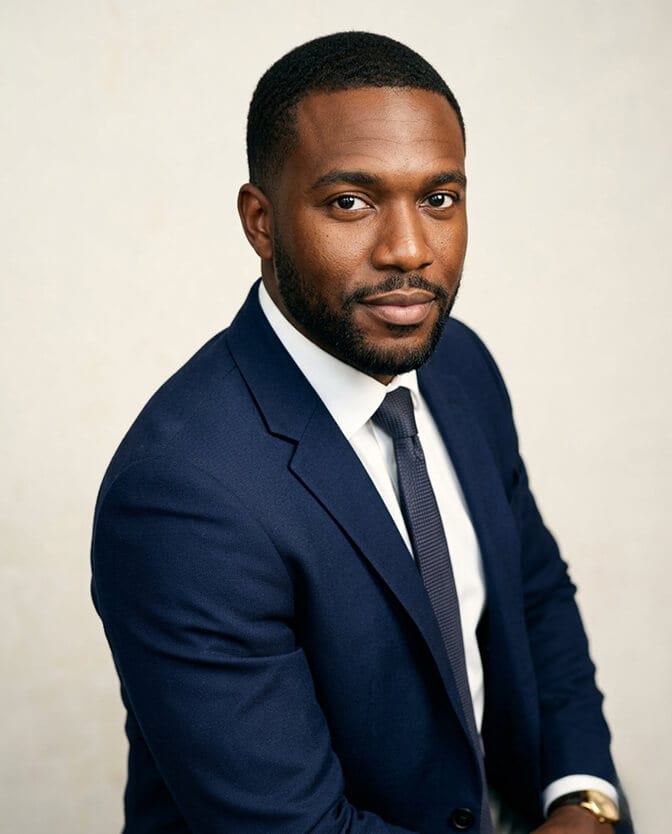
The Chin Turtle: The Most Underrated Adjustment in Headshot Photography
Almost nobody talks about this. Every good photographer uses it.
Push your chin forward and slightly down toward the camera.
It feels strange in person. It looks dramatically better in a photograph.
Here's the mechanics: most people, when nervous or simply unaware, let their chin rest in a natural position, which often creates soft definition along the jawline and sometimes appears as a double chin in photos even on people who don't have one in real life. The camera angle amplifies this.
Pushing the chin forward separates it from the neck. Tilting it slightly down defines the jaw. The combination creates a stronger, cleaner facial structure in the image.
One additional rule: the camera should be at or very slightly above eye level. Camera below eye level is almost universally unflattering. Camera above eye level and chin tucked too far reads as apologetic rather than confident. At or just above eye level, with the chin forward and slightly down, is the sweet spot.
Photographers sometimes call this "the turtle" because extending the chin forward feels like a turtle emerging from its shell. Practice it in a mirror. Once you feel it, you can't unfeel it.
Shoulder Position: The Thing That Makes Everything Else Work
Here's where most people's headshots silently fall apart.
Shoulders pulled up toward the ears communicate stress and self-consciousness. It's an involuntary tension response that most people don't even realize they're doing until they see it in a photograph.
Before every shot, consciously drop your shoulders away from your ears and back.
Not military-posture back. Just settled. Relaxed. Like you've been standing in a comfortable room for a while and your body has found its natural resting position.
This adjustment does several things at once. It opens the chest, which makes the upper body read as more confident and at ease. It lengthens the apparent neck, which improves the proportions of the frame. And it signals to the viewer that you're comfortable in your own skin, which is one of the most trust-building things a headshot can communicate.
The shoulder drop is also the single most common instruction photographers give during sessions, precisely because it's the most commonly forgotten thing in the anxiety of being photographed.
Eye Contact and Expression: The Piece That Either Pulls It Together or Doesn't
You can get the three-quarter turn right. You can nail the lean and the chin turtle and the shoulder drop. And still produce a flat headshot.
Because none of the body language adjustments matter if the eyes are absent.
Direct eye contact with the camera lens is almost always right for LinkedIn. Looking slightly off-camera works in editorial or creative contexts. On LinkedIn, it reads as distracted. The person looking at your profile wants to feel like you're looking at them. Direct lens contact creates that.
What makes direct eye contact work is presence, not intensity. The difference between eyes that are engaged and eyes that are just open is something viewers process in under a second. Engaged eyes have a slight lift in the lower eyelid (the "squinch"), a sense of focus, and a light in them that comes from genuine attention.
The practical technique: right before the shot, bring to mind something that genuinely holds your interest. A problem you're working on. A person you're glad to know. A recent moment of real satisfaction. Your face responds to what you're thinking. Use that.
For expression: a natural, genuine smile works for most industries and most LinkedIn contexts. A composed, neutral expression with engaged eyes works for authority-forward roles. For the dominant 2026 aesthetic, see our deeper breakdown of the confident neutral expression.
What doesn't work is a forced smile that doesn't reach the eyes, or a blank stare that reads as absence rather than composure.
For professionals who want to see how these pose principles translate into AI-generated headshots, browse professional headshot examples from Headshot Photo users across multiple industries. The body language principles show up clearly in the outputs that land hardest.
How to Apply This for AI Headshot Input Photos
This is the part that's specific to 2026 and genuinely useful.
If you're generating headshots using an AI tool, the poses you use in your input photos directly determine the poses in your output. The AI renders what it receives. It improves lighting, sharpens focus, adds professional backgrounds, and polishes the overall quality. It does not fix a dead-on pose or a tensed-up shoulder position.
This means the five-minute pose preparation in this article is as important for AI headshot sessions as it is for traditional photography. More so, actually, because with AI you're usually shooting alone without a photographer coaching you in real time.
Before you shoot your input photos:
Run through the full checklist. Three-quarter turn practiced. Lean forward felt and held. Chin pushed out and slightly down. Shoulders dropped and settled. Internal anchor for the eyes loaded and ready.
Then shoot ten to fifteen frames, varying your expression slightly across them. Review them on your phone. Look for the frames where the body language is right and the eyes are engaged. Those are your uploads.
The AI photo generator from Headshot Photo works from your input photos to produce studio-quality outputs. Give it correctly posed inputs and the results are dramatically stronger than what most people submit.
For teams where consistency across everyone's poses matters, the company headshots page shows how to approach this at scale.
The Five-Minute Pose Warmup (Do This Before Every Shoot)
This takes less time than you think and makes a larger difference than you'd expect.
Minute one: Shake everything out. Roll your shoulders, drop your jaw, take three slow exhales. Break whatever tension pattern your body came in with.
Minute two: Practice the three-quarter turn in a mirror. Find your angle. Right shoulder forward, head turned back to camera, or left shoulder forward, whichever works better for your face. Most people have a side that photographs better. Find yours.
Minute three: Practice the chin turtle five times. Forward and slightly down. Hold for three seconds. Release. Repeat. Build the muscle memory.
Minute four: Drop your shoulders deliberately. Notice where they were versus where they are now. Take a breath from that settled position.
Minute five: Load your internal anchor. The specific memory or thought that produces real engagement in your eyes. Hold it. Take your first frame from that state.
The difference between someone who does this warmup and someone who walks straight in front of the camera cold is visible in the photograph. Every time.
What a Pose Actually Does for You on LinkedIn
Profiles with professional headshots receive dramatically more views, connection requests, and messages than profiles without. But within the universe of professional headshots, pose is what separates photos that generate responses from photos that just satisfy the "has a photo" threshold.
A well-posed LinkedIn headshot communicates trustworthiness, presence, and approachability before anyone reads a word about you. It does the first ten seconds of work that your headline and summary would otherwise have to do alone.
The five adjustments in this article (three-quarter turn, forward lean, chin turtle, shoulder drop, genuine eye engagement) are not complicated. They're not expensive. They require five minutes of practice and the presence of mind to execute them when you're in front of a camera.
That's all that separates a headshot that works from one that doesn't.
Get your poses right first, then let Headshot Photo handle the studio quality. Create your professional headshot with Headshot Photo and upload your best-posed frames for professional AI rendering.
Frequently Asked Questions
1. What are the best poses for a LinkedIn headshot in 2026?
The most effective LinkedIn headshot pose combines a three-quarter body turn (30 to 45 degrees from the camera), a slight forward lean of the upper body, and a chin pushed forward and slightly down toward the lens. Add dropped, relaxed shoulders and direct eye contact with the camera. This combination creates depth, defines the jaw, signals engagement, and produces images that consistently outperform straight-on, stiff poses in profile views and connection responses.
2. How does a three-quarter turn improve a LinkedIn headshot?
A three-quarter turn angles your body away from the camera while keeping your face toward it. This creates visual depth and dimension that a straight-on shot lacks, slims the visual silhouette through foreshortening, and produces a natural, candid quality. It also eliminates the slightly confrontational read of a squared, direct-on pose, making the subject look engaged and present rather than stiff.
3. How do I practice headshot poses before my photo session?
A five-minute warmup before any headshot session produces noticeably better results. Practice the three-quarter turn in a mirror to find your better side. Do the chin turtle (push chin forward and slightly down) five times to build muscle memory. Drop your shoulders deliberately after each exhale. Load an internal mental anchor (a specific memory that produces genuine eye engagement) right before shooting. Even one practice run-through dramatically reduces stiffness in the final frames.
4. Do pose adjustments matter for AI-generated headshots?
Yes, directly and significantly. AI headshot generators render the pose from your input photos at studio quality. They can improve lighting, sharpness, and background. They cannot fix a dead-on pose, tensed shoulders, or absent eye engagement. The body language principles in this article apply to AI input photo sessions exactly as they do to traditional photography sessions. Correctly posed inputs produce dramatically stronger AI headshot outputs.
5. How does body language in a headshot affect LinkedIn engagement and responses?
Body language in a headshot communicates trustworthiness, approachability, and presence before anyone reads a single word of your profile. A forward lean signals engagement. Open, relaxed shoulders signal confidence. Direct eye contact signals presence. A three-quarter turn signals dimension and energy. Profiles with professional headshots already receive significantly more views and messages. Within that group, the profiles whose photos use these body language principles consistently perform at the higher end of engagement.
