Some free AI headshots are genuinely usable. Most aren't. Here's the honest breakdown from testing every major free option in 2026.
I spent last Friday doing something slightly unhinged.
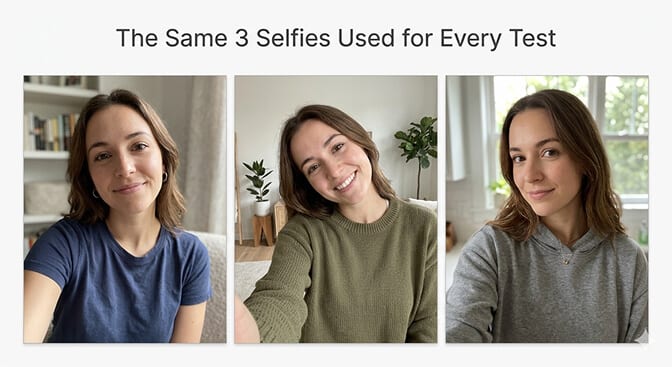
I downloaded, signed up for, or opened every free AI headshot generator I could find. Every single one. I used the same three selfies across all of them. Same lighting. Same angles. Same face.
Then I put every result side by side and asked one question: would I put this on LinkedIn?
Not "does it look kind of professional." Not "is it better than nothing." Would I, as someone who understands what recruiters and clients actually see, put this specific image on a platform where my career reputation lives?
The results were... educational.
Some free tools produced headshots I'd genuinely use. Others produced headshots that looked like someone fed my face through a beauty filter from 2018. A few produced results so uncanny that I showed them to a coworker and she said, "That looks like a wax figure of someone who kind of looks like you."
Here's every tool, every result, and the honest truth about what $0 buys you in 2026.
How I Tested (The Rules)
Before the results, the methodology. Because "I tested everything" means nothing without consistency.
Same input photos across all tools: Three well-lit selfies taken near a window. Different angles. Natural expression. No filters. No makeup. Regular clothes. If a tool couldn't produce decent results from these, the tool has a problem, not my photos.
Same evaluation criteria: I judged each output on four factors: identity accuracy (does it look like me?), skin texture (natural pores or plastic smoothness?), professional quality (would this pass as a real studio headshot?), and usability (would I actually put this on LinkedIn?).
No paid upsells tested: I used only what was available for free. No trials. No "first 3 free then pay." If you had to enter a credit card, it wasn't free.
Tier 1: Actually Usable for LinkedIn
These free tools produced headshots I would genuinely consider using on a professional profile. Not perfect. Not as good as paid tools. But genuinely usable.
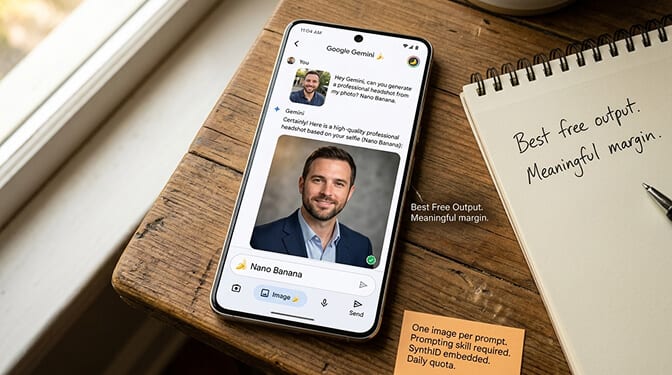
Nano Banana (Google Gemini Free Tier)
What you get: Unlimited access to Nano Banana's base model through the Gemini app. Upload a selfie, prompt for a professional headshot, get a single result.
The result: The best free headshot I generated, by a meaningful margin. My face was recognizably mine. The lighting looked genuinely professional. The background was clean. The skin texture was natural with visible pores, not plastic-smooth.
The catch: One image per prompt. No batch generation. You need prompting skill to get great results. SynthID watermark embedded. And "free" means limited daily generations before you hit the quota.
Verdict: If you have prompting patience and only need one headshot, this is genuinely your best free option in 2026. We wrote a full Nano Banana headshot comparison if you want the detailed tutorial and limitations.
PixelPanda (3 Free Headshots/Day)
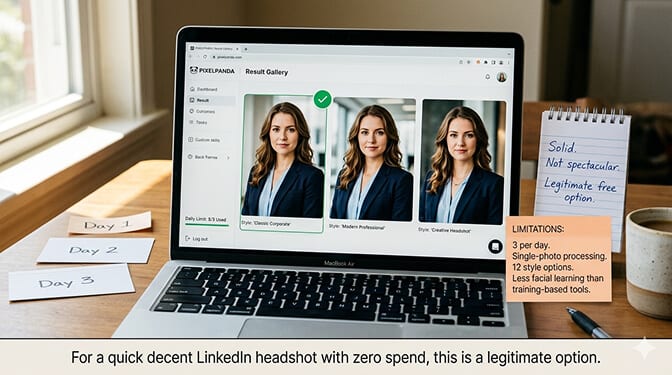
What you get: 3 free AI headshots per day. No credit card required. Single-photo upload (not custom model training). Multiple style options.
The result: Solid. Not spectacular, but genuinely professional-looking. The identity preservation was good. The lighting was clean. The background options were limited but appropriate. Skin texture leaned slightly toward smooth, but not distractingly so.
The catch: Only 3 per day. Single-photo processing means less facial learning than training-based tools. Style variety is narrower than paid tools (12 options vs. 100+). Quality sits slightly below the paid training-based generators in terms of fine detail.
Verdict: For someone who needs a quick, decent LinkedIn headshot and doesn't want to spend anything, PixelPanda's free tier is a legitimate option. The 3-per-day limit means you can try over a few days and pick your best.
Remini (Free with Ads)
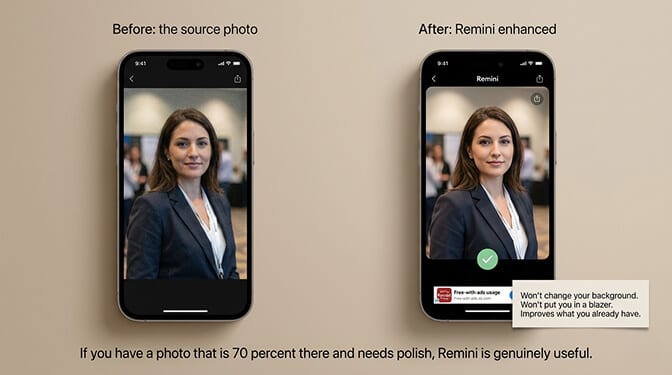
What you get: Free photo enhancement with ads and watermarks. Available as a mobile app (iOS and Android). Enhances existing photos rather than generating new ones.
The result: Remini isn't a headshot generator. It's a headshot enhancer. If you already have a decent photo from a conference, a friend's camera, or an older professional shoot, Remini will sharpen it, improve the lighting, and clean up imperfections. It does this well.
The catch: It won't change your background. It won't put you in a blazer. It won't create something from nothing. It improves what you already have. Also: ads, watermarks on free tier, and the enhanced version sometimes over-smooths skin.
Verdict: If you have a photo that's 70% there and just needs polish, Remini is genuinely useful. If you're starting from a casual selfie and need a full transformation, it's not the right tool.
Tier 2: Fine for Slack, Not for LinkedIn
These tools produced usable results, but with enough quality issues that I wouldn't put them on a platform where my professional reputation is visible.
Supawork AI
What you get: Free AI headshot generation. Upload a selfie, select from business-style backgrounds and settings. No credit card required.
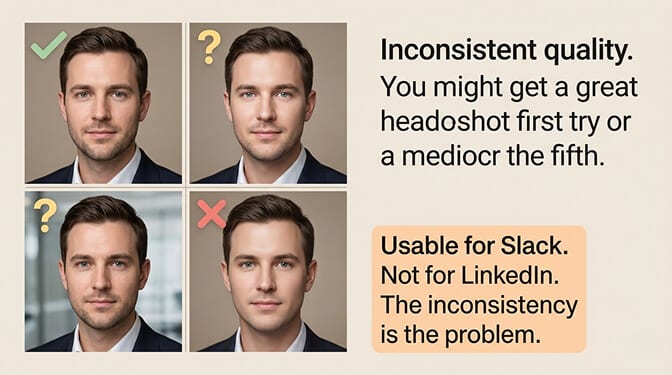
The result: Mixed. Some outputs were surprisingly clean with decent professional framing. Others had a noticeable "AI look": skin that was too smooth, eyes that were slightly too bright, and a general quality that sat in the uncanny valley between photo and rendering.
The catch: Inconsistent quality. You might get a great headshot on the first try or a mediocre one on the fifth. No custom model training means limited facial accuracy. The backgrounds sometimes looked like stock photo composites rather than genuine studio settings.
Verdict: Usable for internal Slack profiles, team directories, or casual contexts where the stakes are low. For LinkedIn or client-facing profiles, the inconsistency is a problem. You'd need to generate several and hope for a good one.
AIEase
What you get: Free AI headshot generation with various style options. Web-based, no download required.
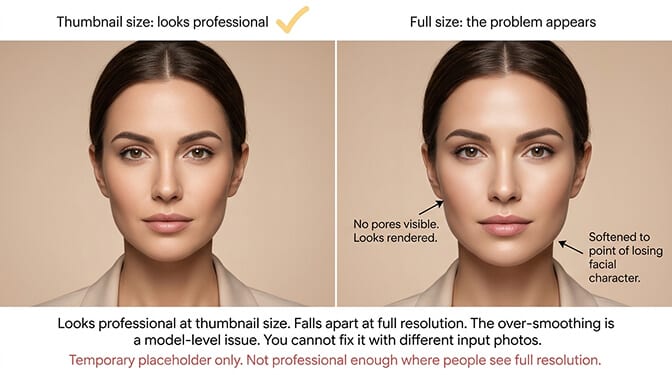
The result: The headshots looked professional at thumbnail size. At full size, the quality issues became apparent. Over-smoothed skin was the primary problem. The results looked like someone had applied a heavy beauty filter. Facial features were preserved but softened to the point of looking rendered rather than photographed.
The catch: The over-smoothing is consistent across multiple attempts. This seems to be a model-level issue, not a prompt issue. You can't fix it by trying different input photos.
Verdict: Might work as a temporary placeholder if you absolutely need something today. Not professional enough for any context where people will see the image at full resolution.
Fotor AI Headshot
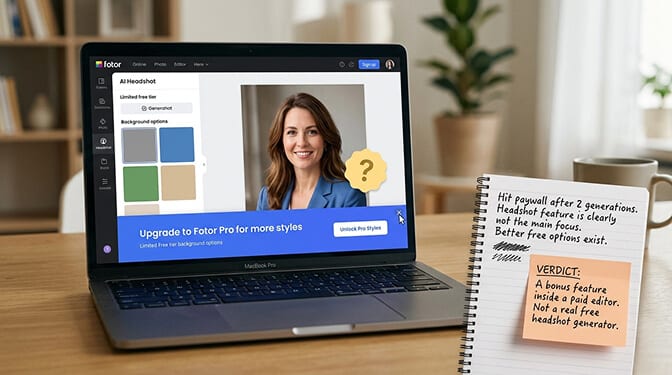
What you get: Limited free headshot generation as part of Fotor's broader photo editing platform. A few free generations before you hit the paywall.
The result: Decent quality, comparable to Supawork. The headshot feature clearly isn't Fotor's primary focus. The results are "good enough for a general photo editor" but not "purpose-built for professional headshots." Background options were limited on the free tier.
The catch: Very limited free generations. You'll hit the paywall fast. The tool nudges you toward the paid subscription at every step. If you already use Fotor for other editing, the headshot feature is a nice bonus. As a standalone free headshot tool, better options exist.
Verdict: A free bonus feature inside a paid photo editor, not a real free headshot generator.
The pattern across Tier 2 tools: they use simpler, single-image processing rather than training a custom model on your face. The results look "professional-ish" at a glance but fall apart under close inspection. Smooth skin, bright eyes, and clean backgrounds can't compensate for the fundamental loss of facial accuracy and natural texture.
Tier 3: Don't Bother
These free tools either produced unusable results or had deal-breaking limitations.
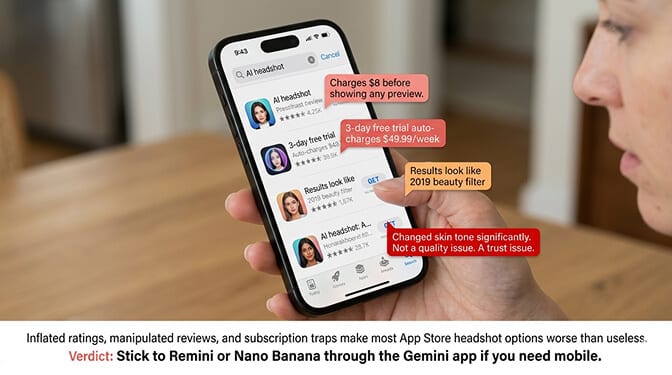
Random App Store "AI Headshot" Apps
I downloaded four apps with "AI Headshot" in their name, 4+ star ratings, and thousands of reviews. Here's the honest summary:
Two charged money before showing any preview. One wanted $8 upfront. Another offered a "3-day free trial" that would auto-charge $49.99/week if you forgot to cancel. These aren't free tools. They're subscription traps with free branding.
One produced results in 30 seconds. Fast, but the headshot looked like a 2019 beauty filter. Smooth plastic skin. Unnaturally bright eyes. My face shape was approximately right but the fine details were wrong.
One changed my skin tone. Significantly. This is not a quality issue. It's a trust issue. Any tool that can't preserve basic skin tone accuracy isn't ready for any use case.
Verdict: The App Store headshot market is a minefield. Inflated ratings, manipulated reviews, and subscription traps make most options worse than useless. If you must use a free mobile app, stick to Remini or use Nano Banana through the Gemini app.
ChatGPT (Free Tier Image Generation)
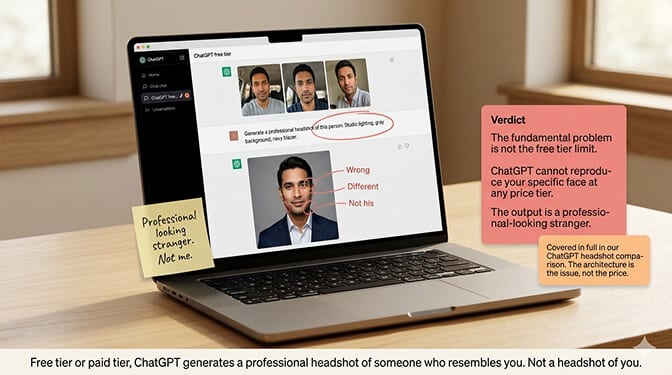
ChatGPT's free tier includes limited image generation. But as we covered in our ChatGPT headshot generator comparison, the fundamental problem isn't the free tier limit. It's that ChatGPT can't reproduce your specific face. The output is a professional-looking stranger. Not useful for headshots regardless of price tier.
The Honest Math: Free vs. $29
Here's where most people get it wrong.
The question isn't "can I get a free headshot?" You can. Nano Banana and PixelPanda both produce genuinely usable free headshots under the right conditions.
The question is: what does "free" actually cost you?
Time cost of free: Getting one good headshot from free tools takes 30-60 minutes of uploading, prompting, evaluating, re-prompting, and selecting across multiple platforms. Getting 4-5 good headshots across different styles (which is what you actually need for LinkedIn, your company page, your resume, and your speaking bio) takes 2-3 hours across multiple tools with inconsistent quality.
Time cost of paid ($29-59): Upload 8 selfies. Select styles. Wait 10-30 minutes. Download 40-100 headshots. Pick your favorites. Total active time: about 15 minutes.
Quality gap: Free tools produce headshots that look professional at thumbnail size. Paid tools produce headshots that look professional at any size, with natural skin texture, consistent lighting, and accurate facial features.
Consistency gap: Free tools generate one headshot at a time, each with slightly different quality. Paid tools generate 40-100 headshots that all look like they came from the same studio session.
If your time is worth more than about $15/hour, the paid tool is cheaper than free when you account for the time investment.
Free AI headshots in 2026 are better than they've ever been. Nano Banana alone has changed the floor. But "better than ever" and "good enough for professional use" are still two different things for most people.
At Headshot Photo, you get 40-100 professional headshots starting at $34. One-time payment. No subscription. 100% money-back guarantee. Every headshot is trained on your specific face, so it looks like you across every style and background. Upload 8 selfies, pick your styles, done in 1 hour.
For the complete pricing breakdown across all paid AI headshot tools, our AI headshot generator pricing guide covers every major option side by side.
My Honest Recommendation
If you have zero budget and need one LinkedIn headshot: Use Nano Banana through the free Gemini tier. Write a detailed prompt. Expect to spend 20-30 minutes getting a result you're happy with.
If you have zero budget and just need a quick photo improvement: Use Remini to enhance a decent existing photo. It won't transform your background or outfit, but it will make a mediocre photo look noticeably better.
If you have $29-59 and need professional headshots: Skip the free tools entirely. The time you save and the quality improvement justify the cost immediately. A single paid session gives you more usable headshots than a full day of free-tool experimentation.
If you need headshots for a team: Free tools are completely impractical for teams. Zero consistency, zero batch capability, zero time efficiency. Use a dedicated tool with team features.
One Last Thing
Here's what surprised me most about this experiment.
The free tools in 2026 are dramatically better than the free tools in 2024. Nano Banana alone moved the quality floor by a significant margin. Two years ago, every free headshot tool produced results that were obviously AI-generated. Today, the best free tool (Nano Banana) produces individual headshots that are hard to distinguish from professional photography.
The gap between free and paid hasn't disappeared. But it's narrowed. And it will continue narrowing.
What paid tools offer that free tools can't match isn't individual image quality. It's the workflow: batch generation, style consistency, zero prompting, fast turnaround, and the confidence that all your headshots look like they came from the same professional session.
Free gives you a headshot. Paid gives you a headshot system.
Know which one you need, and you'll make the right choice.
At Headshot Photo, professionals get the full system. 40-100 headshots. Multiple styles. Consistent quality. 1 hour. Starting at $34.
For guidance on getting the best possible input photos for any headshot tool (free or paid), our best headshot poses guide covers angles and expressions that maximize results.
Frequently Asked Questions
1. What is the best free AI headshot generator in 2026?
Nano Banana (Google's Gemini image model) is the best free AI headshot generator in 2026. Available through the Gemini app's free tier, it transforms uploaded selfies into professional-looking headshots while preserving your facial identity. The quality is significantly better than other free options. PixelPanda (3 free headshots/day) is the second-best option for those who prefer a simpler, no-prompting-required experience.
2. How do free AI headshot generators compare to paid ones?
Free tools produce usable individual headshots but with significant limitations: one image at a time, inconsistent quality between generations, prompting skill required (for Nano Banana), and simpler processing that doesn't train on your specific face (for most other free tools). Paid tools like Headshot Photo ($34-59) generate 40-100 consistent headshots from a model trained on your specific facial features, with zero prompting required. The quality gap at thumbnail size is small; at full resolution, paid tools produce noticeably more natural skin texture and accurate features.
3. Can I use a free AI headshot generator for LinkedIn?
Yes, but with caveats. Nano Banana (via Gemini) produces free headshots that are genuinely LinkedIn-quality with good prompting. PixelPanda's free tier also produces usable LinkedIn headshots. Most other free tools (Supawork, AIEase, App Store apps) produce results with over-smoothed skin and inconsistent quality that may look unprofessional at full resolution. For LinkedIn specifically, invest the prompting time to get a good result from Nano Banana, or spend $29-39 on a dedicated tool for significantly better consistency and quality.
4. Are free AI headshot generators safe to upload my photos to?
Safety varies significantly by tool. Nano Banana (Gemini) operates under Google's privacy policy, which is extensive but worth reading. It embeds SynthID watermarks in all generated images. PixelPanda and other web-based tools have varying privacy policies. App Store apps are the highest risk: many have vague data retention policies and request unnecessary device permissions. Before uploading selfies to any free tool, check whether the tool specifies data deletion timelines and whether your photos may be used for model training. Paid tools like Headshot Photo (ISO 27001 certified) generally have stricter, clearer data privacy practices.
5. Is it worth paying for an AI headshot generator if free options exist?
For most professionals, yes. Free tools require 30-60+ minutes of experimentation to produce one good headshot. Paid tools ($29-59 one-time) produce 40-100 consistent headshots in 10-30 minutes. If your time is worth more than $15/hour, the paid option is actually cheaper when accounting for time investment. Free tools also lack batch generation, style consistency, and professional optimization. The quality floor has risen dramatically in 2026 (especially with Nano Banana), but for anyone who needs multiple matching headshots for different professional contexts, a dedicated paid tool saves both time and produces better results.
