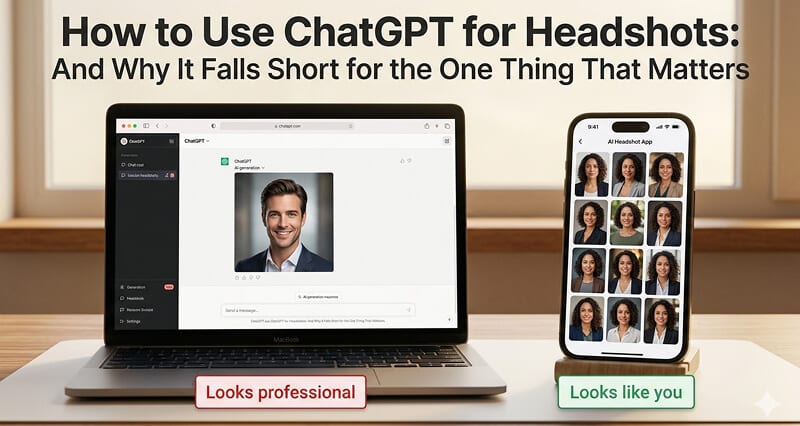
ChatGPT can generate a beautiful professional headshot of a person. It just can't generate a professional headshot of YOU. Here's why that distinction changes everything.
I spent two hours last week trying to get ChatGPT to make me a professional headshot.
Not because I didn't know it wouldn't work. I did know. I run a company that makes AI headshots. I know exactly where the technology breaks.
I did it because my inbox has been flooded with the same question for the past six months: "Why would I pay for an AI headshot when ChatGPT can do it for free?"
Fair question. So I decided to answer it the only honest way: by actually doing it, step by step, and documenting exactly what happened.
Here's the full tutorial. Then the full truth.
Step 1: Upload Your Photos to ChatGPT
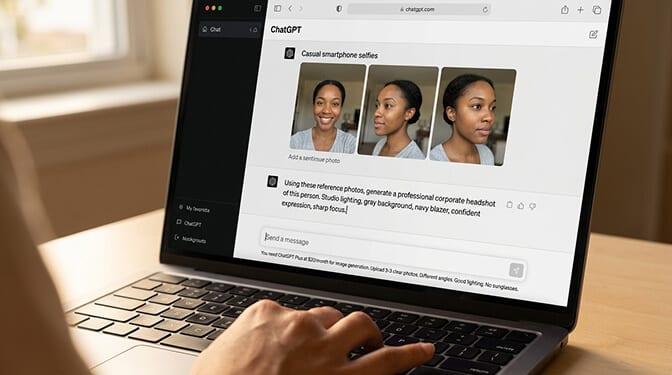
Open ChatGPT (you need the Plus plan at $20/month or the free tier with limited image generation). Click the attachment icon and upload 2-3 clear photos of yourself.
The photos should show your face from different angles. Good lighting. No sunglasses. No heavy filters.
Then type something like: "Using these reference photos, generate a professional corporate headshot of this person. Studio lighting, gray background, navy blazer, confident expression, sharp focus."
Hit enter. Wait about 15 seconds.
Step 2: Review the Results (This Is Where It Gets Interesting)
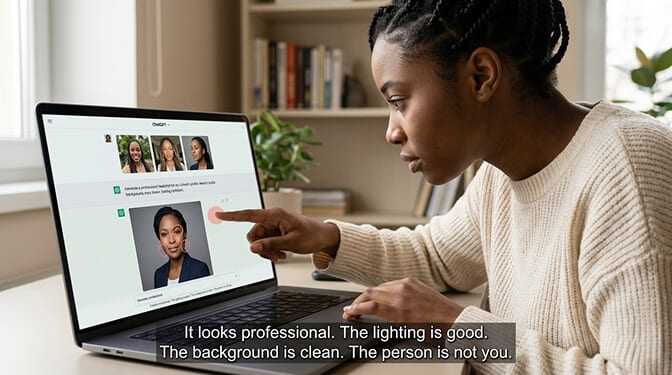
ChatGPT will generate an image. And it will look professional. The lighting will be good. The background will be clean. The expression will be appropriate.
But look closely.
The person in the generated image is not you.
It looks like someone who could be your relative. Someone who shares your general ethnicity, approximate age range, and hair color. But the jawline is different. The nose is slightly wrong. The eye spacing isn't yours. The face shape is close but not right.
It's a professional headshot of someone who vaguely resembles you.
Here's where most people get it wrong. They see a professional-looking image and think "close enough." They upload it to LinkedIn. And then someone who actually knows them sees it and thinks: that's weird.
Because the person in the photo isn't them. Not really.
Step 3: Try to Fix It with Better Prompts
You'll be tempted to refine the prompt. Everyone does. I did.
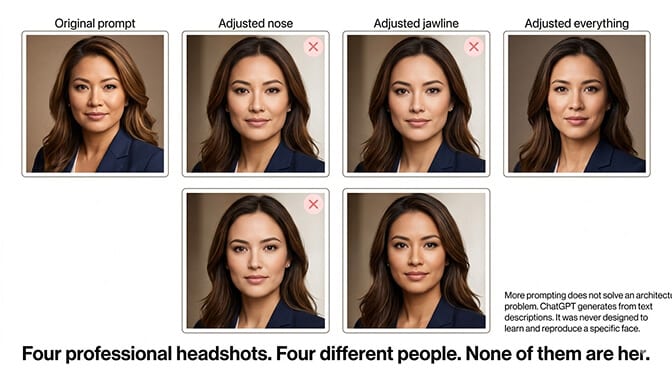
"Make the nose slightly narrower. Make the jawline more angular. Make the eyes a bit closer together. Match the exact skin tone from the uploaded photo."
ChatGPT will try. It will generate another image. And it will be... different. But not more accurate. Just differently inaccurate.
You can do this for hours. Adjusting one feature at a time. Getting closer, then further away. It's like trying to describe your face in words precisely enough for a sketch artist to draw you from scratch, except the sketch artist has never seen you and is working from a text description.
The fundamental problem isn't the prompt. It's the architecture. ChatGPT's image generation model was never designed to learn and reproduce a specific person's face. It generates images from text descriptions. And no text description, no matter how detailed, can capture the 43 muscles and thousands of micro-proportions that make your face uniquely yours.
Why ChatGPT Can't Generate YOUR Face (The Technical Explanation)
Stay with me here, because this is the part that explains everything.
ChatGPT uses a text-to-image model (based on OpenAI's GPT-Image architecture). When you type "professional headshot of a person," it generates an image based on patterns learned from millions of training images. It knows what "professional headshot" looks like as a concept. Lighting angles. Background types. Professional attire. Facial expressions.
What it does NOT have is a model of YOUR specific face.
Dedicated AI headshot generators (like Headshot Photo, HeadshotPro, BetterPic, Aragon AI, and others) work fundamentally differently. When you upload 8-20 selfies, they train a small AI model specifically on your facial features. Your jawline. Your eye spacing. Your nose shape. How your cheekbones catch light. How your hair falls. The specific asymmetries that make your face yours.
This training process takes 30-90 minutes. And it produces a personalized model that can then generate images of YOU in any professional setting while maintaining your actual facial identity.
ChatGPT skips this step entirely. It has no mechanism for fine-tuning on your specific face. OpenAI has not announced or built this capability. Without it, ChatGPT can only generate images that match a text description, not images that match YOUR face.
This is not a flaw in ChatGPT. It's a difference in what the tool was built to do. ChatGPT is a general-purpose AI assistant. Dedicated headshot generators are specialized tools built for one specific job.
A Swiss Army knife can cut things. But you wouldn't use it to perform surgery.
What ChatGPT IS Actually Good For (Credit Where It's Due)
It would be dishonest to dismiss ChatGPT's image generation entirely. It's genuinely impressive for several headshot-adjacent use cases:
- Visualizing what you want. If you're planning a real photoshoot and want to show a photographer the exact style, lighting, and background you're imagining, ChatGPT is perfect. Generate reference images and bring them to your session.
- Creating generic professional photos for placeholders. Building a website mockup and need professional-looking headshots for the design? ChatGPT can fill that role perfectly. The images look great as long as they don't need to represent real, specific people.
- Experimenting with styles. Curious what you might look like in different professional contexts? ChatGPT can give you a rough idea (navy suit vs. creative casual, indoor vs. outdoor, corporate vs. startup). The identity won't be accurate, but the style exploration is genuinely useful.
- Generating headshot prompts for dedicated tools. Some dedicated AI headshot generators let you describe what you want in text. Use ChatGPT to craft and refine those descriptions, then paste them into the dedicated tool.
ChatGPT generates professional-looking images of people. Dedicated headshot generators generate professional-looking images of YOU. Both are real capabilities. They're just different capabilities.
For a deeper look at what strong professional headshots actually look like across different industries, our examples gallery shows real before-and-after transformations from dedicated AI headshot generation.
The Cost Comparison (It's Not What You Think)
"But ChatGPT is $20/month and headshot tools cost $30-60!"
This comparison sounds straightforward. It isn't.
ChatGPT Plus: $20/month. Generates one image at a time. Each generation takes 15-30 seconds. No identity consistency. You'll spend hours prompting and still won't get a usable headshot of yourself. And you're paying $20 every month whether you need headshots or not.
Dedicated AI headshot generator: $29-59 one-time payment. Generates 40-200 headshots of YOUR actual face. Multiple styles, backgrounds, and outfits. Results in 10-60 minutes. You pay once and you're done.
If you're already paying for ChatGPT Plus for other reasons, the "free" headshot generation is a nice experiment. But if you're considering subscribing to ChatGPT specifically for headshots, a one-time dedicated tool is cheaper and dramatically more effective.
At Headshot Photo, you get 40-100 headshots of your actual face starting at $34. One-time payment. Upload 8 selfies. Get results in as little as 1 hour. Every headshot looks like you because the AI is trained specifically on your features.
C2PA Metadata: The Hidden Problem Nobody Mentions
Here's something most people don't know about ChatGPT-generated images.
OpenAI embeds C2PA metadata in every image generated through ChatGPT. C2PA (Coalition for Content Provenance and Authenticity) is a standard that tags images as AI-generated. This metadata is detectable by platforms and tools that check for AI content.
As AI detection becomes more common on professional platforms, this metadata could flag your LinkedIn photo as AI-generated. While LinkedIn hasn't publicly stated they penalize AI-generated photos with C2PA tags, the metadata exists and is detectable.
Most dedicated AI headshot generators do not embed C2PA metadata in their outputs. This isn't about deception. It's about producing images that function identically to traditionally photographed headshots in every context, including metadata analysis.
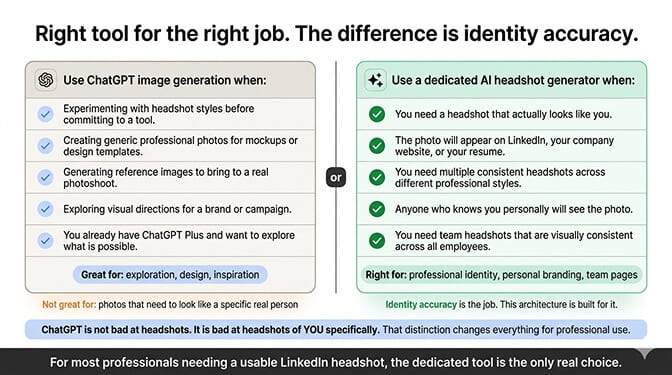
When to Use ChatGPT vs. a Dedicated AI Headshot Generator
Use ChatGPT's image generation if:
- You want to experiment with headshot styles before committing to a tool
- You need generic professional photos for mockups, templates, or design work
- You want to create reference images for a real photoshoot
- You already have ChatGPT Plus and want to play around
Use a dedicated AI headshot generator if:
- You need a headshot that actually looks like you
- The photo will appear on LinkedIn, your company website, or your resume
- You need multiple consistent headshots across different styles
- Anyone who knows you will see the photo
- You need team headshots that are visually consistent across employees
For most professionals looking for a usable LinkedIn headshot, the dedicated tool is the right choice. Not because ChatGPT is bad. Because the job requires identity accuracy, and that's the one thing ChatGPT's architecture can't deliver.
For a comprehensive comparison of how different dedicated tools stack up on pricing, quality, and features, our AI headshot generator pricing guide covers every major tool.
One Last Thing
I showed my ChatGPT-generated headshots to three coworkers. Two of them said "that's a nice photo" and then paused. The third one said what the other two were thinking:
"It looks professional. But it doesn't look like you."
That's the entire problem in one sentence.
ChatGPT can make you look professional. It just can't make you look like you. And a professional headshot that doesn't look like you is a professional photo of someone else.
Your headshot should make people recognize you, not wonder who that is.
At Headshot Photo, the AI trains specifically on your face. Every output looks like you, just in a professional setting with studio-quality lighting. Upload 8 selfies, pick your styles, and get headshots that actually represent you in about 1 hour.
Frequently Asked Questions
1. Can ChatGPT generate professional headshots?
ChatGPT can generate images that look like professional headshots, but they won't accurately represent your specific face. ChatGPT's image generation creates images from text descriptions without training on your facial features. The results look professional in terms of lighting, background, and styling, but the person in the image will not be a reliable likeness of you. For headshots that need to represent your actual appearance, a dedicated AI headshot generator that trains on your photos produces dramatically more accurate results.
2. How does ChatGPT headshot quality compare to dedicated AI headshot generators?
In terms of image quality (lighting, composition, resolution), ChatGPT's output is impressive and comparable to many dedicated tools. The critical difference is identity accuracy. Dedicated generators like Headshot Photo train a custom AI model on 8-20 photos of your face, producing headshots that are recognizably you. ChatGPT generates faces from text descriptions, meaning the output is a professional-looking stranger, not a professional-looking you.
3. What is the best ChatGPT prompt for generating a professional headshot?
Try: "Generate a professional corporate headshot with soft studio lighting, clean gray background, navy blazer, confident but approachable expression, natural skin texture, sharp focus, head and shoulders framing." Upload 2-3 reference photos of yourself alongside the prompt. This produces the best results ChatGPT can offer, though the facial identity will still not accurately match your actual appearance. For identity-accurate headshots, use a dedicated AI headshot generator instead of prompting.
4. Is it worth paying for an AI headshot generator when ChatGPT is free?
Yes, if you need a headshot that looks like you. ChatGPT Plus costs $20/month (recurring) and cannot generate your specific face. A dedicated headshot generator costs $29-59 (one-time) and produces 40-200 headshots that are trained on your actual facial features. The dedicated tool is both cheaper for this specific use case and produces dramatically better results for professional headshots. ChatGPT's image generation is valuable for many tasks, but accurate personal headshots is not one of them.
5. Is it safe to upload photos of my face to ChatGPT for headshot generation?
OpenAI's privacy policy allows uploaded images to be used for model improvement unless you opt out. ChatGPT also embeds C2PA metadata in generated images, tagging them as AI-created. Dedicated AI headshot generators typically have stricter data retention policies (many delete your photos after processing) and do not embed AI-detection metadata in outputs. If data privacy is a concern, check each platform's specific privacy policy. Headshot Photo is ISO 27001 certified and has a clear data deletion policy.
