People size you up fast. In a well-known Princeton study, participants who saw an unfamiliar face for just a tenth of a second formed impressions of trustworthiness and competence that closely matched the judgments of people given unlimited time. On LinkedIn, that tenth of a second happens every time your photo appears next to a comment, an application or a connection request.
LinkedIn's own data says profiles with a photo get up to 21 times more profile views and 9 times more connection requests than profiles without one. Having a photo is step one. Having the right LinkedIn profile picture for your field is what this guide covers.
For women, the right image goes beyond looking presentable. It should fit your industry, your role and how you want to be remembered. A creative director's photo can carry color and personality. A consultant's should signal precision. A nurse's should feel calm and kind.
Below you'll find female LinkedIn headshot examples across 10 industries, the poses and outfits that photograph best, LinkedIn's photo specs, and how to get studio-quality results from a few selfies with an AI headshot generator.
Quick answer: what makes a good LinkedIn profile picture for women?
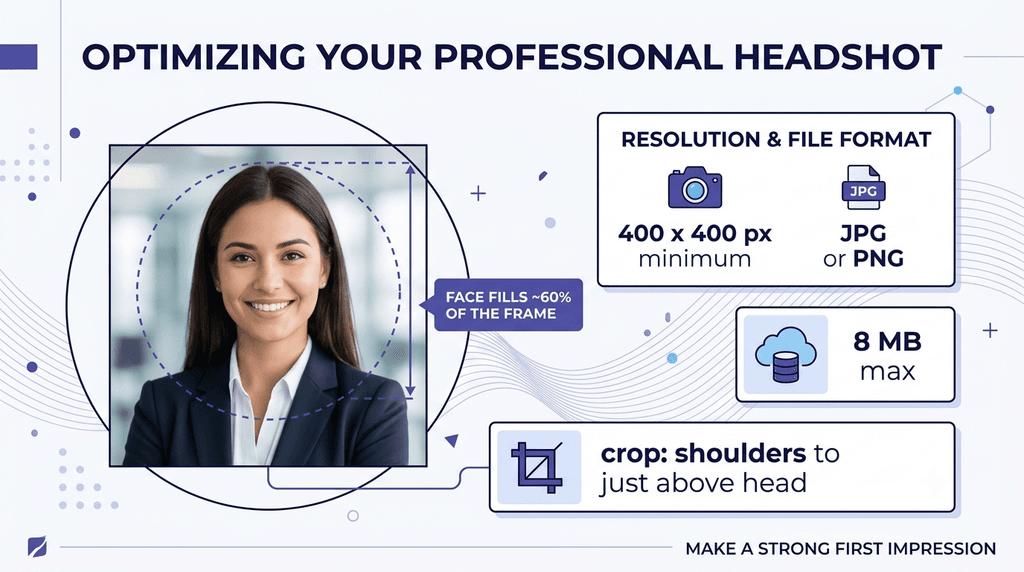
- Your face fills about 60% of the frame, cropped from the top of your shoulders to just above your head. This is LinkedIn's own framing advice.
- Soft, even light hits your face from the front, ideally from a window.
- The background is a solid color or a softly blurred office in a neutral or muted shade.
- You wear a solid-color top or blazer with a neckline that frames your face.
- You look into the lens with a relaxed smile and your shoulders turned slightly.
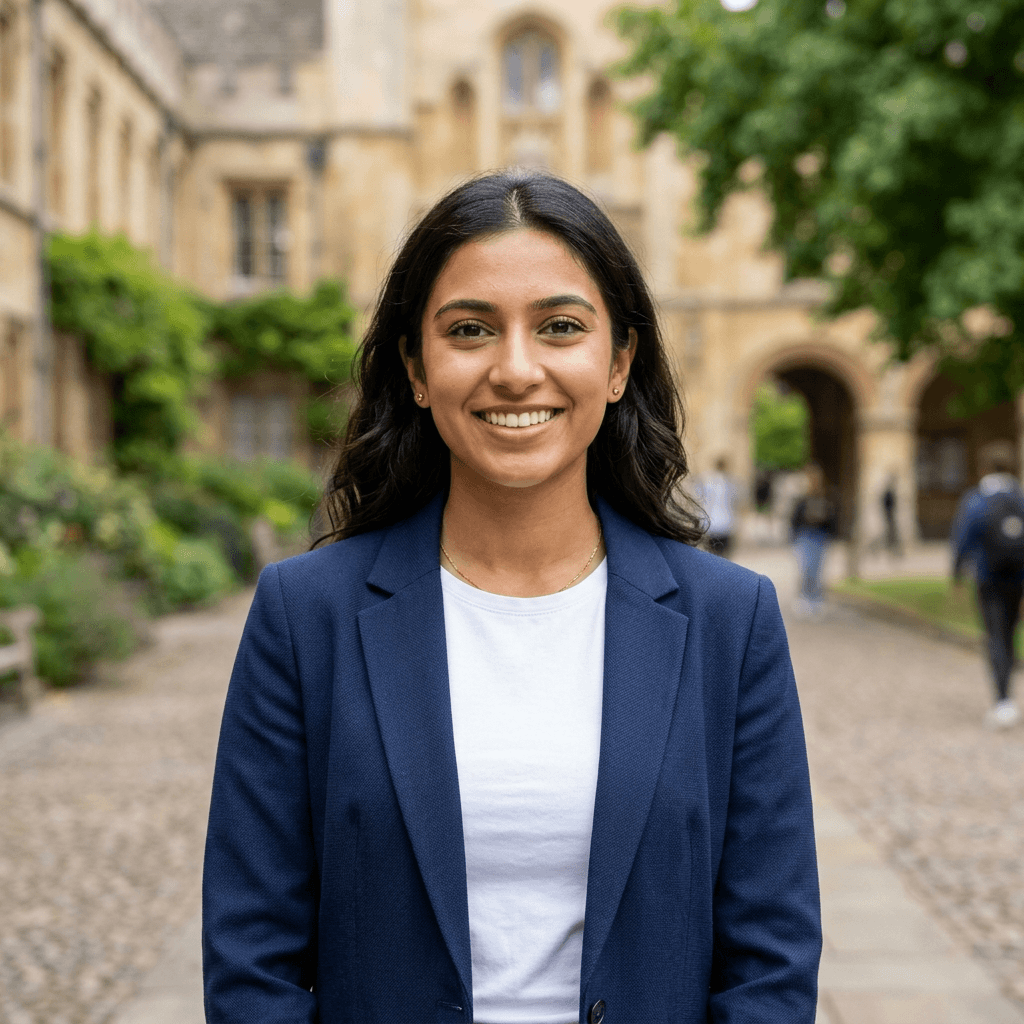
- The photo is recent, looks like you today, and is a square of at least 400 x 400 pixels.
Female LinkedIn Headshot Examples
Real, professional LinkedIn profile picture examples across industries. Every look below can be generated from a few selfies.


Get your own headshots like these
Upload a few selfies and get 40 studio-quality LinkedIn headshots from $34, delivered in as little as 1 hour depending on your plan. No photographer, no studio.
Create My Headshots →Trusted by 14,239 professionals · 100% money-back guarantee
Best Female LinkedIn Headshots: Industry-Wise Breakdown
Your headshot should speak the language of your profession before you say a word. Use the industry closest to yours as your starting point, then adjust for your role and seniority.
Once you've picked a look, a profile picture maker can crop it to LinkedIn's square frame and clean up the background.
1. Corporate and Finance
In banking, investment, accounting and executive leadership, trust and precision come first. Your photo should read as competent and in control, without looking distant. The overall look is polished and composed, with clear executive presence.
Common traits:
- Studio or clean indoor lighting
- Structured attire, like a blazer or a high-neck top
- Neutral expression or a soft, closed-mouth smile
- Minimal backgrounds such as light grey, charcoal or a blurred office
Wear: a tailored blazer in navy, charcoal or black over a solid shell. Skip: loud prints, statement earrings and very casual knits. For senior roles, see our guide to the female executive outfit for headshots.

2. Tech and Startups
Tech values agility and approachability. Whether you're an engineer, product manager or founder, your photo should feel smart but relaxed: confident in your skills and open to collaboration.
Common traits:
- Natural light or soft indoor lighting
- Smart-casual clothing like blouses, fine knits or subtle prints
- Friendly expressions or soft smiles
- Light, modern backgrounds: blurred office, soft neutrals or outdoors
Wear: a solid blouse, a fine-knit sweater or an unstructured blazer. Skip: company swag tees and hoodies unless that's how you show up to client meetings. More ideas in our business casual headshots guide.

3. Creative Industries (Design, Marketing, Writing)
Creative fields reward individuality. Your photo can show more personality and style while staying professional. A candid or expressive look often works better than a stiff studio pose.
Common traits:
- Natural or artistic lighting, studio or outdoor
- Outfits that reflect your personal style
- Open smiles or mid-laugh expressions
- Backgrounds with color, texture or real-world context
Wear: a signature color, an interesting texture or a jacket you'd wear to a pitch. Skip: costume-like styling that hides your face or needs explaining. For more, see creative professional headshots.

4. Healthcare and Wellness
Patients and peers want to feel at ease. Whether you're a clinician, nurse, therapist or wellness coach, your photo should feel calm, kind and reliable.
Common traits:
- Soft lighting, natural or diffused
- Subtle makeup and gentle expressions
- Soft neutral or white backgrounds
- Simple, tidy hair styling
Wear: a white coat or clean scrubs if you're patient-facing, or a soft solid knit for wellness roles. Skip: heavy makeup and busy clinic backgrounds. See more medical headshot examples for women.

5. Education and Non-Profit
In education and non-profit work, people look for warmth, purpose and dependability. Your photo should feel grounded and welcoming, with a straightforward setting.
Common traits:
- Soft, even lighting
- Natural or slightly formal attire
- Warm, natural smiles
- Backgrounds with subtle texture like bookshelves, light walls or outdoors
Wear: a muted blouse or cardigan in green, blue or warm neutrals. Skip: formal suits that feel stiff for classroom or community roles.

6. Legal and Consulting
Clients expect authority, logic and confidence. Whether you're a partner at a firm or an independent consultant, your photo should be sharp, composed and free of distractions.
Common traits:
- Professional studio lighting with gentle contrast
- Blazers or structured attire in solid, neutral colors
- Direct gaze with a neutral or slight smile
- Plain or dark backgrounds such as navy, charcoal or off-white
Wear: a black, navy or charcoal blazer with a simple shell. Skip: casual outdoor settings and bright prints. More detail in lawyer headshots: what to wear.

7. Real Estate, Sales and Client-Facing Roles
In sales, real estate, account management and hospitality, likability matters as much as competence. These photos are usually brighter, with open expressions and bigger smiles.
Common traits:
- Bright, natural or well-lit studio lighting
- Clean, confident outfits, often with color
- Wide smiles and open posture
- Light backgrounds such as soft white or a blurred interior
Wear: a blazer in a clear color like cobalt, emerald or red. Skip: dim lighting and serious expressions that read as cold. See real estate headshots for more.

8. Freelancers and Consultants
Freelancers often switch between client types in the same week. Your photo needs to feel polished enough for corporate clients and relaxed enough for creative work.
Common traits:
- Soft indoor natural light or a daylight studio
- Smart-casual outfits that reflect your style
- Slight head tilt or relaxed smile
- Light walls, a tidy home office or a clean outdoor setting
Wear: one solid, versatile layer (a knit or soft blazer) that works for any client. Skip: cafe shots where cups, menus or other people creep into the frame.

9. HR, Recruiting and People Teams
Recruiters and HR leaders are often the first face a candidate sees. Your photo should feel friendly and trustworthy, and it should match the professionalism you expect from candidates.
Common traits:
- Bright, even lighting
- Business casual: a blouse or soft blazer
- Warm, open smile with direct eye contact
- Softly blurred office or light neutral background
Wear: soft structure, like a knit blazer over a solid top. Skip: overly formal studio looks that feel distant to candidates. If your whole team needs matching photos, see employee onboarding photos.

10. Students and Early-Career Professionals
If you're a student, recent graduate or applying for your first role, your photo should look capable and current, not overdressed. Recruiters want to see someone ready to work.
Common traits:
- Clean, even light (a window works well)
- A simple top or blazer in a solid color
- Friendly, confident smile
- Plain light background or a softly blurred campus or office
Wear: a solid blouse or a simple blazer. Skip: cropped graduation, party or group photos. Using the same photo on applications? See our guide to the job application picture.
What Makes a Great Women's LinkedIn Headshot
Whatever your industry, the same fundamentals decide whether a photo works. Once you've found a style for your field, use these to get the shot right.
LinkedIn Photo Poses for Women
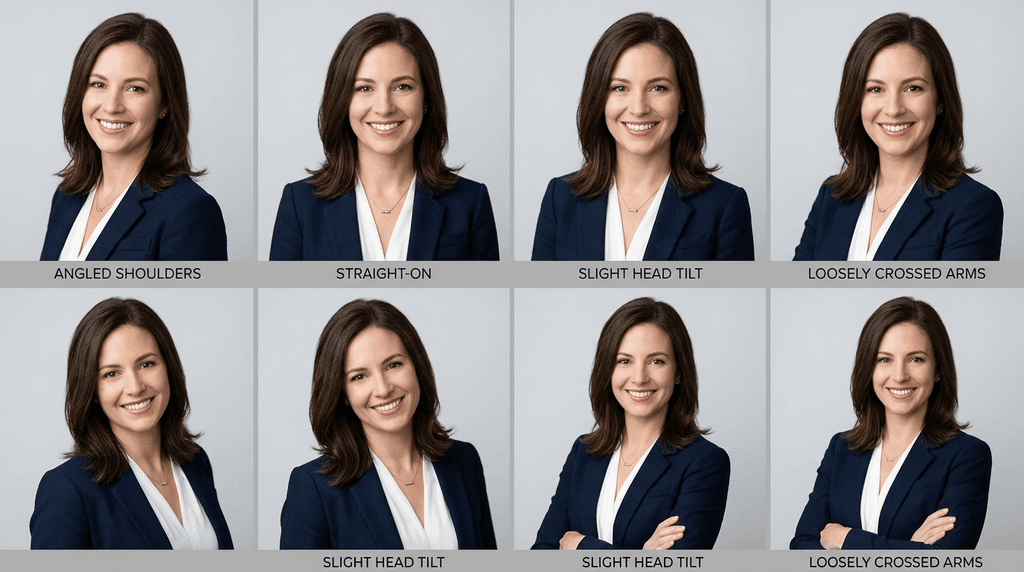
A LinkedIn photo is cropped tight, so small changes in posture show up clearly. These six poses work for almost any role:
- The angled shoulder. Turn your shoulders about 20 to 30 degrees away from the camera, then turn your face back to the lens. It adds depth and looks more relaxed than facing straight on.
- Chin forward and down. Push your chin slightly toward the camera and tip it down a touch. It defines your jawline and avoids a double chin.
- Straight-on and confident. Face the camera squarely with relaxed shoulders. It suits legal, finance and leadership roles where directness is the message.
- The slight head tilt. A small tilt reads as warm and approachable. Keep it subtle so it doesn't look playful.
- Arms crossed (loosely). Works for executives and founders when the crop includes your upper arms. Keep the arms soft, not tight across the chest.
- Seated and leaning in. Sit on the front edge of a chair and lean slightly forward. It looks engaged and keeps your posture upright.
Whatever pose you choose, keep your back straight and drop your shoulders away from your ears. For more options, see our guide to female headshot poses.
Backgrounds
Your background should support you, not compete with you. Solid neutrals like white, light grey, soft blue or warm beige keep the focus on your face. If you want more character, a softly blurred office, bookshelf or greenery works, as long as nothing sharp or bright sits behind your head.
Two checks before you upload: the background shouldn't match your hair or outfit so closely that you blend in, and it should still look clean when LinkedIn crops it into a small circle. See our best headshot background colors for a full color guide.
Outfits, Colors and Necklines
Solid colors beat busy patterns because they keep attention on your face. Jewel tones like emerald, sapphire and plum flatter most skin tones. Navy, charcoal and black project authority. Above all, make sure everything fits well across the shoulders.
The neckline matters more than people expect, because the crop stops just below it:
- V-neck and scoop necks lengthen the neck and suit most face shapes.
- Crew and high necks look sharp and modern, especially under a blazer.
- Collared shirts read as classic and formal, which suits finance and law.
- Avoid strapless or very low necklines. In a tight crop they can look like you're wearing nothing at all.
For full outfit ideas, read what to wear for professional headshots (female) and the best color to wear for a headshot.
Hair, Makeup, Glasses and Accessories
- Hair: style it the way you wear it to work. Smooth flyaways and keep hair from covering your eyes. Not sure whether to wear it up or down? See hair up or down for headshots.
- Makeup: go slightly more defined than everyday, with a matte base to cut shine. Defined brows and lashes help your eyes read at thumbnail size. Our eye makeup for headshots guide has step-by-step looks.
- Glasses: if you wear them daily, wear them in your photo so people recognize you. Tilt the frames slightly down to reduce glare.
- Jewelry: one simple piece, like studs or a fine necklace. Large or moving pieces pull focus.
- Cultural and religious attire: a hijab, saree, kurta, headwrap or other traditional wear is completely professional on LinkedIn. Neat styling and solid colors work best. See professional headshots with a hijab.
Expression
A natural smile that reaches your eyes is your most powerful tool. Think of something that makes you laugh just before the shot, and look into the lens rather than at the screen. If a big smile isn't you, a relaxed closed-mouth smile with soft eyes works just as well.
Lighting
Soft, even light flatters every skin tone and smooths harsh shadows. Face a window for indoor shots, or stand in open shade on a bright day outside. Skip the on-camera flash, which adds shine and flattens your features. If you're working on fine lines, see our guide to headshots for women over 50.
LinkedIn Profile Picture Size and Crop
LinkedIn shows your photo as a small circle in feeds, comments and search results, so framing matters as much as quality.
| Setting | What to use |
|---|---|
| Minimum size | 400 x 400 pixels |
| Upload size | A square around 800 x 800 to 1,000 x 1,000 pixels keeps it sharp on high-resolution screens |
| File type | JPG or PNG |
| Maximum file size | 8 MB |
| Shape | Square, displayed as a circle |
| Framing | Face fills about 60% of the frame, cropped from the top of your shoulders to just above your head |
| Banner (cover image) | 1,584 x 396 pixels |
Two settings are worth checking after you upload. First, keep your face centered so the circle crop doesn't cut off your hair or chin. Second, open your profile photo visibility setting and choose "All LinkedIn members" or "Public" so recruiters outside your network can see it. Need exact pixel sizes for other platforms? See professional headshot dimensions.
Common LinkedIn Photo Mistakes Women Should Avoid
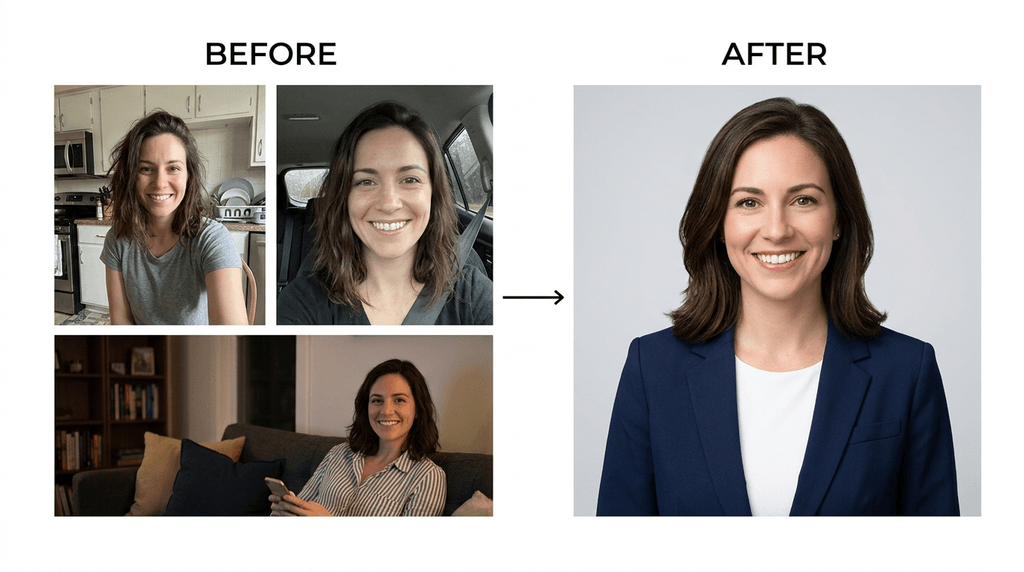
- Cropping yourself out of a group or event photo. A stray shoulder or half a face next to yours is easy to spot.
- An outdated photo. If your hair, glasses or face have changed, update it. People should recognize you on a video call.
- Sunglasses, hats or heavy filters. Anything that hides your eyes or changes your skin reduces trust.
- Selfie distortion. An arm's-length phone camera makes your nose look larger and your face rounder. Use a timer and stand a few feet back.
- Busy or bright backgrounds. Patterned walls, windows behind you or other people pull focus.
- Wedding, party or vacation shots. Great photos, wrong context.
- Low resolution. A blurry photo reads as careless, even if you look great in it.
Match Your Photo to Your LinkedIn Banner
Your profile photo sits on top of your banner, so the two should work together. Pick a banner color that contrasts with your photo's background, keep text away from the lower-left corner where your photo overlaps it, and use the space to say what you do. Need ideas? See our LinkedIn cover photo quotes.
AI LinkedIn Headshots for Women: What's Allowed and What Works
You can use an AI headshot on LinkedIn, as long as it looks like you. LinkedIn's Professional Community Policies ask members not to use any image that doesn't look like them as a profile photo. LinkedIn has also confirmed publicly that members can enhance or create profile photos with AI, but the photo must reflect their likeness.
In practice, that gives you three simple rules:
- Pick results that look like you on a good day. Same face shape, skin tone, features and age.
- Don't let AI change who you are. Slimmer faces, new eye colors or heavy skin smoothing cross the line from polishing to misrepresenting.
- Be ready for a video call. If someone would be surprised when they meet you, choose a different image.
For the full picture, read LinkedIn's AI headshot policy and can employers tell if a headshot is AI.
General AI image tools vs a dedicated headshot generator
Many women now paste a selfie into a general AI image tool with a prompt like this one:
Using my uploaded selfie, keep my facial features exactly the same. Create a photorealistic LinkedIn headshot: head-and-shoulders crop, navy blazer over a cream top, light grey studio background, soft front lighting, relaxed confident smile, square format.
This can work for a single image. The weak spots are consistency and likeness: each new prompt can shift your features slightly, and getting a set of outfits and backgrounds to match takes a lot of trial and error. See our AI headshot prompt guide if you want to go that route.
A dedicated generator like Headshot Photo works differently. You upload a few selfies once, pick the styles for your industry, and get a full set of 40 to 100 headshots across up to 10 backgrounds and 10 clothing styles. That gives you matching photos for LinkedIn, your resume, your company website and your email signature, plus edit credits to fine-tune your favorites. Uploads are deleted within 7 days, and you own your final images.
Wrapping Up
The best LinkedIn headshot for a woman isn't one universal look. It's the version of you your industry expects to trust: structured and composed in finance and law, warm and bright in sales and healthcare, expressive in creative work. Get the fundamentals right (light, framing, a clean background, a solid outfit), then let your field decide the rest.
You don't need to book a studio to get there. With Headshot Photo, you upload a few selfies and get a full set of industry-ready headshots, so you can pick the one that fits your profile, your resume and your company page.
Get your LinkedIn headshot with Headshot Photo
40 to 100 studio-quality headshots from a few selfies, ready in as little as 1 hour. One-time payment, money-back guarantee.
Create My Headshots →See pricing · Trusted by 14,239 professionals · 100% money-back guarantee
FAQs
1. What are the best LinkedIn headshots for women?
The best LinkedIn headshots for women are clear, recent head-and-shoulders photos that match the tone of their industry. They use soft light, a clean background and a solid outfit, with the face filling about 60% of the frame.
2. Do headshot styles really differ by industry?
Yes. A lawyer's photo should project authority with a dark backdrop and a direct gaze, while a designer's can show more color and personality. Matching your photo to your field helps people trust you faster.
3. Can I use an AI-generated headshot on LinkedIn?
Yes, as long as it looks like you. LinkedIn's policies require your profile photo to reflect your likeness, so choose AI results that keep your real features, skin tone and age. Avoid images that change how you look in ways that would surprise someone meeting you in person.
4. Can you make a LinkedIn headshot from a selfie?
Yes. With an AI headshot generator, you upload a few regular selfies and get professional headshots with realistic lighting, backgrounds and outfits. It's faster than booking a photographer and lets you compare several looks before choosing.
5. Should I smile in a LinkedIn headshot?
Usually, yes. A natural smile that reaches your eyes makes you look approachable. If a big smile doesn't feel like you, a relaxed closed-mouth smile with soft eyes works just as well.
6. What size should a LinkedIn profile picture be?
Upload a square JPG or PNG of at least 400 x 400 pixels and under 8 MB. A square around 800 x 800 to 1,000 x 1,000 pixels stays sharp on high-resolution screens.
7. What should a woman wear for a LinkedIn photo?
Wear a solid-color top or blazer that fits well, in a shade that suits your skin tone. V-necks, crew necks and collared shirts photograph best. Skip loud prints, logos and very low necklines.
8. What is the best background for a LinkedIn profile picture?
A plain or softly blurred background in white, light grey, soft blue or warm beige keeps the focus on your face. A blurred office or greenery works too, as long as it's uncluttered.
9. How often should I update my LinkedIn photo?
Update it whenever your appearance changes noticeably, such as a new haircut, new glasses or a change in role. As a rule of thumb, refresh it every two to three years so it still looks like you.
10. Can I wear a hijab or traditional clothing in my LinkedIn photo?
Yes. A hijab, saree, kurta, headwrap or other cultural or religious attire is fully professional on LinkedIn. Neat styling, solid colors and good light matter far more than the type of outfit.