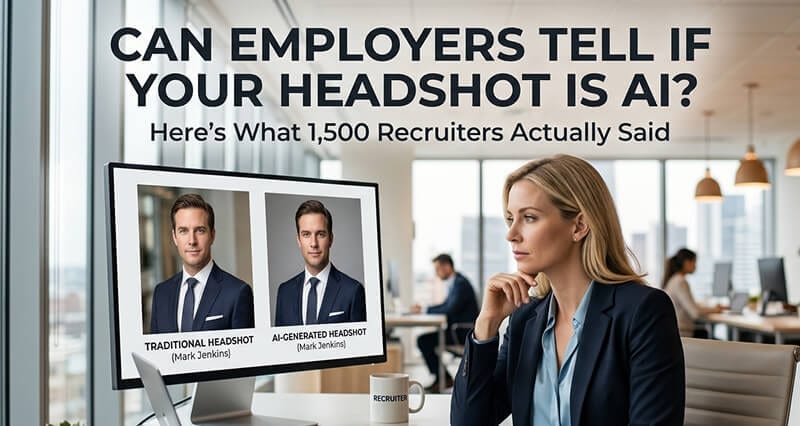
The short answer is no. But the longer answer is more interesting, and more useful, than you'd expect.
A friend of mine is a senior recruiter at a Series C startup. She reviews about 200 LinkedIn profiles a week.
Last month I showed her ten professional headshots and asked her to guess which ones were AI-generated and which were taken by a photographer.
She got four out of ten right.
Four.
"That's worse than flipping a coin," I told her.
She stared at the photos again. "I would have bet money that number six was real. The lighting on the left side of his face was so natural."
Number six was AI.
The anxiety around AI headshots is almost always bigger than the actual risk. But I understand why you're searching for this. You're thinking about using an AI headshot (or you already have one) and there's a voice in the back of your head saying: What if they can tell? What if it looks fake? What if it costs me the job?
Let me walk you through what actually happens when employers look at your headshot, what the research says, and what specific things actually give away a bad AI photo.
The Data: Recruiters Are Basically Guessing
This isn't speculation. Multiple studies have tested this directly.
A 2024 study by Ringover surveyed over 1,000 recruiters and hiring managers, showing them a mix of AI-generated and traditional headshots and asking them to identify which was which. Recruiters correctly identified AI headshots only 40% of the time. That's below random chance. Even more interesting: 76.5% of recruiters actually preferred the AI headshots when evaluating them on professionalism and approachability.
A separate survey of 500 hiring professionals by FotosDePerfi found a similar number: only 38% correctly identified AI headshots. When recruiters were "confident" in their identification, they were still wrong 41% of the time.
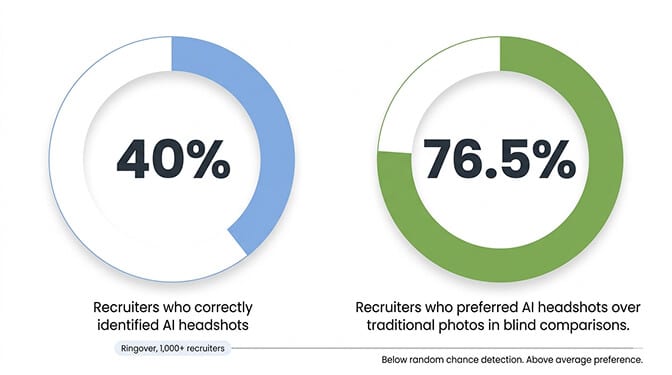
The bottom line: when shown high-quality AI headshots, recruiters perform worse than a coin flip at detecting them. And when they can't tell, they actually prefer the AI versions.
Stay with me here, because the nuance matters.
What Actually Gives Away a Bad AI Headshot
The studies above tested high-quality AI headshots. The emphasis on "high-quality" is important because not all AI headshots are created equal. Bad AI headshots are detectable. Good ones aren't.
Here are the specific tells that recruiters and employers actually notice:
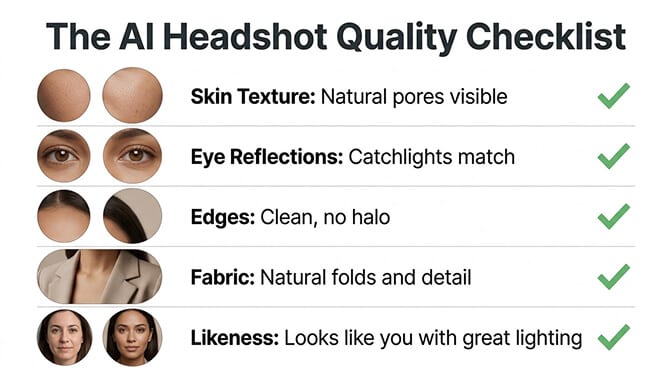
Overly smooth skin. This is the number one giveaway. Cheap AI tools remove all natural skin texture, pores, freckles, and fine lines. The result looks like a wax figure. Real skin has texture. Professional photography captures it. Good AI preserves it. Bad AI erases it.
Unnatural eye reflections. In a real photo, the catchlight in each eye (the small white reflection of the light source) is consistent between both eyes and matches the lighting direction. Bad AI sometimes generates mismatched or physically impossible catchlights, or eyes that seem lit from different directions.
Background inconsistencies. Look at where your body meets the background. Bad AI creates a subtle "glow" or halo around the edges of hair and shoulders, or produces background blur that doesn't follow real optical physics. It's subtle, but people who look at hundreds of photos (like recruiters) develop a subconscious sense that something is off.
Weird fabric rendering. Collar folds, tie knots, and blazer lapels are complex shapes. Cheap AI tools sometimes produce clothing that looks slightly melted or asymmetrical in ways that real fabric never does. Buttons might be inconsistent. Collar points might not match.
Too perfect symmetry. Real faces are slightly asymmetrical. That asymmetry is part of what makes a face look human. Some AI tools produce faces that are too symmetrical, creating an uncanny valley effect even when every individual feature looks realistic.
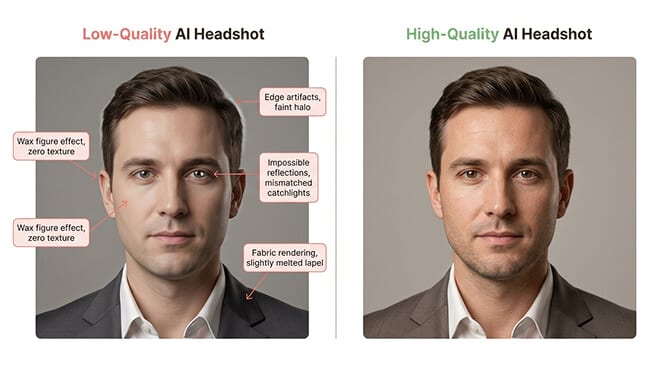
The pattern is clear: the tells that give away AI headshots are all artifacts of low-quality generation. They're not inherent to AI technology. They're inherent to bad AI tools.
This matters because the question isn't really "can employers tell if it's AI?" The question is: "Is the specific AI tool you used good enough that there's nothing to detect?"
For a deeper look at what makes a good professional headshot in any context, our guide to good headshot examples shows what quality output looks like across industries.
Do Employers Actually Care?
Here's the part nobody tells you.
Even when recruiters DO identify an AI headshot, most of them don't care. Not in the way you're afraid they will.
The FotosDePerfi survey found that 82% of recruiters said candidates do NOT need to disclose that their headshot is AI-generated. Their reasoning was practical: you don't disclose what camera your photographer used, what editing software processed the image, or whether you got a haircut specifically for the photo. The tool that created the image isn't relevant to the hiring decision.
The 18% who preferred disclosure weren't necessarily opposed to AI headshots. Even within that group, 73% said non-disclosure wouldn't negatively impact their candidate evaluation.
The real concern isn't AI. It's authenticity.
Recruiters care about one thing when they look at your headshot: Does this person look like someone I'd want to interview? Followed immediately by: When they walk into the interview, will they look like their photo?
That second question is the one that actually matters. A recruiter who sees a polished headshot and meets someone who looks completely different will feel misled, regardless of whether the headshot was AI or from a photographer who used heavy retouching.
The standard is the same for AI and traditional photography: your headshot should look like you on a good day. Same face. Same general appearance. Just with better lighting and a cleaner background than your bathroom mirror provides.
A 2024 SHRM study found that 66% of HR professionals already use AI to write job descriptions and 44% use AI for resume screening. When AI is already on both sides of the hiring process, concerns about AI in a profile photo feel increasingly arbitrary.
LinkedIn's Actual Policy
Since most professional headshot anxiety centers on LinkedIn, let's be specific about what the platform actually says.
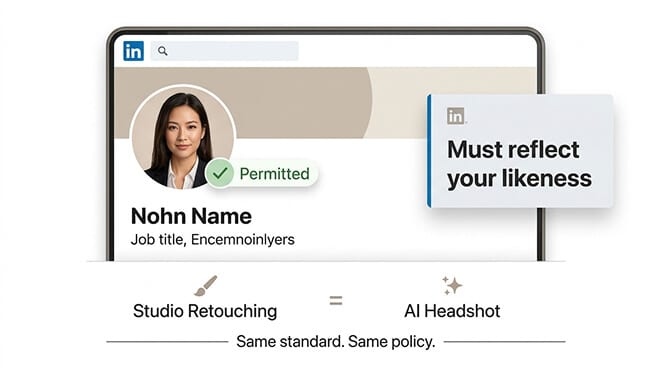
LinkedIn's policy permits AI-enhanced profile photos provided they "reflect your likeness." That's the standard: the photo must look like you. It doesn't need to be a literal unedited photograph of you.
This is the same standard that applies to professionally retouched studio photography, which has been used on LinkedIn since the platform launched. A photographer who smooths your skin, removes blemishes, and adjusts lighting is also creating an image that isn't a literal representation of what their camera captured. The distinction between "AI-generated" and "professionally retouched" is increasingly meaningless from a visual output perspective.
LinkedIn has not banned AI headshots. They reserve the right to remove photos that violate community policies, but that applies to all photos, not specifically AI ones.
The Real Risk Assessment
Let's be honest about the actual risk calculus.
Risk of using a high-quality AI headshot: Minimal. Recruiters can't reliably detect them. The majority don't care. LinkedIn permits them. The image looks professional and current.
Risk of using a bad AI headshot: Moderate. Overly smooth skin, weird artifacts, and uncanny valley effects DO get noticed, and they create a negative impression. Not because the recruiter identified it as AI, but because the photo looks off in a way that's hard to articulate but easy to feel.
Risk of using no professional headshot: High. LinkedIn profiles without photos receive 21x fewer views. Recruiters have told 71% of candidates they've been passed over partly due to poor profile photos. An empty or amateur photo slot costs you visibility every single day.
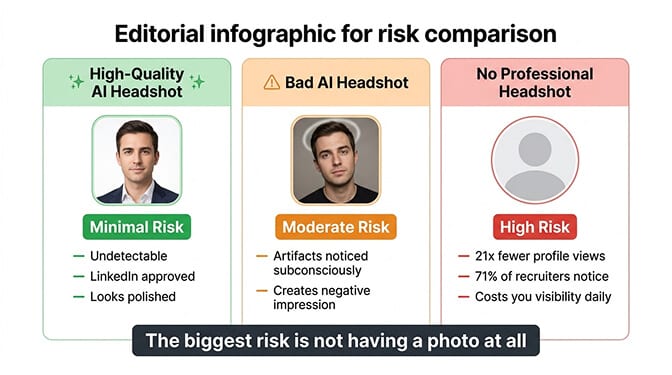
The irony: the people most worried about being "caught" with an AI headshot are dramatically underestimating the cost of NOT having a professional headshot at all. A good AI headshot is infinitely better than no headshot.
At Headshot Photo, the AI is specifically trained to preserve natural skin texture, generate physically accurate lighting, and avoid the common artifacts that make cheap AI headshots detectable. Upload a few selfies, get studio-quality results in minutes. The output is designed to be indistinguishable from professional photography because that's the entire point.
How to Make Sure YOUR AI Headshot Is Undetectable
If you're going to use an AI headshot, do it right. Here's how to avoid the tells:
Upload high-quality reference photos. The AI can only work with what you give it. Well-lit, clear, recent selfies from multiple angles produce dramatically better results than dark, blurry, filtered photos. Our guide to AI headshot styles covers what to look for in your input photos.
Choose a platform that preserves skin texture. Our best AI headshot generators guide ranks tools by realism. Zoom in on the output. Can you see pores? Fine lines? Natural skin variation? If the skin looks like smooth plastic, the tool isn't good enough. Move on.
Check the eyes. The catchlights (white reflections) should match in both eyes and be consistent with the direction the face is lit from. If one eye has a reflection at 2 o'clock and the other at 10 o'clock, that's a tell.
Inspect edges carefully. Look where hair meets background and where clothing meets background. Any glow, halo, or unnatural blur at the edges is a dead giveaway. Clean edges with natural falloff are what you want.
Compare it to your actual face. Show the headshot to someone who knows you well. If they say "that looks like you, just with really good lighting," you're fine. If they say "that looks like a different person," the AI went too far.
Pick the right context. An AI headshot works perfectly for LinkedIn, company directories, email signatures, conference bios, and anywhere your photo appears at thumbnail size. For executive editorial portraits that appear in press coverage at full page size, consider a traditional photographer.
One Last Thing
My recruiter friend? After our little experiment, she told me something that stuck with me.
"I look at 200 profiles a week. You know what I actually notice? Not whether the photo is AI or real. I notice when someone doesn't have a professional photo at all. I notice when the photo is clearly 10 years old. I notice when someone used a vacation selfie with a cocktail cropped out."
She paused.
"Nobody has ever lost a job because their headshot was 'too professional.' But people lose opportunities every day because their photo doesn't look professional enough."
That's the real takeaway. Employers aren't running forensic analysis on your headshot. They're making a split-second judgment: Does this person look professional? Do they look current? Do they look like someone worth talking to?
If your headshot answers yes to all three, nobody cares how it was made.
Get the headshot. Make it good. Stop worrying.
At Headshot Photo, you can generate professional headshots from casual selfies in about 1 hour. Studio-quality lighting, natural skin texture, clean backgrounds. The kind of output that passes recruiter scrutiny because it was built to meet the same standard as professional photography.
For more guidance on making sure your headshot matches what recruiters expect, our professional headshot examples that get you hired guide covers what works across industries.
Frequently Asked Questions
1. Can employers actually tell if a headshot is AI-generated?
In most cases, no. Research shows recruiters correctly identify AI headshots only 38-40% of the time, which is worse than random guessing. The detection rate applies specifically to high-quality AI headshots. Low-quality AI with overly smooth skin, unnatural eye reflections, or background artifacts is more detectable. The quality of the AI tool matters more than whether AI was used.
2. How do AI headshots compare to traditional photographer headshots in recruiter perception?
In blind comparisons, recruiters actually prefer AI headshots. The Ringover study found 76.5% of recruiters favored AI-generated photos over traditional photography when evaluating professionalism and approachability. This is likely because good AI tools produce consistently optimal lighting and framing, while traditional photography varies based on the photographer's skill and the subject's comfort level.
3. How do I make sure my AI headshot looks natural and undetectable?
Upload high-quality, well-lit reference photos from multiple angles. Choose an AI platform that preserves natural skin texture (check for visible pores and fine lines). Inspect the output for matching eye reflections, clean edges where hair meets background, and realistic clothing details. Show the result to someone who knows you. If they say "that looks like you with great lighting," the headshot is ready.
4. Is it worth using an AI headshot instead of hiring a photographer?
For standard professional uses (LinkedIn, company directories, email signatures), AI headshots offer comparable quality at $29-$50 versus $150-$500+ for a photographer. The time savings are significant: 1 hour versus scheduling, traveling, and waiting for edited results. For executive editorial portraits or situations requiring specific physical environments, a photographer still adds value. For everything else, AI is the practical choice.
5. Are AI headshots acceptable for LinkedIn and job applications?
Yes. LinkedIn's policy permits AI-enhanced photos provided they "reflect your likeness." No major hiring platform prohibits AI headshots. 82% of recruiters in surveys say candidates don't need to disclose AI usage. The professional standard is the same regardless of method: your headshot should look like you, appear current, and present you professionally. How the image was created is not something employers evaluate.
