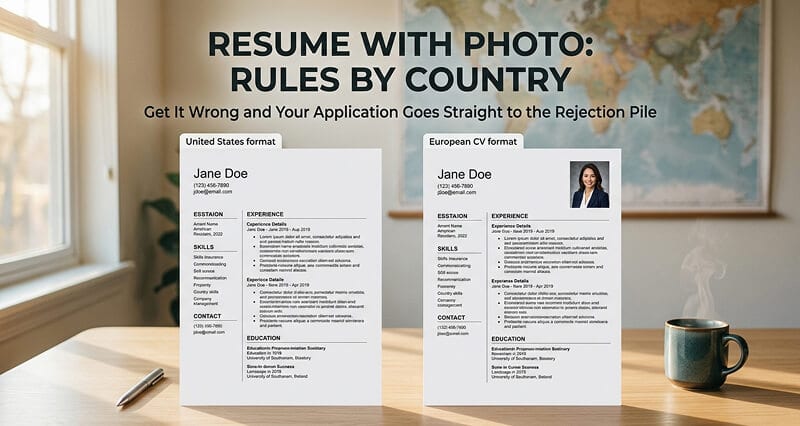
The rules change depending on where you're applying. Get it wrong and your resume goes straight to the rejection pile. Here's everything you need to know.
A software engineer I know applied for a job in Berlin last year. She had a stellar resume. Great experience. Strong portfolio. She submitted it without a photo.
She didn't get a callback.
When she asked a German colleague what happened, he looked at her resume and immediately said: "Where's your photo? In Germany, this looks incomplete."
Six months later, a friend in San Francisco told her the opposite story. He'd applied to a U.S. tech company with a photo on his resume (he'd been living in Japan where it's required). The recruiter told him, politely, that including a photo was a red flag in the American hiring process.
Same resume. Same qualifications. One country wants the photo. Another country sees it as a problem.
This is the confusion that drives people to search "resume with photo" at 2 AM before a deadline. The answer isn't yes or no. It's: where are you applying?
Let me clear this up completely.
The Country-by-Country Rules (The Quick Reference)
Here's what you actually need to know, organized by what each market expects:
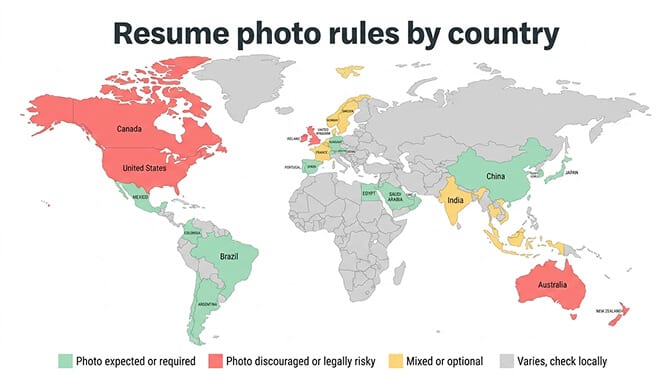
Photo Expected or Required
Germany and Austria: A professional photo on your CV is still standard practice and strongly expected. Submitting without one may signal that you don't understand local norms. Use a passport-style professional headshot, head and shoulders, clean background, business attire.
Spain: Photos on CVs remain common and expected. A clean professional headshot in the upper corner is standard.
China: You'll typically submit two resume versions (Chinese and English), and both should include a professional headshot. This is standard practice across industries.
Japan: The traditional resume format (rirekisho) requires a passport-sized photo. This is non-negotiable for most Japanese employers.
South Korea: Photos are standard on Korean resumes (iryeokseo). Professional presentation is deeply valued in Korean hiring culture, and the photo is part of that expectation.
Most of Latin America: Countries including Brazil, Mexico, Argentina, and Colombia generally expect photos on resumes. A clean professional headshot is standard.
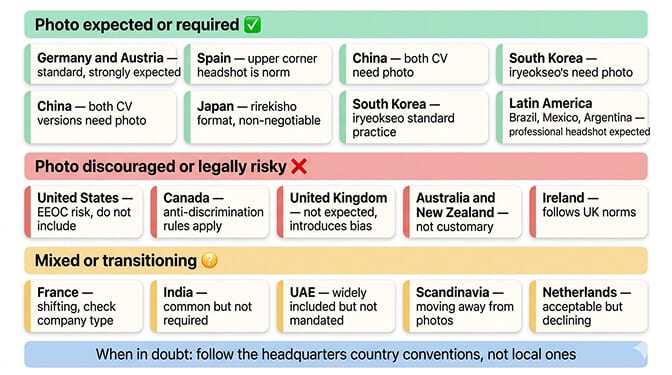
Photo Discouraged or Risky
United States: Do not include a photo. The U.S. Equal Employment Opportunity Commission (EEOC) discourages employers from requesting photos because they can trigger discrimination based on race, gender, age, or appearance. Including one can flag your resume as a liability risk for the company.
Canada: Similar anti-discrimination rules apply. Photos on resumes are discouraged and may be viewed negatively by hiring managers.
United Kingdom: Photos are not expected and are generally discouraged. UK employers focus on skills and qualifications, and a photo may introduce unconscious bias.
Australia and New Zealand: Photos are not customary and are discouraged by most hiring practices.
Ireland: Follows UK norms. No photo expected.
Mixed or Transitioning
France: Historically expected, but shifting. Many French companies now accept resumes without photos, especially multinational firms. Include one if the job posting requests it or if you're applying to a traditional French company. Skip it for international firms based in France.
India: Not strictly required, but commonly included. A passport-sized professional photo is the norm when included.
UAE and Gulf States: Not officially required, but widely included. Most candidates add a professional headshot to their CV.
Scandinavia (Sweden, Norway, Denmark, Finland): Increasingly moving away from photos. International companies operating in these countries generally prefer no photo.
Netherlands: Photos are becoming less common, but still acceptable.
The universal rule: when in doubt, check the specific company's norms. If applying to a foreign company based in another country, follow the headquarters country's conventions, not the local ones.
What Your Resume Photo Should Actually Look Like
If you're in a country where a photo is expected, the photo quality matters enormously. A bad resume photo is worse than no photo at all.
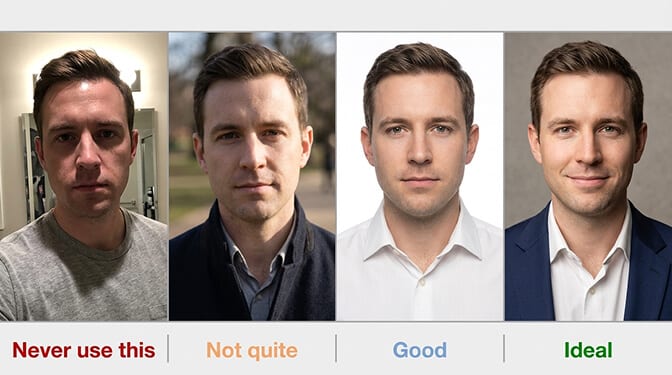
Background: Clean and neutral. White, light gray, or soft blue. No patterns, no outdoor backgrounds, no office environments. The background should be invisible: it frames your face without drawing attention.
Framing: Head and shoulders. Your face should occupy approximately 60-70% of the image. Not a full body shot. Not just your face cropped to the eyebrows. Standard portrait framing.
Expression: Professional and approachable. A slight, natural smile with engaged eyes. Not a grin. Not stone-faced. Think: "I'm someone you'd want to work with."
Attire: Business appropriate for your industry. Solid colors photograph best. What you'd wear to an interview at the company you're applying to.
Technical specs:
- Size: Typically 2x2 inches (5x5 cm) or passport-size (35x45 mm depending on country)
- Resolution: At least 300 DPI for print resumes, 150+ DPI for digital
- Format: JPEG or PNG
- File size: Under 1MB if embedding in a digital resume
The photo should look current. If you've changed significantly in appearance since the photo was taken (new glasses, different hairstyle, significant weight change), update it. A resume photo from 5 years ago creates a disconnect at the interview stage.
For guidance on expressions and angles that work well in tight portrait framing, our guide to model headshot examples covers what makes a compelling close-up photo.
Where to Place the Photo on Your Resume
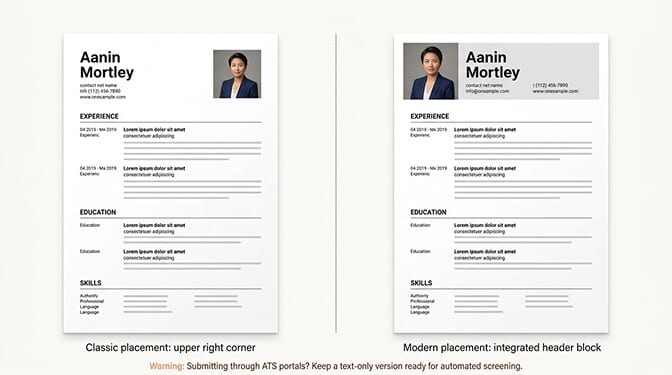
Standard placement: Upper right corner of the first page. This is the convention in Germany, Austria, Spain, and most of Europe. The photo should be small enough that it doesn't dominate the layout (roughly 5-10% of page space) but large enough to be clear.
Alternative placement: Upper left corner, integrated into the header. Some modern CV templates place the photo alongside the name and contact information in a unified header block. This works well in countries where the photo is expected as part of a modern format.
Size on the page: Approximately 2-3 cm wide by 3-4 cm tall for a standard A4 resume. Large enough to see clearly but not so large it competes with your content.
The ATS warning: Many large companies use Applicant Tracking Systems (ATS) that scan resumes automatically. Most ATS are optimized for text-only documents. Images can confuse these systems, potentially causing your resume to be misread or rejected before a human ever sees it.
The practical solution: If you're submitting through a large job portal or ATS, consider submitting a text-only version of your resume for the automated screening AND having a photo version ready for direct emails, PDF submissions, and any stage where a human reviews your application.
How to Get a Professional Resume Photo (Without Booking a Studio)
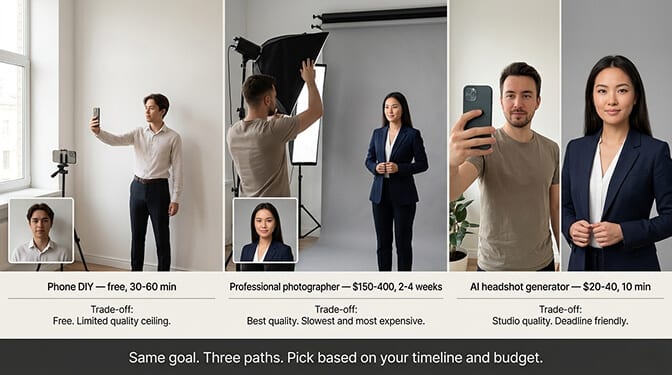
This is where most people get stuck. You need a professional photo. You need it now. You don't have a photographer booked. You don't have $300 for a studio session. You have a deadline.
Here are your realistic options:
Phone DIY (Free, 30-60 minutes): Find a plain white wall, face a large window for natural light, use the rear camera on a timer or ask a friend to help. Take 50+ shots and pick the best one. Crop to head-and-shoulders. This works in a pinch but the quality ceiling is limited.
Professional photographer ($150-$400, 2-4 weeks): The highest quality option but the slowest and most expensive. Book a studio session, get 2-3 retouched images, wait for delivery. Not practical if your deadline is tomorrow.
AI headshot generator ($20-$40, 1 hour): Upload casual selfies, receive studio-quality professional headshots with clean backgrounds and proper lighting. The output is specifically designed for professional contexts like resumes, LinkedIn, and company directories.
At Headshot Photo, you can upload a few selfies and get a polished, resume-ready headshot with a clean neutral background in about 1 hour. The AI handles the lighting, background, and professional polish automatically. For job seekers on a deadline, it's the fastest path from "I need a photo" to "done."
The Mistakes That Get Resumes Rejected
Even in countries where photos are expected, these specific errors will hurt you:
Selfies. Even well-lit selfies look like selfies. The slight angle, the arm crop, the front-camera softness. Recruiters notice.
Cropped group photos. Someone else's shoulder is always visible. The lighting doesn't match professional standards. It signals "I didn't prepare."
Old photos. If you walk into the interview and the hiring manager doesn't recognize you from your resume photo, you've already created a trust problem.
Heavy filters or retouching. Your resume photo should look like you, not a smoothed, filtered, idealized version of you. Natural skin texture, realistic lighting, genuine expression.
Casual clothing. A resume photo in a t-shirt or casual top looks out of place on a formal document. Dress for the interview.
Distracting backgrounds. A bookshelf, a restaurant, a beach. The background should be invisible. Neutral and clean, nothing else.
One Last Thing
That software engineer who didn't get a callback in Berlin? She got an AI headshot, added it to her CV, and reapplied to the same company two months later.
She got the interview.
She got the job.
The resume was identical. The qualifications were identical. The only difference was a small, clean, professional photo in the upper right corner that told the German hiring manager: This person understands how things work here.
A resume photo isn't about vanity. In countries where it's expected, it's about cultural literacy. It tells the employer you've done your homework. You understand their norms. You respect their process.
And in countries where it's not expected? Leave it off. That's cultural literacy too.
Know the rules. Follow them. And make sure the photo is one you're proud of.
At Headshot Photo, job seekers get professional, resume-ready headshots from casual selfies in minutes. Clean background, proper lighting, natural expression. Whether your resume needs a photo depends on the country. Whether your photo looks professional depends on you.
For more on making your professional photo work across platforms beyond just your resume, our guide to AI LinkedIn photo tools covers how to optimize for the platform that matters most.
Frequently Asked Questions
What is a resume with photo and when should you use one?
A resume with photo is a CV that includes a small professional headshot, typically placed in the upper right corner of the first page. You should use one when applying for jobs in countries where it's expected (Germany, Austria, Spain, China, Japan, South Korea, most of Latin America) or when the job posting specifically requests one. In the U.S., UK, Canada, and Australia, photos on resumes are discouraged and may hurt your application.
How does a resume photo compare to a LinkedIn headshot in terms of requirements?
Resume photos are typically smaller (passport-sized, around 2x2 inches), use a neutral white or gray background, and follow a more formal standard than LinkedIn headshots. LinkedIn allows slightly more personality (warmer expressions, varied backgrounds). However, the core requirements are the same: professional attire, clean framing, good lighting, and a natural expression. A single high-quality AI headshot can work for both contexts with minor cropping adjustments.
How do I add a professional photo to my resume?
In Microsoft Word: Insert > Pictures, select your headshot, then resize to approximately 2-3 cm wide. Use "In Front of Text" wrapping to position it in the upper right corner. In Google Docs: Insert > Image > Upload from computer, then drag to position. In resume builders (Resume.io, NovoResume): use templates that include a photo placeholder and upload directly. Always save as PDF to preserve formatting across devices.
Is it worth paying for a professional resume photo?
Yes, especially if you're applying in countries where photos are expected. A bad resume photo (selfie, poor lighting, casual attire) actively hurts your application. Professional options range from $29 for an AI headshot generator like Headshot Photo to $150-$400 for a traditional photographer. For most job seekers, the AI option provides comparable quality at a fraction of the cost and time.
Will a photo on my resume cause problems with ATS (Applicant Tracking Systems)?
It can. Most ATS are designed to parse text, and embedded images may cause formatting errors or be stripped out entirely. If submitting through an online job portal, consider using a text-only version of your resume. For direct email submissions, PDF attachments, and any human-reviewed stage, include the photo. Having both versions ready is the safest approach for international job seekers.
