
The no-panic guide for professionals who need a headshot yesterday, without booking a photographer, buying a ring light, or begging a friend.
It was 9:47 PM on a Sunday.
I was finishing a job application for a role I really wanted. Resume polished. Cover letter sharp. References lined up.
Then I hit the final field: "Upload a professional headshot."
I stared at my phone's camera roll. A blurry photo from a friend's wedding. A selfie with sunglasses at the beach. A group shot where I'd been cropped so aggressively you could see someone else's elbow on my shoulder.
Nothing even close to professional.
I needed a headshot. I needed it now. And I had absolutely no idea where to start.
If that panic sounds familiar, keep reading. Because I've since learned that getting a professional headshot doesn't require a photographer, a studio, or even a full day. It requires about 1 hour and a little knowledge about your options.
Why This Keeps Happening to Smart People
Here's the weird part. The people who don't have headshots aren't lazy or careless. They're usually the opposite. They're busy. Heads-down in actual work. Building things, managing teams, closing deals.
And then one day, without warning, somebody needs their photo.
Maybe it's a LinkedIn connection request from a recruiter. Maybe it's a conference speaker page. Maybe their company just redesigned the website and suddenly everyone needs a "team photo" by Friday.
The headshot isn't something you think about until you desperately need one.
And by then, you're Googling "professional headshot near me" at 11 PM, finding photographers booked three weeks out, charging $300-500 for a session you don't have time to attend.
That's the old way. Let me show you the new one.
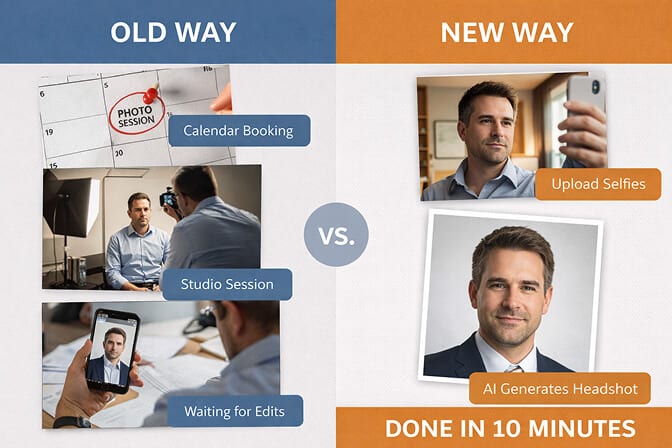
The 1-Hour Headshot: A Step-by-Step Rescue Plan
I'm going to give you three options, ranked by how much time you have. Pick the one that fits your situation.
Option 1: You Have 1 Hour (The AI Route)
This is where most people should start. Especially if you need something today, not next week.
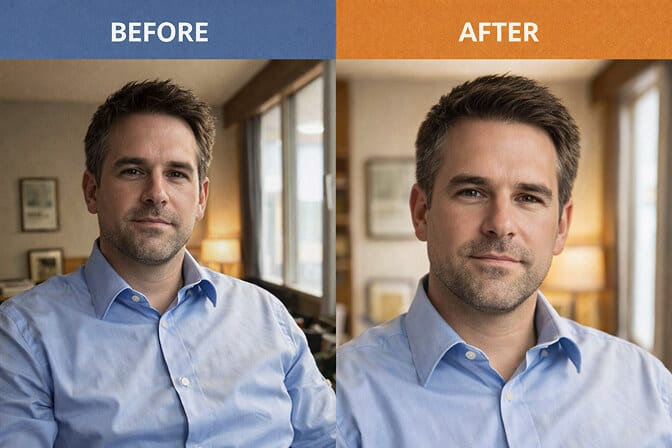
AI headshot generators have gotten remarkably good. We're not talking about the weird, plastic-looking results from 2023. The technology in 2026 produces headshots that genuinely look like a professional photographer took them.
Here's how it works:
Step 1: Grab 8 selfies from your phone. They don't need to be perfect. Just well-lit, face clearly visible, from slightly different angles. A mix of straight-on and slight turns. No sunglasses. No hats.
Step 2: Upload them to an AI headshot tool. The AI studies your facial features, lighting patterns, and structure across all the photos.
Step 3: Choose your style. Select a background (office, studio, neutral gradient), an outfit style (business formal, smart casual, creative), and let the AI generate your options.
Step 4: Download your favorites. You'll typically get dozens of variations to choose from. Pick 2-3 that feel most like you on a good day.
Total time? About 1 hour from start to finish.
The best headshot isn't the one that took the longest. It's the one where you look like someone worth meeting.
At Headshot Photo, this is exactly what we built. Upload 8 selfies, pick your preferences, and get 100 professional headshots in roughly 1 hour. No scheduling. No travel. No awkward small talk with a photographer while you try to "look natural."
Option 2: You Have 30 Minutes (The DIY Phone Method)
Maybe you don't want to use AI. Maybe you want a "real" photo. Totally fair.
You can take a legitimately good headshot with your smartphone if you follow a few rules:
Find a window. Stand directly facing a large window. Not in direct sunlight. Overcast light through a window is the most flattering light source you'll find outside a studio. Turn off all overhead lights. That yellow cast from ceiling fixtures ruins everything.
Find a clean wall. Plain white, light gray, even a clean brick wall. Anything that doesn't compete with your face for attention.
Recruit a friend (or a timer). Have someone stand about 5-6 feet away and shoot at chest height. If you're alone, stack some books on a table and use your phone's self-timer. Avoid selfies. The distortion from arm's length is real, and recruiters can tell.
Dress one notch up. You don't need a suit. A clean, fitted shirt in a solid mid-tone color (navy, charcoal, burgundy) works great. Wrinkle-free. No logos. No patterns.
Take 50+ shots. Seriously. The more you take, the more natural options you'll have. Shake your shoulders loose between shots. Think about something that genuinely makes you smile.
Edit lightly. Crop to head-and-shoulders. Bump brightness slightly. That's it. No filters. No face-smoothing apps.
This method works. It won't match studio quality, but it's a massive upgrade over no headshot at all. You can read more about DIY headshots here.
Option 3: You Have a Weekend (The Budget Studio Route)
If you have a few days and $50-150 to spare, you can book a mini-session at a local studio or with a freelance photographer.
Many photographers now offer 15-20 minute "headshot only" sessions. No outfit changes, no elaborate setups. Just you, a clean background, and professional lighting.
This is a solid option if you specifically want that "a real camera was involved" feeling. But be honest with yourself about timing. If you need a headshot for a Monday morning deadline, this isn't your move.
Where to find quick sessions: Search "headshot mini session" on Google or Instagram for your city. Check JCPenney Portraits for walk-in corporate headshot packages. Look at local coworking spaces that occasionally host headshot pop-up events.
This Is Where Most People Get It Wrong
The biggest mistake isn't choosing the wrong option. It's choosing no option.
I can't tell you how many professionals I've talked to who have had "get a headshot" on their to-do list for literally years. They keep putting it off because they imagine it has to be this big, expensive, time-consuming production.
It doesn't.
A good headshot in 2026 takes 1 hour and costs less than a lunch. A great headshot takes slightly longer. But even a "good enough" headshot is infinitely better than the blank gray silhouette on your LinkedIn profile.
And that blank silhouette is costing you more than you think.
LinkedIn's own data has consistently shown that profiles with professional photos get significantly more views and connection requests than those without. Recruiters scroll past faceless profiles. Clients hesitate to reach out when there's no photo. Conference organizers need a speaker photo and you send them... nothing?
The absence of a headshot isn't neutral. It's a negative signal.
Watch: Why Your Professional Headshot Matters More Than You Think
If you're still on the fence about whether this is worth 1 hour of your time, this short video breaks down how your profile photo affects first impressions, LinkedIn engagement, and career opportunities. It might change how you think about that blank photo placeholder.
Generate Pro Headshots in 2 Mins with Headshotphoto.io!
"But I'm Not Photogenic"
Stop. I hear this constantly, and I need to address it directly.
Being "photogenic" is not a fixed trait. It's not something you're born with or without. It's a function of three controllable things: lighting, angle, and expression.
Bad lighting makes everyone look bad. The wrong angle makes everyone look awkward. A forced smile makes everyone look uncomfortable.
That's not your face failing. That's your setup failing.
When people tell me they're not photogenic, what they usually mean is: "Every photo I've taken of myself with bad lighting and a front-facing camera at arm's length looked terrible."
Of course it did.
An AI headshot tool or a proper DIY setup fixes all three variables at once. Good lighting. Proper distance. Multiple shots so you catch a natural expression instead of a stiff one.
For more on this, our blog on why you might not look photogenic and how to fix it goes deep on the science and psychology behind it.
What About Using an Old Photo?
This comes up a lot. "I have a decent photo from two years ago. Can I just use that?"
Here's my honest answer: if you look the same today as you did in that photo, yes. But if your hair has changed, your weight has shifted, or you've aged visibly, using an old photo creates a disconnect.
The purpose of a headshot is recognition. When someone meets you after seeing your photo, they should think, "Yep, that's the person I expected." Not, "Wait, who is this?"
If your existing photo is more than 2-3 years old, it's probably time for a refresh. And with AI tools, refreshing takes less time than arguing with yourself about whether the old one still works.
The "I'll Do It Later" Trap
Here's what I know after working in the headshot space for years: the people who wait are the people who end up scrambling.
They wait until the night before a job application deadline. They wait until their company announces new website photos. They wait until a recruiter asks for a headshot and they have to send a cropped vacation photo from 2019.
You're reading this article right now. That means some part of your brain already knows you need a headshot. So do yourself a favor: take 1 hour today and knock it out.
If you want the fastest path, try Headshot Photo AI headshot generator and have professional options ready before your coffee gets cold. Upload 8 selfies, pick your styles, and you're done.
No more blank profiles. No more borrowed blazers. No more "I'll do it next week."
Just a headshot that looks like you. On your best day. Ready when you need it.
Frequently Asked Questions
What should I do if I don't have a professional headshot?
You have three fast options: use an AI headshot generator like Headshot Photo to create a professional headshot from selfies in about 1 hour, take a DIY photo using your smartphone near a window with natural light and a clean background, or book a quick mini-session with a local photographer. The AI route is the fastest and most affordable option for most people. To compare, check out Best AI Headshot Generators Review.
How does an AI headshot compare to a professional photographer?
AI headshots in 2026 produce results that are remarkably close to studio photography in terms of lighting, background quality, and overall polish. The main difference is cost (AI tools start around $34 vs. $200-500 for a photographer) and speed (1 hour vs. days or weeks). Professional photographers still offer value for high-stakes executive branding, but for LinkedIn, resumes, and company profiles, AI headshots deliver excellent quality.
How do I take a quick professional headshot with my phone?
Stand facing a large window for natural, diffused lighting. Use a clean, simple wall as your background. Have a friend photograph you from about 5-6 feet away at chest height, or use your phone's self-timer on a makeshift tripod. Wear a fitted, solid-color top. Take at least 50 shots to increase your chances of capturing a natural expression. Crop to head-and-shoulders and adjust brightness slightly.
Is it worth paying for an AI headshot generator?
Yes, if you value your time. Free AI generators exist but often produce lower-quality results with limited customization. Paid tools like Headshot Photo typically offer higher resolution, more outfit and background options, better facial accuracy, and faster processing. At $34 for 100 headshots, the cost per image is a fraction of what you'd pay a photographer, and the results are ready in minutes.
Are AI-generated headshots professional enough for LinkedIn and job applications?
Absolutely. Modern AI headshot generators produce high-resolution images with realistic lighting, natural skin texture, and professional backgrounds. They are widely used for LinkedIn profiles, resumes, company websites, and speaker pages. Recruiters and hiring managers are looking for a clean, professional, and current photo. A well-generated AI headshot meets all three criteria.
