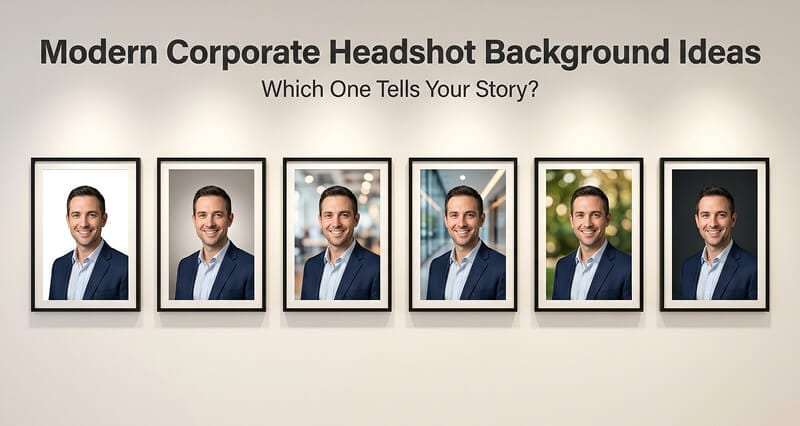
Your background isn't decoration. It's the 2 inches of frame that tells people whether you're a Fortune 500 executive or a startup founder before they read a single word.
A CMO I know spent $800 on corporate headshots for her leadership team. The photos were technically flawless. Great lighting. Natural expressions. Sharp focus.
Then she put them on the company website and realized the problem.
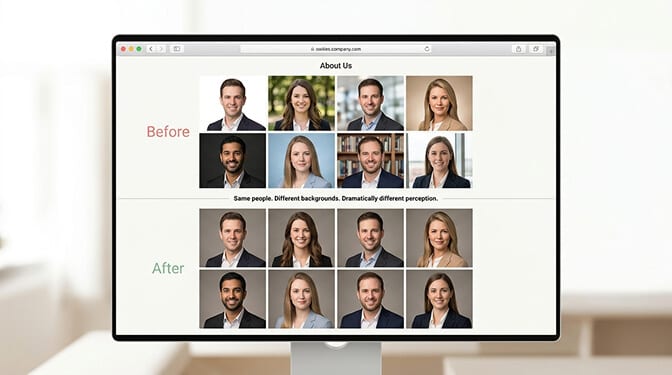
The CEO's headshot was taken against a warm gray background. The CTO's had a blurred office bookshelf. The VP of Sales stood in front of what looked like a hotel lobby. The CFO had a white backdrop that was clearly a different shade of white than the CEO's gray.
The individual photos were great. Together, they looked like a team that had never met.
The background of a corporate headshot seems like a small detail. It's not. It's the visual context that tells people who you are before they process your face. And when you're building a team page, it's the element that determines whether your company looks organized or chaotic.
Here are the modern background options, when to use each one, and the mistakes that make good headshots look amateur.
Solid Neutrals: The Default for a Reason
Solid backgrounds remain the most popular choice for corporate headshots, and they deserve that position. A clean, even-colored background puts 100% of the visual attention on your face and eliminates variables.
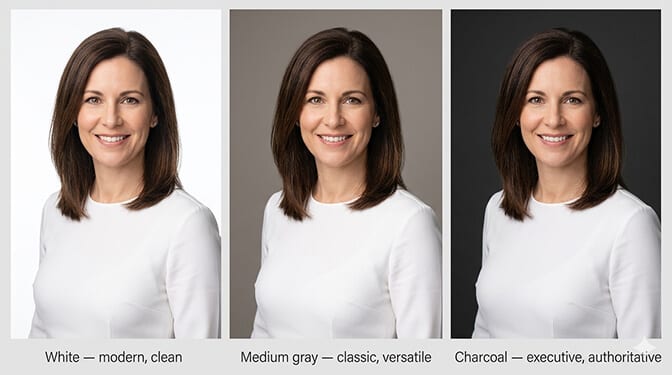
White is the brightest, most modern option. It reads as clean, fresh, and contemporary. Works well for tech companies, healthcare, and any brand with a modern visual identity. The risk: if the lighting isn't perfect, white can wash out skin tones or create a "floating head" effect if there's no shadow separation between you and the backdrop.
Light to medium gray is the safest, most versatile corporate background. It works for every skin tone, every outfit, every industry. It photographs consistently under different lighting conditions. If you're choosing one background for a team of 20+ people with different skin tones and clothing choices, medium gray is almost always the right answer.
Charcoal and dark gray are the fastest-growing trend in corporate headshot backgrounds in 2026. Dark backgrounds add gravitas and sophistication. They work particularly well for executive headshots, finance, law, and leadership team pages. Darker clothing receives higher trust ratings against dark backgrounds, creating a powerful, authoritative frame.
Navy and dark blue signal trust, stability, and dependability. There's a reason the financial services industry gravitates toward blue. It's not coincidence. It's color psychology doing exactly what it's supposed to do.
The rule for solid backgrounds: the lighter the background, the more approachable you look. The darker the background, the more authoritative you look. Pick based on what you need to communicate, not what you think looks nicest.
For a complete breakdown of which colors work best by industry, our guide to portrait background ideas covers 20+ options with examples.
Modern Office and Environmental Backgrounds
This is where it gets interesting, and where most people get it wrong.
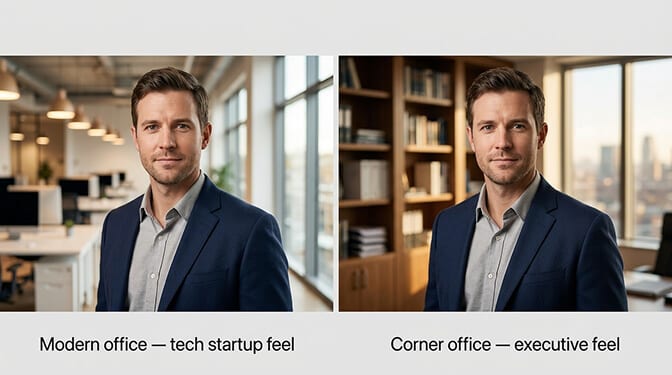
An environmental headshot places you in a real or simulated professional setting: a modern office, a coworking space, a conference room, a clean workspace. The background adds context and narrative. It tells the viewer something about where you work, how you work, and what your professional world looks like.
When office backgrounds work:
- You want to communicate what your work environment feels like (modern, creative, established, clinical)
- The background is genuinely clean, curated, and intentional
- The background is blurred enough (f/1.8-f/2.8 equivalent) that it provides context without competing with your face
- Your company's aesthetic is part of the story (architecture firms, design studios, co-working spaces)
When office backgrounds don't work:
- The background is cluttered, messy, or accidental-looking
- Random coworkers are visible in the background (even blurred, this is distracting)
- The office environment doesn't match the professional image you're building
- You're trying to match headshots across a distributed team (every office looks different)
The glass wall / lobby background is a specific variant worth calling out. A blurred glass partition, modern lobby, or floor-to-ceiling window creates a sense of space and contemporary architecture without specific clutter. It reads as "I work in a nice building" without revealing details. This works well for commercial real estate professionals, architects, and executives at companies with impressive physical spaces.
The critical mistake with environmental backgrounds: using them for team consistency. If your CEO is photographed in the New York office lobby and your CTO is photographed in the Austin satellite office, those photos will never match, no matter how good the photographer is. The lighting is different. The architecture is different. The color temperature is different. For team pages, solid backgrounds win.
Outdoor and Natural Backgrounds
Outdoor backgrounds are growing in popularity, especially for industries where warmth, approachability, and personal connection matter more than formal authority.
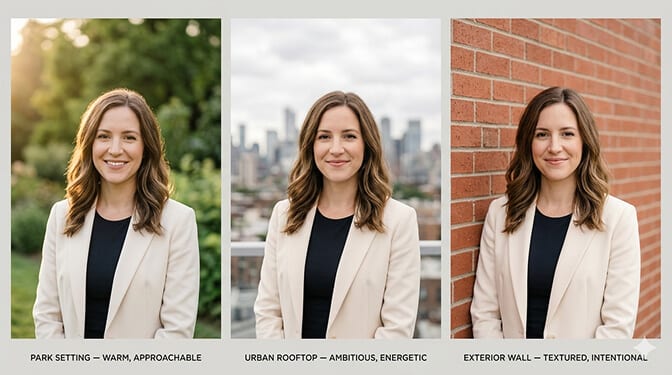
Park or garden settings with heavily blurred greenery create warmth and approachability. The green tones are universally flattering to skin and signal freshness and vitality. Best for: coaching, wellness, education, nonprofits, and any professional whose brand is built on human connection.
Urban/city backgrounds with blurred architecture or skyline add energy and ambition. Best for: entrepreneurs, commercial real estate, urban professionals, and anyone whose professional story is tied to a city.
Exterior walls (clean brick, stone, or architectural surfaces) provide texture without busyness. They add visual interest while keeping the focus on you. Best for: creative professionals, consultants, and anyone who wants a headshot that feels intentional but not overly formal.
Outdoor headshot rules:
- Shoot on overcast days or in open shade. Direct sunlight creates harsh shadows and squinting.
- Golden hour (last hour before sunset) creates the warmest, most flattering light.
- Use enough background blur (bokeh) that the environment provides context, not distraction.
- Your face should still be the sharpest, brightest element in the frame.
For outdoor posing techniques that complement natural backgrounds, our guide to outdoor headshots covers what works in natural-light settings.
Gradient and Abstract Backgrounds
Soft gradients (where the color fades from one tone to another) are a modern alternative to flat solid colors. They add depth and dimension while maintaining the clean, distraction-free quality of a solid background.
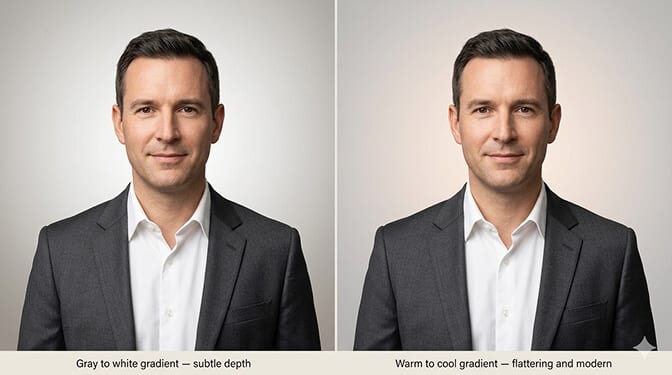
When gradients work: When you want a solid-background look with slightly more visual sophistication. They photograph well, they add depth to the frame, and they're easy to match across a team since the gradient can be replicated exactly.
When gradients don't work: When the gradient is too dramatic or colorful. A sharp gradient that visibly shifts from blue to purple, for example, draws attention away from your face. The best gradients are so subtle you might not consciously notice them. They just make the headshot feel slightly more three-dimensional.
The Team Consistency Rule (More Important Than Any Individual Choice)
Stay with me here, because this matters more than which background you pick.
For any company with more than one person on their website, the single most important background decision is consistency, not style.
A team page where every headshot has the same medium gray background, same lighting direction, same framing ratio, and same color temperature looks professional. Even if medium gray isn't the "coolest" option.
A team page where one person has a white background, another has outdoor bokeh, another has an office environment, and another has charcoal looks like the photos were assembled from five different decades. Even if each individual photo is beautiful.
Pick a background. Any reasonable background. Then use it for everyone. Consistency beats creativity for team pages. Every time.
This is one of the strongest arguments for AI headshot generators in a corporate context. When you run a team through Headshot Photo, every person selects the same background preset. The AI generates every headshot with identical background color, identical lighting direction, and identical framing. Perfect consistency across 5 people or 500, regardless of when each person submits their photos.
Traditional photography can achieve this on a single photo day, but the consistency degrades as new hires join, people update their photos at different times, and different photographers are used across different locations.
Choosing Your Background: The Quick Decision Framework
If you just want the answer without reading the theory:
You're in finance, law, or consulting: Medium gray or charcoal. Clean. Professional. No surprises.
You're in tech or SaaS: White or light gray. Modern. Clean. Bright.
You're an executive or C-suite: Dark gray or charcoal. Authority. Gravitas.
You're in healthcare: White or light gray. Clean. Clinical. Trustworthy. Our guide to medical headshots for women covers healthcare-specific background choices.
You're in creative industries: More freedom. Soft outdoor bokeh, textured walls, subtle gradients, or bold solid colors that match your brand palette. Just make sure your face remains the star.
You're in real estate: Bright, warm backgrounds. Outdoor settings or lobby environments work well. You're selling approachability and trust.
You need team consistency: Solid neutral (white, gray, or charcoal). No exceptions. No "but Sarah wanted outdoor." Consistency wins.
One Last Thing
That CMO with the mismatched leadership team headshots? She eventually ran everyone through an AI generator with the same charcoal background preset. Took two days. The team page looked like it was shot by a single photographer in a single session.
Nobody on the team noticed they were using AI. But every visitor to the website noticed, unconsciously, that the company looked coordinated, professional, and intentional.
The best background isn't the most interesting one. It's the one that serves the headshot instead of competing with it. It should make you look professional without anyone remembering what color it was.
That's the test. If someone looks at your headshot and says "great photo," the background did its job. If they say "interesting background," it didn't.
At Headshot Photo, you can select from multiple professional background options and apply the same one across your entire team. Studio-quality results from casual selfies, with perfect consistency, in about 1 hour per person. No studio visit, no matching headache.
For more on what to wear against these backgrounds, our guide to beard styles for professional headshots covers grooming that complements any backdrop.
Frequently Asked Questions
What is the best background for a corporate headshot?
Medium gray is the most versatile corporate headshot background. It works with every skin tone, every outfit color, and every industry. It photographs consistently under different lighting conditions and matches well across team members. For executive headshots, charcoal or dark gray adds authority. For modern tech or healthcare, white or light gray provides a clean, contemporary feel. The "best" choice depends on your industry and the message you want to communicate.
How do office or environmental headshot backgrounds compare to solid color backgrounds?
Environmental backgrounds (blurred offices, lobbies, glass walls) add narrative and context that solid backgrounds can't. However, they're significantly harder to match across a team, especially for distributed companies with multiple locations. Solid backgrounds provide perfect consistency and work across every platform and crop size. Use environmental backgrounds for individual executive portraits or personal brand shots. Use solid backgrounds for team pages and company directories.
How do I choose a corporate headshot background for a large team?
Pick one solid neutral color (white, medium gray, or charcoal) and use it for every team member without exception. Consistency matters more than which specific color you choose. AI headshot generators like Headshot Photo make this easy because every person selects the same background preset and the output matches perfectly, regardless of when each person submits their photos.
Is it worth using outdoor backgrounds for corporate headshots?
Outdoor backgrounds work well for industries where warmth and approachability matter (coaching, wellness, real estate, education). They add natural warmth and visual interest. However, they require careful management of lighting conditions (overcast or golden hour only), sufficient background blur, and they're difficult to match across a team. For formal corporate or team-page headshots, solid backgrounds are generally the safer investment.
Can AI headshot generators produce realistic corporate backgrounds?
Yes. Modern AI headshot platforms generate backgrounds that are indistinguishable from studio backdrops for standard corporate uses. They offer solid colors (white, gray, charcoal, navy, blue), soft gradients, and blurred environmental options. The key advantage is consistency: AI generates identical backgrounds across every team member regardless of when they submit photos. For standard LinkedIn, company website, and directory uses, AI backgrounds meet the same quality standard as physical studio backdrops.
